
Local reputation management is the work of controlling what nearby customers see when they search for your business: your star rating, your reviews, your replies and the accuracy of your listings on Google, Yelp, Facebook and other sites. Done well, it lifts your visibility in Google Maps and turns more searches into calls and visits. It is a routine, not a one-time fix, and it works best when your profile, listings, reviews and lead response are managed as one system. That is how we approach it at NetViper Interactive for businesses in Northeast Florida.
TL;DR
- Reputation is a measurable business asset: a peer-reviewed study of 251 small business owners linked online reputation management to better performance and higher Google star ratings.
- Google says review count and positive ratings can help local ranking, and complete, accurate profiles are more likely to appear in local results.
- Ask every customer for a review in a compliant way. Offering discounts or freebies for reviews is prohibited by Google and Yelp.
- Reply to every review, especially the critical ones, promptly and without personal attacks.
- Track operational numbers you can count: review requests, new reviews per month, and calls, direction requests and website clicks from your profile.
Table of Contents
- What local reputation management actually covers
- Why it matters to the bottom line
- How reputation connects to Google Maps rankings
- The platforms to manage first
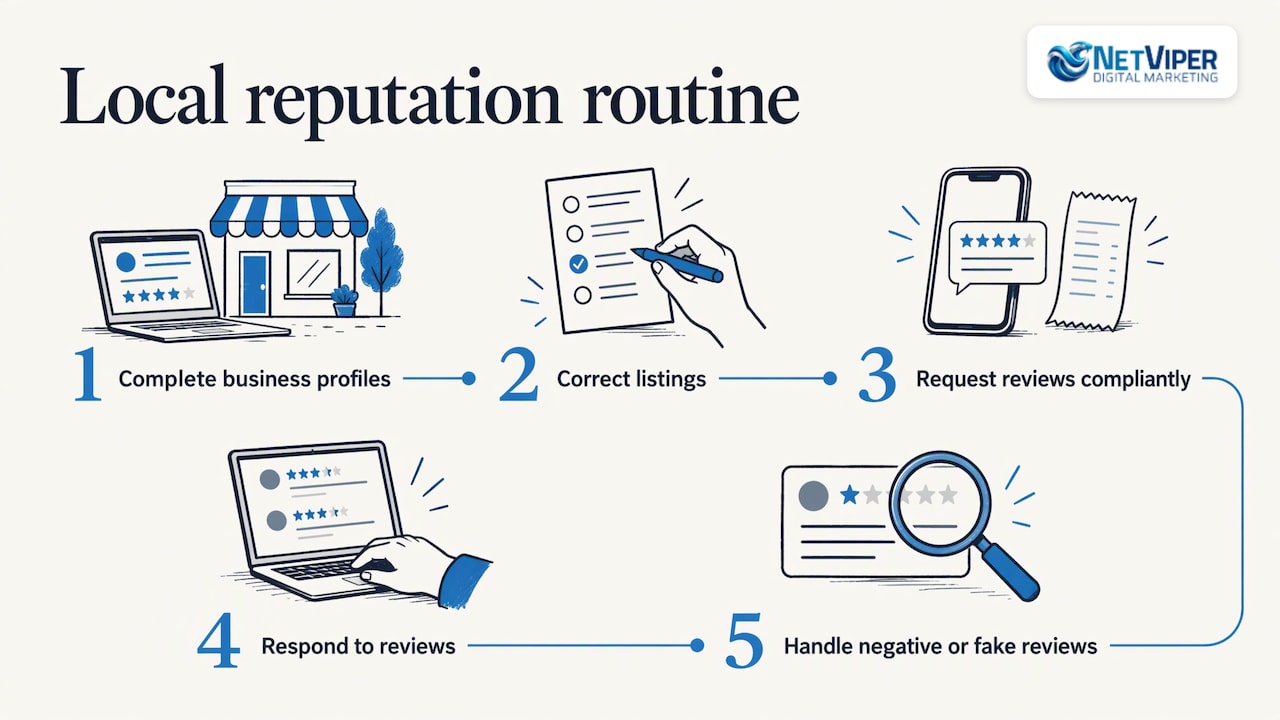
- A step-by-step local reputation management routine
- Reputation and advertising work together
- Where NetViper fits
- Our perspective
- FAQ
- Sources
What local reputation management actually covers
Most owners think of reputation as reviews. In practice it has four parts:
- Presence: a claimed, complete and accurate profile on Google and every other site where customers look you up.
- Reviews: a steady flow of genuine new reviews, not a burst followed by months of silence.
- Response: timely, professional replies to positive and negative feedback.
- Follow-through: answering the customer who calls or fills out a form after reading those reviews.
The local part matters. A national brand can spread its reputation across many channels. A local business wins or loses on a handful of places nearby customers check before a visit: your Google Business Profile, Yelp, Facebook, a few directories and your own website. Your job is to make each one accurate, active and persuasive.
Why it matters to the bottom line
The evidence that reputation affects revenue is stronger than most owners assume. A January 2026 study in the Journal of Small Business Strategy surveyed 251 small business owners and found that online reputation management positively affects small-business performance and Google star ratings, both highly significant results. The authors argue that positive reviews reflect real customer experiences that competitors find hard to copy, and that consumers see them as more credible than traditional advertising.
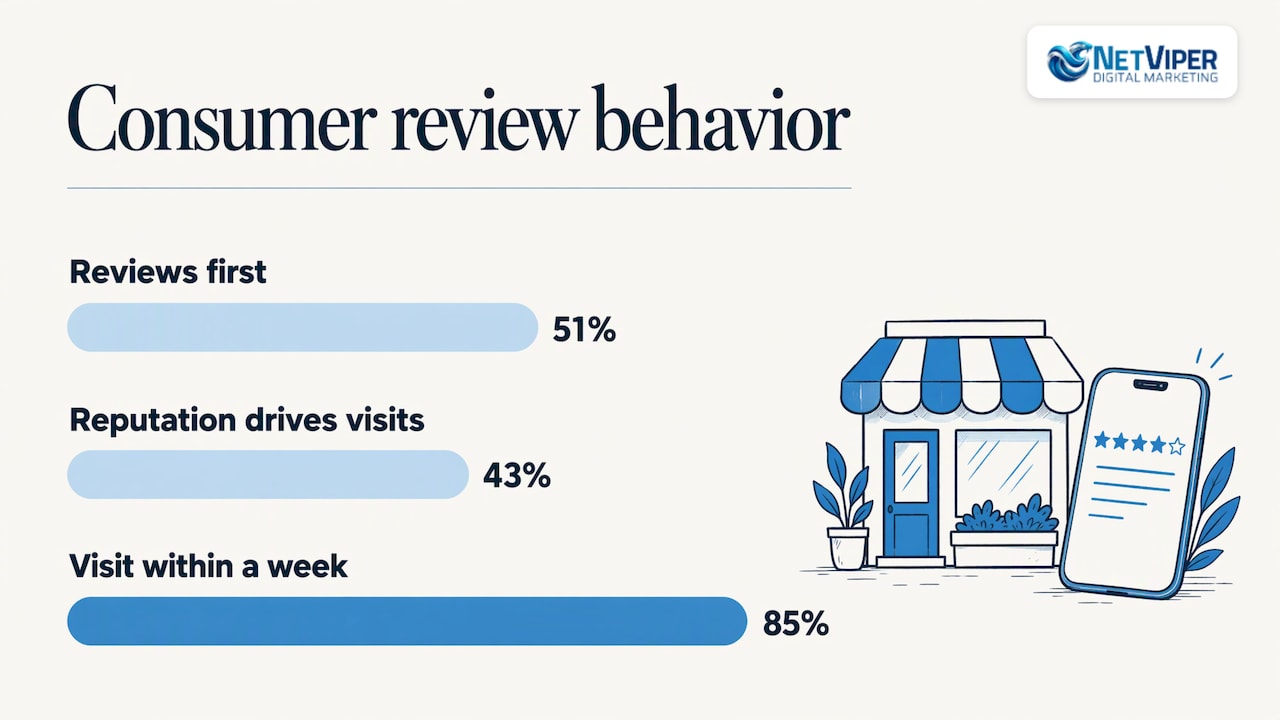
Customer behavior points the same way. A 2025 consumer report on local search from HubSpot found that 51% of consumers say reading reviews is the first thing they do when researching a local business, and 43% said online reputation most influenced their decision to visit. The same report notes that 85% of consumers visit a business within a week of finding it online, and that review responses matter more than review volume when people decide where to go.
That last point deserves attention. Replying is one of the few parts of reputation management that costs nothing but time and is entirely under your control.
Negative feedback carries a real price too. A small business guide from Xero US reports that a single negative review can cost a company 30 potential customers. Treat that as a reminder to catch and answer problems early rather than as a precise forecast for your shop.
How reputation connects to Google Maps rankings
Google states that local results are mainly based on relevance, distance and prominence. Prominence reflects how well known a business is, including how many websites link to it and how many reviews it has. According to Google’s guidance, more reviews and positive ratings can help your local ranking. The same page says businesses with complete and accurate information are more likely to show up in local search results, and that there is no way to request or pay for a better local ranking.
That last line explains why reputation management is part of local SEO and not a separate chore. Rankings are earned through the signals Google reads: accurate information, consistent listings, review activity and links. If you want to see how those pieces fit together, our guide to local SEO for Jacksonville businesses walks through the local ranking picture. Our online review management guide goes deeper on the review side.
The platforms to manage first
Start where your customers look. For most local businesses in Northeast Florida, that means this order:
| Platform | Why it matters | First action |
|---|---|---|
| Google Business Profile | Drives Maps and local pack visibility and is often the first thing a nearby customer sees | Verify ownership, complete every field, add photos |
| Yelp | Heavily used by consumers comparing local options, especially restaurants and home services | Claim the page, confirm address and phone, choose accurate categories |
| Reviews and recommendations sit next to your posts and ads | Keep hours, contact details and responses current | |
| Industry and local directories | Feed consistency signals and give customers another place to find you | Audit name, address and phone for exact matches |
Yelp’s own guidance for business owners recommends claiming your page, verifying your address and phone number, choosing appropriate categories and adding photos. Google’s Business Profile is the same idea on a larger stage, and it also connects to advertising, as covered below.
A step-by-step local reputation management routine
Step 1: Claim and complete your profiles
Verify your Google Business Profile, then fill in everything: categories, service areas, hours, services, photos and a description that matches how customers describe what you do. Incomplete profiles lose to complete ones, and mistakes such as wrong hours produce one-star reviews that no reply can fully repair.
This is where most owners stall, because the work is detailed and ongoing. Hours change for holidays, services change, and photos go stale. Our Google Business Profile Optimization service is built for this stage, and our Google Business Profile management guide explains what a complete setup covers.
Step 2: Fix your listings so the facts agree everywhere
Your business name, address and phone number should read the same on every site. When they do not, customers get wrong directions, and search engines get conflicting signals. Audit the major directories, correct what is off and keep checking, because aggregators and old listings reintroduce errors over time.
We offer Listings & Citations at $60 per month, and our local listings management guide explains how the process works if you want to understand it first.
Step 3: Ask for reviews, the compliant way
The businesses with the strongest review profiles ask every satisfied customer, at the moment of highest goodwill. Google lets you remind customers to leave reviews by sharing a link or QR code. Practical ways to do that:
- Send a text or email with your direct Google review link right after the job is complete.
- Print a QR code on receipts, invoices, appointment cards or the counter.
- Ask in person, then follow up while the experience is fresh.
- Make it a standard step in your workflow so it does not depend on anyone remembering.
Know the rules before you build the process. Google considers offering free or discounted goods or services in exchange for reviews fake and misleading content, and it is strictly prohibited. Yelp’s business owner rules say not to write reviews for your own business or for competitors, not to offer freebies, discounts or payment for reviews, and not to pressure, pay, bully or sue people into changing or removing critical reviews. They also say not to work with companies that offer to “fix your reviews.”
Federal rules apply as well. The FTC’s rule on consumer reviews and testimonials was codified at 16 CFR part 465 in October 2024. In short, fake reviews and review suppression are regulatory risks, not clever shortcuts. For any question about how the rule applies to your business, ask your attorney.
Step 4: Respond to every review
Reply to positive reviews with a short, specific thank you. Reply to critical ones faster and more carefully. Google’s advice for replying to negative reviews is to protect privacy and avoid personal attacks, be honest and explain limitations, apologize when appropriate, personalize the reply and respond promptly.
A reliable template for a critical review:
- Thank the reviewer and acknowledge the specific problem in a sentence.
- Apologize if something went wrong, without arguing the facts in public.
- Offer a direct way to resolve it, such as a phone number or email.
- Keep it short. The reply is written for the next customer reading it, not only for the reviewer.
Yelp reports that its study shows responding to critical reviews increases the chances that the review’s rating is upgraded. Even when it does not, a calm reply shows prospects how you treat people when things go wrong.
Step 5: Handle negative and fake reviews
Separate two kinds of bad reviews.
Legitimate criticism. A real customer had a real problem. Reply publicly as above, fix the problem offline, and learn from the pattern. If three reviews mention slow callbacks, that is an operations issue, not a reputation issue.
Policy-violating reviews. Reviews that are fake, off-topic, from competitors, or that break Google’s content policies can be flagged for removal through your profile. Flag them with a clear reason, and keep replying to everything else. Do not attempt to pressure reviewers, and do not hire anyone who promises to delete reviews on demand.
How quickly you answer the customer behind the review is part of this. A one-star review often comes from a missed call or an unanswered inquiry. That is one reason we pair reputation work with lead response: our NV AI Pro Agent is $497 per month, and our AI chatbots and voice agents are designed so businesses do not miss leads. Our guide on automated lead follow-up shows how a response system works in practice.
Step 6: Measure what you can count
Attribution in reputation management is imperfect, so track operational numbers that you can verify:
- Review requests sent per month
- Request-to-review conversion rate
- New reviews per month, compared month over month
- Average star rating over a rolling period
- Response time and response rate
- Calls, direction requests and website clicks from your Google Business Profile
Watch the trend, not any single month. If review volume rises and profile actions rise with it, the routine is working. If actions are flat while ratings climb, look at your profile content, photos and offers. For calls from ads and listings, our guide to call tracking explains how to tie phone calls back to their source.
Reputation and advertising work together
Good reviews do more than lift organic rankings. They make paid traffic convert better. Google’s guidance on Local Services Ads notes that these ads appear above organic and pay-per-click listings, that you pay only when a customer gets in touch, and that review score and review count are important visibility metrics. If you run them, reviews are part of how you compete. Our Local Services Ads management guide covers how to run them.
A verified Business Profile also unlocks features in Google Ads. According to Google Ads Help, linking a verified profile enables location assets, Promoted pins on Google Maps and in-store conversion tracking, and lets you advertise using the profile as your landing page. A strong rating beside your ad is more persuasive than any headline you can write.
Where NetViper fits
Reputation management is easy to describe and hard to sustain. The profile needs updating, the listings drift, the review requests slip, and the missed calls pile up. We handle the pieces that connect to local visibility and lead capture for Northeast Florida businesses:
- Google Business Profile Optimization to get your profile complete and accurate.
- Listings & Citations at $60 per month to keep your business information consistent.
- Local SEO through our GeoBoost plans, starting at $497 per month for GeoBoost 25 and $1,697 per month for GeoBoost 100, and our SEO + Local SEO service at $1,495 per month.
- AI receptionist and chatbot tools, with the AI Receptionist setup and deployment at $997 one-off, so a lead is answered when a customer finds you.
See our local SEO plans for details, or talk to us about the full program. Our Full Digital Program is $1,995 per month with a one-time set-up fee of $2,500.
Our perspective
Most local business owners we talk to treat reputation as something that happens to them. A review shows up, and they react. We see it the other way around: reputation is a system you build, and the businesses that win in Google Maps are the ones that run that system every week.
The system has a few moving parts that have to work together. A complete, accurate profile. Listings that agree with each other. A simple, compliant way to ask every happy customer for a review. A fast, human reply to every piece of feedback. And a way to answer the lead who calls or messages after reading it.
That last piece is what we think gets overlooked. A strong rating earns the click, and what happens in the next five minutes decides whether it becomes revenue. That is why we put AI chatbots and voice agents alongside local SEO: so the attention your reputation earns is not lost to a missed call.
If you are choosing where to start, begin with the profile and listings. They are the foundation every review sits on, and they are where Google looks first.
Dave Fogel
FAQ
How long does local reputation management take to show results?
Some improvements, such as correcting wrong hours or replying to old reviews, take effect right away. Review volume and rating changes build over weeks and months as you collect new reviews consistently. Treat it as an ongoing routine, and judge progress by month-over-month trends.
Can I pay to remove a negative review?
No. Google says there is no way to pay for a better local ranking, and Yelp’s rules tell businesses not to work with companies offering to “fix your reviews” or to pressure reviewers. Reviews that violate platform content policies can be flagged for review, and the rest are best answered publicly and professionally.
Is it okay to offer a discount for a review?
No. Google treats offering free or discounted goods or services in exchange for reviews as fake and misleading content and strictly prohibits it, and Yelp says the same. Ask for honest feedback with a direct link or QR code instead.
Which platforms should I focus on first?
Start with your Google Business Profile, because it drives Maps and local search visibility. Then claim and complete your Yelp and Facebook pages and make sure your directory listings match your core business details.
How do I know if it is working?
Track review requests, new reviews per month, your average rating, response time, and the calls, direction requests and website clicks from your Google Business Profile. A rising trend across these numbers is a good sign that the routine is paying off.
Sources
- From Reviews to Revenue: Examining the Impact of Online Reputation Management on Small Business Performance
- Tips to improve your local ranking on Google
- Tips to get more reviews, Google Business Profile Help
- The DOs and DON’Ts of Yelp for Business Owners
- FTC regulatory agenda, consumer reviews and testimonials rule
- Consumer Report: The Lowdown on Local Search, HubSpot
- Online reputation management guide for small businesses, Xero US
- How to grow your business with Local Services Ads, Google
- Benefits of using a Business Profile, Google Ads Help
Recommended

Local Reputation Management: A Practical Guide for Local Businesses
Learn how local reputation management works: claim your profiles, earn reviews within platform rules, handle negative reviews, and measure results.

Local Business Lead Generation: A Practical Guide for 2026
How local businesses generate leads: Google Business Profile, local SEO, Google Ads, Facebook ads, fast follow-up and AI, with a simple plan to start.

Google Ads Conversion Tracking: Setup and Fixes for 2026
Set up Google Ads conversion tracking step by step, check that it records accurately, and fix the common reasons conversions stop tracking.
