
Google Ads conversion tracking is a free tool that records what people do after they click your ad, such as a purchase, a form submission or a phone call. You create a conversion action in your account, install the Google tag on your website, then confirm the status reads Active. This guide covers each step, the methods available, and how to fix tracking that has stopped working.
TL;DR
- Conversion tracking has two steps: create a conversion action, then install a Google tag on your website.
- Track the actions that bring in revenue: form fills, booked appointments, and calls. Not just page views.
- Mark your main conversions as primary so Smart Bidding can learn from them, and keep the rest as secondary.
- Check the status column. Active means healthy; Misconfigured means conversions have stopped recording.
- Most failures come from a missing tag, duplicate counting, or auto-tagging being off.
Table of Contents
- What a conversion is and why you track it
- Decide what to track before you build anything
- What you need before setup
- How to set up Google Ads conversion tracking, step by step
- Track phone calls, not just forms
- How to check that tracking is working
- Google Ads conversions not tracking: how to fix it
- What conversion tracking services handle
- Our perspective
- Get tracking set up by local specialists
- FAQ
- Sources
What a conversion is and why you track it
A conversion is a customer activity that is valuable to your business. Google’s documentation lists purchases, sign-ups and phone calls as examples. Without tracking, you can see clicks and spend, but you cannot see which keywords, ads, ad groups or campaigns produce leads.
For a local service business, this is the difference between knowing you spent $3,000 and knowing that $3,000 produced 40 booked estimates. Tracking lets you work out profitability by keyword or ad, conversion rates and cost per conversion. It also feeds Smart Bidding, which uses your conversion data to optimize bids toward your goals.
Google Ads can measure several kinds of conversion:
- Website actions: purchases, sign-ups, form submissions.
- Phone calls: calls from ads, calls to a number on your site, and taps on a number on mobile.
- App actions: installs and in-app activity.
- Offline conversions: for example, store sales tied back to an ad.
These are described on the conversion measurement overview. For most local businesses, forms and calls carry nearly all the value.
Decide what to track before you build anything
The most common mistake is tracking everything and treating it all as equal. A page view of your “About” page is not a lead. Start with a short list tied to revenue.
- Primary conversions: quote requests, booking confirmations, qualified calls.
- Secondary conversions: newsletter sign-ups, brochure downloads, scroll depth. These are useful for observation but should not steer bidding.
This split matters. Google notes that misconfiguring primary and secondary settings can keep Smart Bidding from optimizing effectively, because the algorithm relies on those signals.
If your site has no clear conversion event, such as a thank-you page after a form, build one first. A dedicated confirmation page or form-submit event makes tracking far more reliable. Our conversion-focused web design work starts from exactly this point.
What you need before setup
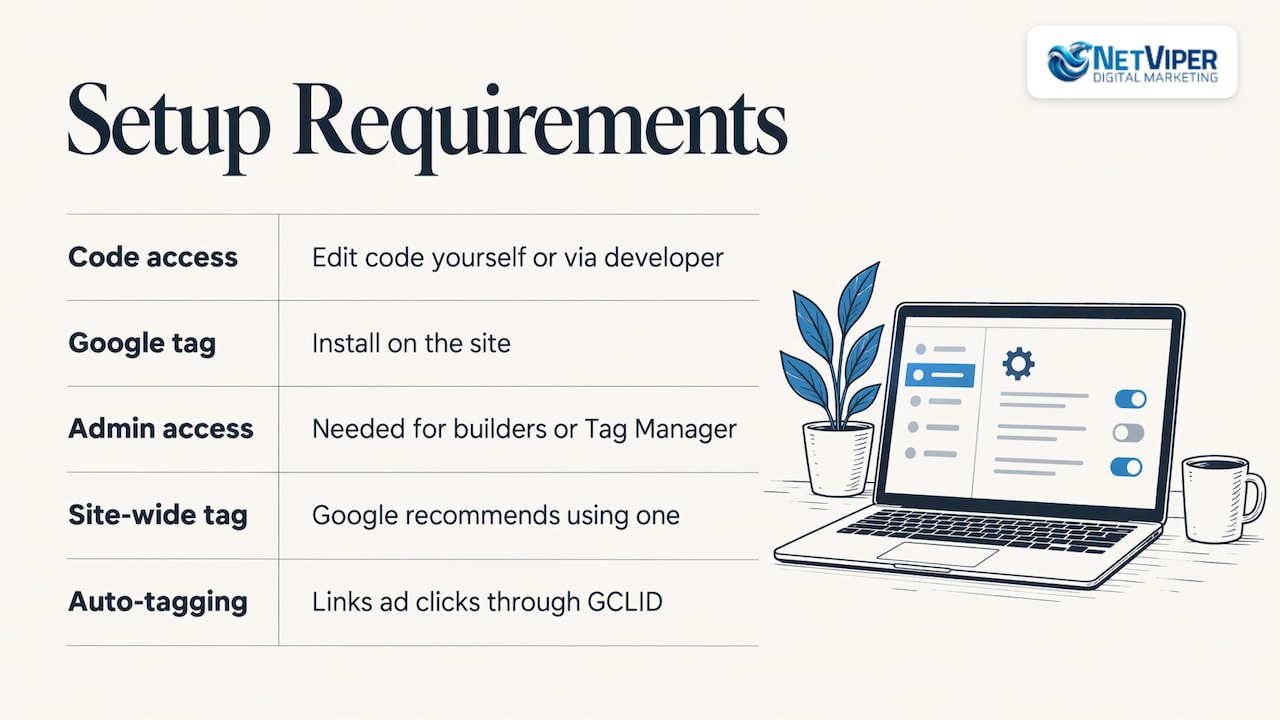
Google states you need the ability to edit your website code, either yourself or through a developer, and a site where the Google tag will live. If you use a website builder or Google Tag Manager, you usually do not touch code directly, but you still need admin access.
Also turn on auto-tagging. Google recommends a site-wide tag and auto-tagging in every Google Ads account, so each ad click carries a GCLID that links the click to a later conversion.
How to set up Google Ads conversion tracking, step by step
The menu names change from time to time, but the flow below follows Google’s current web conversion setup instructions.
- In Google Ads, open Goals, then Summary.
- Select + Create conversion action.
- Choose Conversions on a website, enter your domain and select Scan.
- Pick a conversion category, such as lead form submission or purchase.
- Create the conversion from the Google tag or from a Google Analytics event.
- For a simple page-load conversion, choose Automatically without code, select the event type and URL match type, then enter the thank-you page URL.
- Review the settings and select Done.
- Install the Google tag if it is not already on your site, then select Agree and finish.
URL setup versus code setup
Use the URL method when a conversion equals a page load, like a thank-you page. Use code when you need to track button clicks, pass dynamic values or send transaction IDs. If your form submits without changing pages, you will likely need the code route or a Tag Manager trigger.
Using Google Tag Manager
If you already run Tag Manager, open the conversion action in Google Ads and choose Use Google Tag Manager, which walks you through creating the tag. Keep one owner for your tags. Two people adding the same conversion in different places is a leading cause of double counting.
Importing from Google Analytics
You can import Analytics events as conversions. Per Google, you need Admin access in Google Ads and Edit access in the linked Analytics property. Only key events qualify, and import options can take 24 to 48 hours to appear. Native Google Ads tags are generally the simpler choice for bidding, so import only when you want Analytics as your single source.
Track phone calls, not just forms
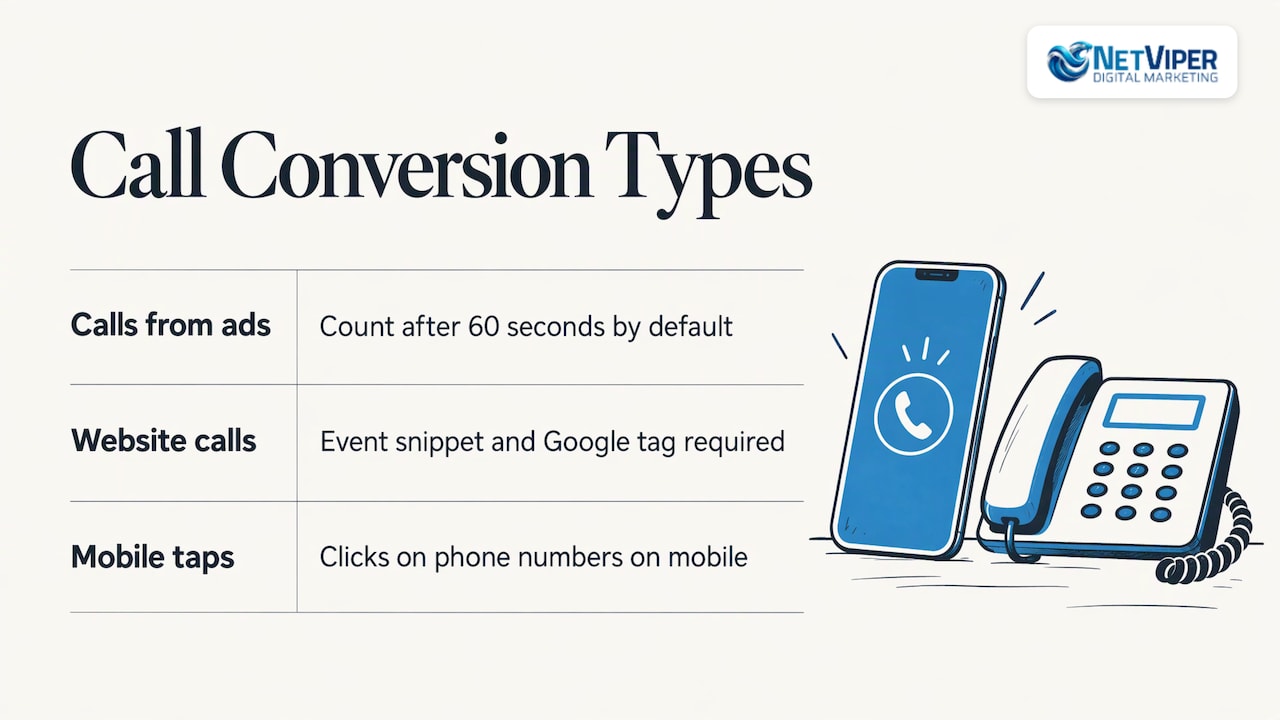
For many Jacksonville and St. Augustine service businesses, the phone is the main conversion. Google supports three call types: calls from ads, calls to a number on your website, and clicks on numbers on mobile. Calls from ads count by default after 60 seconds. Website call tracking requires the event snippet and the Google tag.
If you want to see which campaign, keyword and landing page each call came from, read our guide to call tracking for ads.
How to check that tracking is working
Open your conversion actions and read the status. Google defines five statuses:
| Status | What it means |
|---|---|
| Active | Everything is working as intended |
| Needs attention | Action items to address, but recording has not stopped |
| Misconfigured | Conversions stopped recording because of a setup error or broken tag |
| Awaiting conversions | None recorded in the last 7 days, often because the action is under 48 hours old or campaigns are paused |
| Removed | Manually deleted or archived |
Then run a real test. Click your own ad or visit your page, complete the form, and confirm the event fires using Tag Assistant. Wait for the status to update before you judge the result. Finally, compare Google Ads numbers to your own records, such as your CRM or booking calendar. If Ads reports 30 leads and your inbox shows 18, you have a problem to find.
Google Ads conversions not tracking: how to fix it
Problems usually fall into four groups: missing conversions, duplicates, delayed reporting and misattribution. Work through these in order.
The tag is missing or broken
A Misconfigured status points here. Confirm the Google tag is on every page, that your site update or theme change did not remove it, and that the conversion ID and label match your account.
Auto-tagging is off or the GCLID is lost
With auto-tagging on, each click adds a GCLID parameter, and scripts store it in a first-party cookie on your domain. If a click-tracker or redirect strips the parameter, the link between click and conversion breaks. Google advises that redirects pass the GCLID to your landing pages, and that cross-domain conversion pages use the gtag.js domain linker.
The conversion linker is not on every page
The linker should fire on every page, not just conversion pages, so clicks can still be matched when third-party cookies are blocked.
Conversions are counted twice
This happens when the same conversion is set up in the tag, in Tag Manager and in an Analytics import, or when a thank-you page can be refreshed. Keep one source per action and mark duplicates secondary or remove them.
The form does not load a new page
Many modern forms submit in the background. A URL-based conversion will never fire. Switch to a form-submit trigger or an event-based setup.
Reporting looks delayed
New actions can sit in Awaiting conversions for a while, and conversions are credited to the click date, so recent days can change. Review results over a longer window before changing bids.
If tracking works but results are weak, the issue may be the offer or page rather than the tags. Our guide to Google Ads that are not converting covers that side.
What conversion tracking services handle
When a business hires help, the work usually covers auditing existing tags, defining which actions matter, building and testing conversion actions, setting up call and form tracking, importing offline results, and monitoring for breakage. The Google Ads API describes the same lifecycle: creating, importing, adjusting, monitoring and grouping conversion actions.
Our perspective
We audit a lot of local accounts, and the pattern is consistent: the campaign gets blamed when the measurement is the real problem. A contractor sees 200 clicks and no leads, and assumes Google Ads does not work. Often the form fires no event, or the phone number is not tracked at all.
Our view is simple. Tracking comes first, ads second. Once every call and form is recorded, you can see which keywords pay and cut the ones that do not. That is how a Northeast Florida business turns a budget into a predictable lead flow.
This is also why we pair tracking with fast lead response. A recorded conversion is only valuable if someone answers it quickly, which is where our AI automation tools and custom landing pages fit.
Dave Fogel
Get tracking set up by local specialists
If you would rather not edit tags yourself, we handle it. Our Conversion Tracking Audit is $175 per hour, and conversion tracking is part of our Google Ads management for businesses across Northeast Florida. You can see all programs and published rates on our digital marketing pricing page.
If your landing page is the weak link, our landing page optimization service builds pages designed for lead capture and booking.
FAQ
How do I track conversions in Google Ads?
Create a conversion action under Goals, then install the Google tag on your website. Choose what counts, such as a form submission or a call, and let the tag record it. Check that the status shows Active.
How long until conversions show up?
A new action may show Awaiting conversions until it records its first event, and Google notes that this status often appears when an action is under 48 hours old. Test with a real submission and check again after a day or two.
Should every conversion be primary?
No. Set the actions that represent real leads or sales as primary so bidding learns from them. Keep softer actions as secondary so they are reported but do not steer bids.
Can I track phone calls?
Yes. Google Ads supports calls from ads, calls to a website number and mobile number clicks. Each is set up as its own conversion action.
Sources
- About conversion measurement, Google Ads Help
- About return on investment (ROI), Google Ads Help
- Ads Measurement & Conversion Tracking, Google Ads
- Set up conversion tracking for your website
- How Google Ads tracks website conversions
- Set up your web conversions
- Google Ads conversions, Tag Manager Help
- Conversion action categories, Google Ads API
- Troubleshooting conversion tracking, Google Ads Help
- Conversion management, Google Ads API
- Fix Google Ads Conversion Tracking Problems Guide 2026
- A User-Friendly Guide to GCLID and Advanced Tracking
Recommended

Local Business Lead Generation: A Practical Guide for 2026
How local businesses generate leads: Google Business Profile, local SEO, Google Ads, Facebook ads, fast follow-up and AI, with a simple plan to start.
Google Ads Conversion Tracking: Setup and Fixes for 2026
Set up Google Ads conversion tracking step by step, check that it records accurately, and fix the common reasons conversions stop tracking.

Google Business Profile Management: What It Covers and How to Do It Well
Google Business Profile management explained: how to claim, edit and maintain your listing, handle reviews and users, and what a management service should include.
