
Automated lead follow-up is a set of rules that answers every new inquiry right away, keeps contacting the lead on a schedule, and hands the lead to a person the moment they reply. For a local business, the point is simple: the lead who fills out a form at 7 p.m. gets an answer at 7:01, not the next afternoon. This guide shows how to set that system up, which messages to send, how to stay inside U.S. email and text rules, and where an AI receptionist fits.
TL;DR
- Speed decides outcomes. In a Harvard Business Review study of 1.25 million leads, firms that responded within an hour were far more likely to reach a decision maker than slower firms.
- A working system has four parts: a trigger (form, call, chat), an owner and deadline, a short multi-channel sequence, and a rule that stops automation when a human should take over.
- Text and email are regulated. Get consent before you text, include an opt-out in every message, and honor opt-outs promptly.
- Measure replies, bookings and drop-off points weekly, then adjust timing and wording.
- We build this for Northeast Florida businesses with CRM workflows and AI agents, including a 24/7 AI receptionist.
Table of Contents
- What automated lead follow-up actually is
- Why speed matters more than clever copy
- The five parts of a working follow-up system
- Staying compliant with U.S. email and text rules
- Keeping automated messages personal
- Where AI agents fit in
- Our perspective: speed and a clean handoff beat complexity
- A simple setup plan for your first month
- How NetViper can help
- FAQ
- Sources
What automated lead follow-up actually is
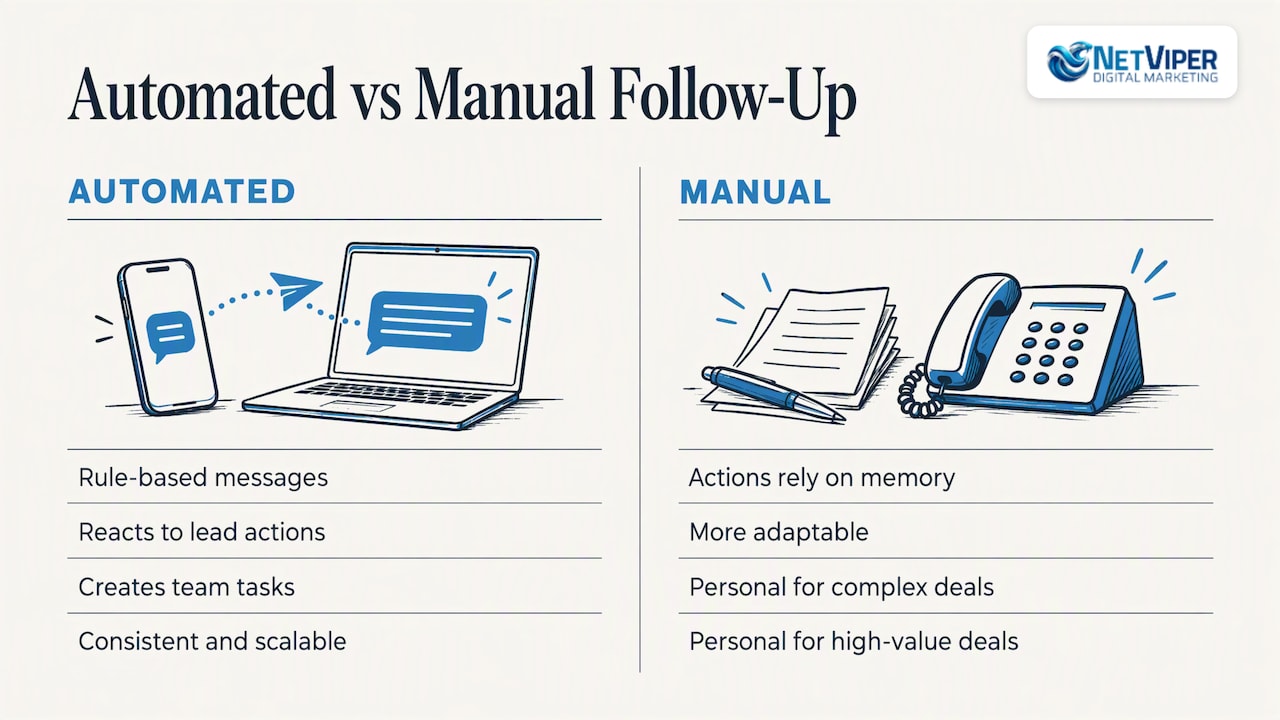
Automated lead follow-up uses predefined rules to send messages, react to what a lead does, and create tasks for your team. Manual follow-up depends on someone remembering to take each action. According to one consulting firm’s comparison, automation is more consistent and scalable, while manual follow-up is more adaptable and personal for complex or high-value deals.
That comparison points to the right design: automate the first response, the reminders and the bookkeeping, and keep people for conversations. A CRM vendor’s guide describes the goal as keeping prospects from falling through the cracks while freeing salespeople for higher-value conversations.
For a plumber, dentist, law office, home builder or HVAC company in Jacksonville or St. Augustine, “lead” means a form fill, a missed call, a chat message, a Google Business Profile message or a Facebook lead form. Each one should start the same clock.
Why speed matters more than clever copy
The best-known research on this is a Harvard Business Review study. Researchers audited 2,241 U.S. companies by sending each a web-generated test lead. Only 37% responded within an hour, and 23% never responded at all. In a separate analysis of 1.25 million leads, firms that tried to make contact within an hour were nearly seven times as likely to qualify the lead as those that waited even one more hour, and more than 60 times as likely as those that waited a day or longer.
The study is from 2011, and channels have changed, but the lesson holds up in practice: the business that answers first usually gets the conversation. If you pay for clicks through Google Ads, every slow reply wastes money you already spent.
Three common leaks show up in local businesses:
- After-hours inquiries. Evenings and weekends are when many homeowners search, and nobody is at the desk.
- Missed calls. A caller who reaches voicemail often dials the next business on the map.
- No second touch. One reply, then silence. Most leads need several contacts before they engage.
The five parts of a working follow-up system
1. A trigger that captures every source
Workflows start when something happens. A CRM guide lists form submissions and lead-scoring thresholds as typical enrollment triggers. Another lead-management guide adds email replies and advertising events.
List every place a lead can come from and connect each to the same CRM:
- Website forms and landing pages
- Phone calls and voicemails
- Website chat
- Google Business Profile messages and calls
- Facebook and Instagram lead forms
- Online booking requests
If a source is not connected, it is not part of your system. This is why we build lead capture into smart websites and landing pages from the start, so the form, the tracking and the follow-up share one record.
2. A named owner and a deadline
Automation should enforce accountability, not just send messages. A small-business follow-up guide recommends giving every new lead a named owner and a deadline immediately, with a five-minute response target during business hours and an automated acknowledgment after hours.
In practice, the system creates a task such as “Call Maria R., roofing estimate, due in 15 minutes” and alerts the owner by text. If the task is overdue, it escalates to a manager.
3. A short sequence across channels
One published example from a sales CRM is a good model: a qualified-lead trigger, owner assignment, an immediate follow-up task, a text after a five-minute delay, an optional call task after 30 minutes, and a later email if there is still no reply. You can adapt it to a local service business:
| Time after inquiry | Action | Channel |
|---|---|---|
| Instant | Acknowledge, confirm what happens next | Email or text (with consent) |
| 5 minutes | Personal-sounding text with a booking link | Text |
| 30 minutes | Task for a person to call | Phone |
| Next morning | Short email with one useful answer or photo | |
| Day 3 | Check-in with an easy yes/no question | Text |
| Day 7 and later | Move to nurture list, monthly value email |
The exact delays are a starting point. Your own reply data should decide what stays.
4. Stages and stop rules
Keep your pipeline simple. The same small-business guide suggests stages such as new, contacted, quoted, booked, won, lost and nurture, and says any reply, booking or “no” should pause automation and route the lead to a person.
This rule protects your reputation. Nothing feels more robotic than getting a “just checking in!” text after you have already spoken with someone. Build these stops in:
- Reply received: pause the sequence and notify the owner.
- Appointment booked: switch to reminders and confirmations.
- “Stop” or unsubscribe: end all marketing messages.
- Quote sent: change to a quote-specific sequence.
5. Reporting that feeds changes
Treat the workflow as a living document. The same sales CRM source recommends tracking which messages get replies, which steps convert and where leads drop off, then changing delays, wording or step order. One small-business advisor suggests watching three to five revenue-relevant metrics, such as stage conversion and sales-cycle length, and reviewing them weekly instead of tracking everything.
For most local businesses, a weekly review of these is enough:
- Median time to first response
- Percentage of leads contacted within your target window
- Reply rate by channel
- Booked appointments per 100 leads
- Lead source with the best booking rate
Tie the last one back to your ad spend. Conversion tracking is what shows which campaigns produce booked jobs rather than just form fills, and it is a service we offer alongside our conversion tracking audit.
Staying compliant with U.S. email and text rules
Automation multiplies mistakes as fast as it multiplies good messages, so build compliance in before launch. This is general information, not legal advice. For anything unclear, ask a business attorney who handles TCPA and CAN-SPAM matters.
Email: CAN-SPAM
The FTC says CAN-SPAM covers all commercial email, including business-to-business email. Your automated emails need:
- Accurate header information and a non-deceptive subject line
- Clear identification that the message is an ad, when it is one
- A valid physical postal address
- A clear way to opt out
The same FTC guide says opt-outs must be honored within 10 business days, and each violating email can carry penalties of up to $53,088. Set your system to suppress an address the moment someone unsubscribes rather than waiting.
Text messages: TCPA
The FCC explains that autodialed texts to mobile phones generally require prior consent. Commercial texts require written consent, informational texts may rely on oral consent, and recipients can opt out at any time by a reasonable method. An FCC 2026 order restates that robocalls and robotexts generally require prior express consent and that callers must stop covered messages once consent is revoked.
Practical steps for your forms and workflows:
- Add clear consent language next to the phone field, and do not pre-check the box.
- Store the date, time and wording of each consent in your CRM.
- Include opt-out instructions in marketing texts and honor “STOP” immediately, across every workflow.
- Keep a suppression list that all your tools share.
Keeping automated messages personal
Leads can tell when a message is mass-produced. A few habits help:
- Reference what they asked for. Use the service and the town: “Thanks for requesting a roof inspection in Ponte Vedra.”
- Send from a real name and number. A reply to a text should reach a human or a well-configured AI assistant.
- Ask one question per message. “Would Tuesday morning or Wednesday afternoon work?” beats a paragraph.
- Offer something useful. A price range, a photo of past work or a short answer to a common question gives a reason to reply.
- Stay out of the evening. Send non-urgent follow-ups during reasonable hours, even though the system could send at any time.
Where AI agents fit in
Rules-based workflows handle the sequence. AI agents handle the conversation part: answering a call that nobody picked up, responding to a chat question, qualifying a lead and booking an appointment. Our AI agents and chatbots are designed for that role, and we explain how they raise sales efficiency when a team is too busy to answer every inquiry the minute it arrives.
A reasonable division of labor looks like this:
| Task | Rules-based workflow | AI agent | Person |
|---|---|---|---|
| Instant acknowledgment | Yes | Yes | |
| Answer after-hours calls | Yes | ||
| Qualify basic fit (service, area, timing) | Yes | ||
| Book a standard appointment | Yes | Yes | |
| Reminders and no-show recovery | Yes | ||
| Quote for a complex or high-value job | Yes | ||
| Handle an upset customer | Yes |
The handoff is what matters. An AI agent should know when to stop and pass the lead, with the conversation attached, to someone on your team.
Our perspective: speed and a clean handoff beat complexity
We work with local businesses across Northeast Florida, and the pattern is consistent: the problem is rarely a lack of leads. It is that leads arrive when nobody can respond. A contractor on a roof, a salon owner with a client in the chair and a clinic that closes at five all lose inquiries the same way.
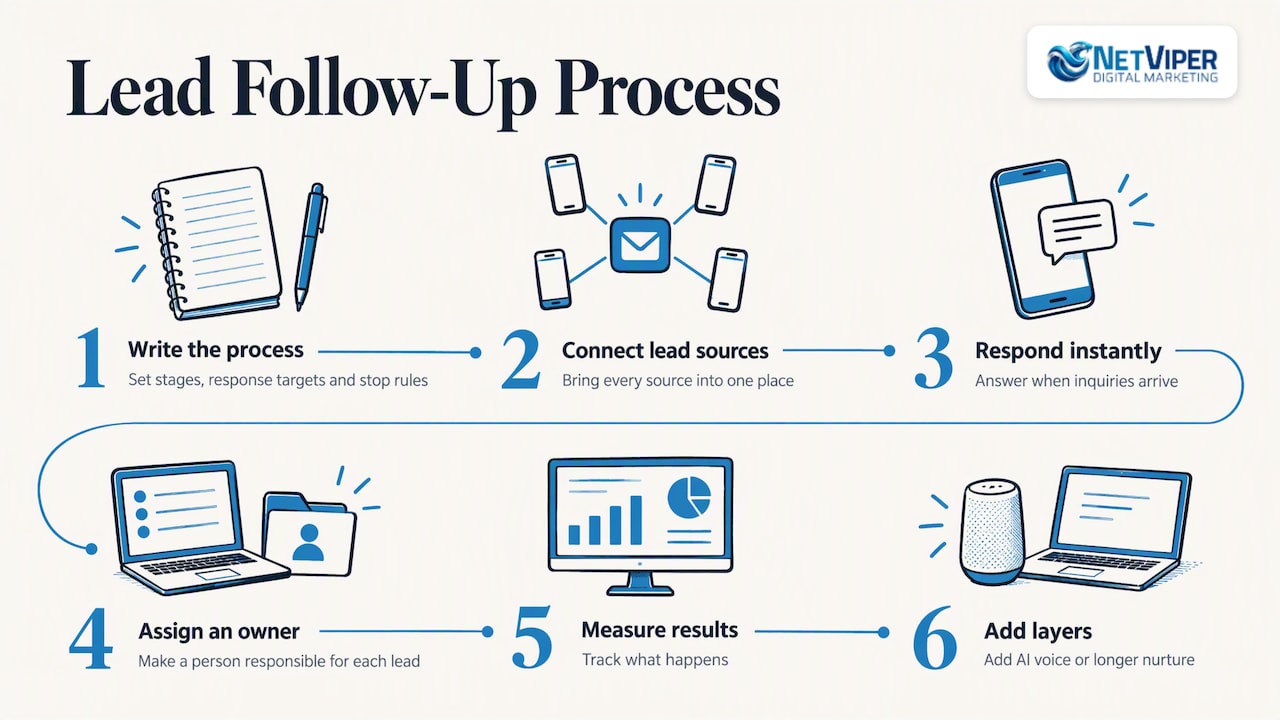
So we start with the simplest version that works. Connect every lead source to one place, respond instantly, make sure a person owns each lead, and measure what happens. Only then do we add layers such as AI voice agents or longer nurture sequences. We also tie follow-up to the ad side: if you pay for Google Ads or Facebook ads, the follow-up system is what turns paid clicks into booked work, and conversion tracking shows whether it is happening.
Our advice to owners is to resist buying a tool before you have written down the process. Sketch your stages, response targets and stop rules on one page first. Software then just carries out the plan.
— Dave Fogel
A simple setup plan for your first month
Week 1: Map and connect. List every lead source, choose a CRM, and route every source into it. Test each form and phone path yourself.
Week 2: Write the messages. Draft the instant acknowledgment, the five-minute text, the call-task prompt and two emails. Add consent and opt-out language. Keep each message short.
Week 3: Build and test. Create the workflow with owners, deadlines and stop rules. Submit test leads at different hours and confirm that replies pause the sequence.
Week 4: Launch and review. Go live, then check the response-time and booking numbers at the end of the week. Fix the weakest step first.
After that, review weekly for the first couple of months, then monthly.
How NetViper can help
If you would rather not build this yourself, we set it up for businesses in Jacksonville, St. Augustine and the surrounding area. Our NV AI Pro Agent is $497 per month, and AI Receptionist setup and deployment is a one-time $997, both described on our AI agents page. The agent answers inquiries and helps capture and book leads so fewer slip away outside business hours. If you want follow-up built together with ads, SEO and landing pages, our Full Digital Program covers the whole path from click to booked job.
Not sure where your leads are leaking? Start with a review of your current response times and lead sources, then decide whether workflows, an AI agent or both make sense. See our digital marketing services to get started.
FAQ
How fast should I respond to a new lead?
As fast as you realistically can. One small-business guide suggests a five-minute target during business hours, plus an automated acknowledgment after hours. The Harvard Business Review research above found that contact within an hour made qualification far more likely than later contact.
How many follow-ups are enough?
There is no universal number. A practical local-business sequence runs five to seven touches over about two weeks across text, phone and email, then moves unresponsive leads to a slower nurture list. Your reply data should tell you where to add or cut steps.
Do I need a CRM to automate follow-up?
Yes, in practice. A CRM keeps one record per lead, so triggers, tasks, messages and reports all work from the same data. Spreadsheets and inbox reminders cannot reliably pause a sequence when a lead replies.
Can I text leads automatically?
Only with the right consent. The FCC says commercial autodialed texts to mobile phones generally require written consent and recipients must be able to opt out. Put consent language on your forms and honor “STOP” right away.
Will automation make my business feel impersonal?
It does not have to. Keep messages short, specific to the inquiry and sent from a real name, and stop the sequence the moment a person replies. Automate the routine steps so your team has more time for real conversations.
Sources
- The Short Life of Online Sales Leads, Harvard Business Review
- CAN-SPAM Act: A Compliance Guide for Business, FTC
- Stop Unwanted Robocalls and Texts, FCC
- FCC 2026 order on robocalls and robotexts
- Lead Follow-Up: Manual vs Automated
- Lead Follow-Up Automation Guide
- How to Build a Small Business Lead Follow-Up System
- Automate follow-ups with workflows
- Lead Management CRM Software: Guide and Top Picks
- How to Grow Your Small Business with a CRM and Simple Sales System
Recommended

Local Business Advertising in Florida: Where to Spend First
How Florida local businesses can advertise: pick the right channels, win Google Maps and Search, track every lead, and respond to inquiries fast.

Local Search Ranking Factors: What Moves You Up in 2026
Google ranks local businesses on relevance, distance and prominence. Here are the local search ranking factors you can control, in order of priority.

Chatbot Development for Business: What It Involves and How to Start
Chatbot development for business explained: what a chatbot can do, how projects are built, what to plan for, and how local businesses get one live without the guesswork.
