
Local listings management is the ongoing work of claiming, correcting and syncing your business information across Google, Bing, Apple Maps, directories and data aggregators, so customers and search engines see the same accurate details everywhere. For a local business, it comes down to three jobs: get the core facts right, keep them right, and watch for anything that changes them without your approval. Below you will find what the work covers, how to decide between doing it yourself, using software or hiring help, and how to connect listings to local PPC so the leads can be measured.
TL;DR
- Listings management means claiming, updating and maintaining your business name, phone number, address and often hours, services and descriptions across online channels.
- The job does not end at distribution: it also includes duplicate monitoring, handling user-suggested edits and keeping data accurate afterward.
- Google Business Profile is the listing that matters most. Google reports that complete and regularly updated profiles earn more views and clicks.
- Small businesses can do much of this by hand; multi-location or busy owners usually benefit from software or a managed service.
- Pair listings with local PPC and proper tracking so you can see which calls, direction requests and form fills turn into revenue.
Table of Contents
- What local listings management actually covers
- Why accurate listings matter for leads
- Local listings management services: what you are buying
- Manual, software or managed service?
- How AI search changes the job
- Perspective: listings are the foundation, not the finish line
- Connecting listings to local PPC
- Measuring whether it works
- How we can help
- Choosing a provider: questions to ask
- FAQ
- Sources
What local listings management actually covers
A listing is any public record of your business: your Google Business Profile, a Bing Places entry, an Apple Maps card, a Yelp page, an industry directory, a chamber of commerce page, a navigation app. Managing those listings means keeping the data in each one correct.
At minimum that data is your business name, phone number and physical address, often shortened to NAP. Most definitions add a description, products or services and operating hours. The platforms themselves ask for more. Bing Places’ API documentation lists categories, coordinates, email, website, social URLs, photos, service areas, regular hours, holiday hours and closure status. Semrush’s listing management documentation names the same kinds of fields, plus images and map coordinates.
More than matching NAP fields
The common mistake is treating listings as a one-time copy-and-paste. Semrush describes listing management as distributing updates, monitoring and suppressing duplicate listings, managing user suggestions and maintaining accuracy after the data goes out. Each of those matters:
- Distribution: pushing a change (new hours, new phone number) to many sites at once instead of one login at a time.
- Duplicate control: old or accidental listings split your reviews and send customers to dead numbers.
- User suggestions: anyone can propose an edit to a listing. Someone has to review them.
- Ongoing accuracy: data aggregators and directories feed each other, and old information can resurface months later.
Data Axle frames the same job as centralizing and distributing location, phone, website and hours data across search engines, directories, navigation systems, virtual assistants and AI-driven search. The destinations are no longer only blue links.
Service-area businesses
If you visit or deliver to customers rather than serve them at your address, such as a plumber, mobile detailer or landscaper, your setup differs. Google’s guidance for service businesses says a profile can show your name, website, phone, hours, reviews and services, and that service-area businesses do not serve customers at their business address. Define the areas you serve carefully, and do not publish a home address you would rather keep private if Google lets you hide it.
Why accurate listings matter for leads
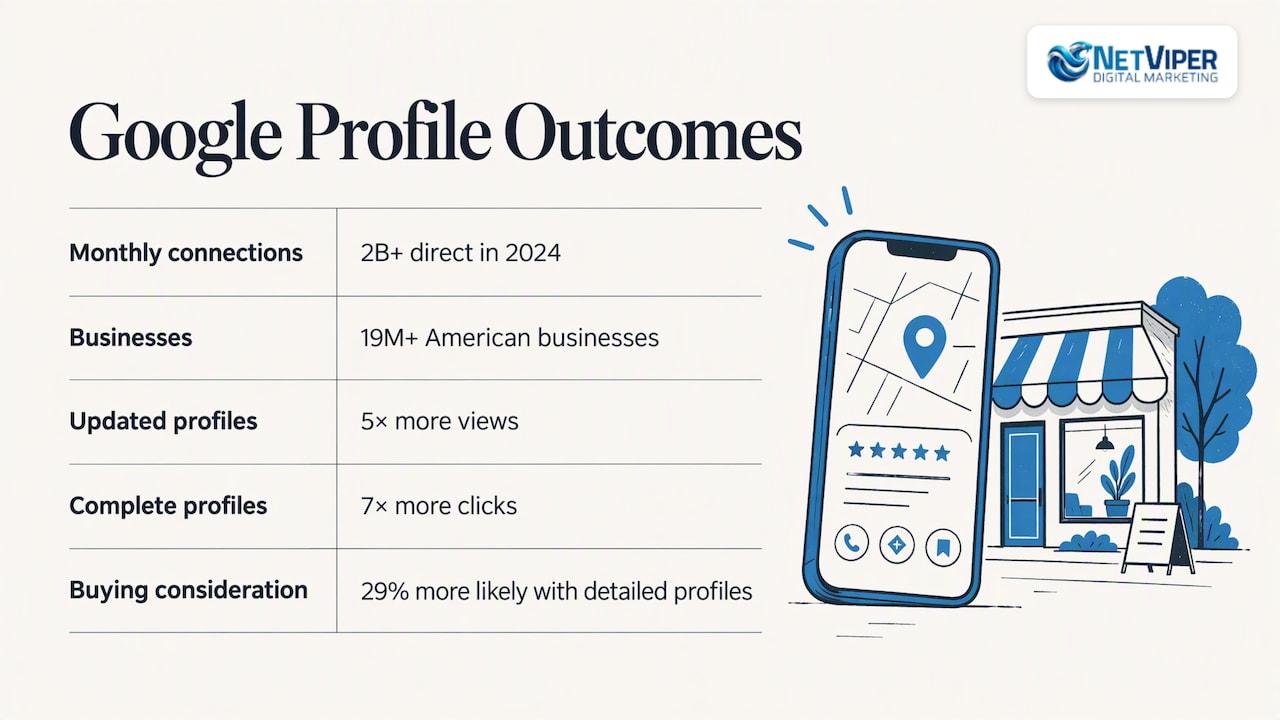
Customers act on what they see in a listing: they tap to call, request directions or message. Google reports that in 2024 it helped drive more than 2 billion direct connections every month, including calls, direction requests, messages, bookings and reviews, for over 19 million American businesses. The same playbook says regularly updated profiles see 5x more views, businesses with complete profiles see 7x more clicks, and 29% of customers are more likely to consider buying from businesses with detailed profiles.
Those are Google’s own figures about its own product, so treat them as direction rather than a promise for your category. The practical point holds: a half-empty or outdated profile gives up visibility to a competitor who filled theirs out.
Inconsistency has a cost too. Search Engine Journal’s analysis explains that mismatched NAP details across directories can weaken search engines’ trust in your data and frustrate users, which can mean lost leads and reputation damage. Picture a customer in Jacksonville who calls the old number from a stale directory, reaches a disconnected line and moves on to the next result. You never see that lost lead in any report.
Local listings management services: what you are buying
Searches such as “local business listing services” or “business listing management service” point to the same basic offer. A solid service should deliver:
- An audit of where your business appears today, with errors and duplicates flagged.
- Claiming and cleanup of the profiles that matter most, starting with Google Business Profile and Bing Places.
- Distribution of one master set of data to directories and aggregators.
- Duplicate suppression and review of suggested edits.
- Ongoing monitoring so changes in hours, services or addresses are updated everywhere.
- Reporting tied to actions customers take, not just a count of sites.
Be cautious about any provider that sells a big number of directories as the main benefit. A listing on an obscure site you will never rank on does less for you than a complete, active Google Business Profile with fresh photos, accurate categories and answered reviews.
Manual, software or managed service?
There are three realistic ways to manage listings. The right one depends on how many locations you have and how much time you can spend.
| Approach | Best for | Strength | Watch out for |
|---|---|---|---|
| Manual | One location, stable details | No recurring fee | Time, missed directories, drift over months |
| Software platform | Several locations, an in-house marketer | Bulk updates and one dashboard | You still do the strategy, cleanup and review work |
| Managed service | Owners who want it handled | Cleanup, monitoring and optimization done for you | Ask what is included and who owns the accounts |
Miriam Ellis notes that small businesses often manage Google Business Profiles largely by hand, while large enterprises use bulk creation, verification and management tools or APIs. That fits what we see locally: a single-location dentist can keep a handful of profiles current with a calendar reminder, but a contractor with three service areas and a changing phone setup will fall behind.
One caution on “source of truth” tools
Some platforms can sync updates to Google and automatically override outside edits. One vendor documents this behavior when its service is chosen as the source of truth. That is useful when your data is correct and dangerous when it is not. Before you turn on any override, confirm your master data, and make sure you, not the vendor, own the Google Business Profile login.
A simple manual routine
If you go the do-it-yourself route, this is a workable cycle:
- Write down one master version of your name, address, phone, website URL, hours, categories and description.
- Claim and complete Google Business Profile and Bing Places first, then Apple Maps and the main industry directories for your trade.
- Search your phone number and old addresses to find duplicates, then merge or request removal.
- Update holiday hours before each holiday, not after.
- Review suggested edits and new reviews weekly.
- Recheck everything quarterly and after any move, rebrand or phone change.
How AI search changes the job
AI assistants and voice search pull from the same listing data, so errors spread into more places. Semrush says some directories are used by or referenced within AI platforms, and positions listing management as a way to be found through voice and AI search. Before relying on any tool that promises AI visibility, verify the basics yourself: search your business name and services on the main assistants, compare what they say with your master data, and fix the source listing when they are wrong. No tool can guarantee how an AI system will present you.
Perspective: listings are the foundation, not the finish line
We work with local businesses across Northeast Florida, and the pattern is consistent. Owners come to us asking for more leads, and the first thing we check is whether the business can be found and trusted. Wrong hours, a duplicate profile or a mismatched phone number quietly undermine everything built on top of them, including ad spend.
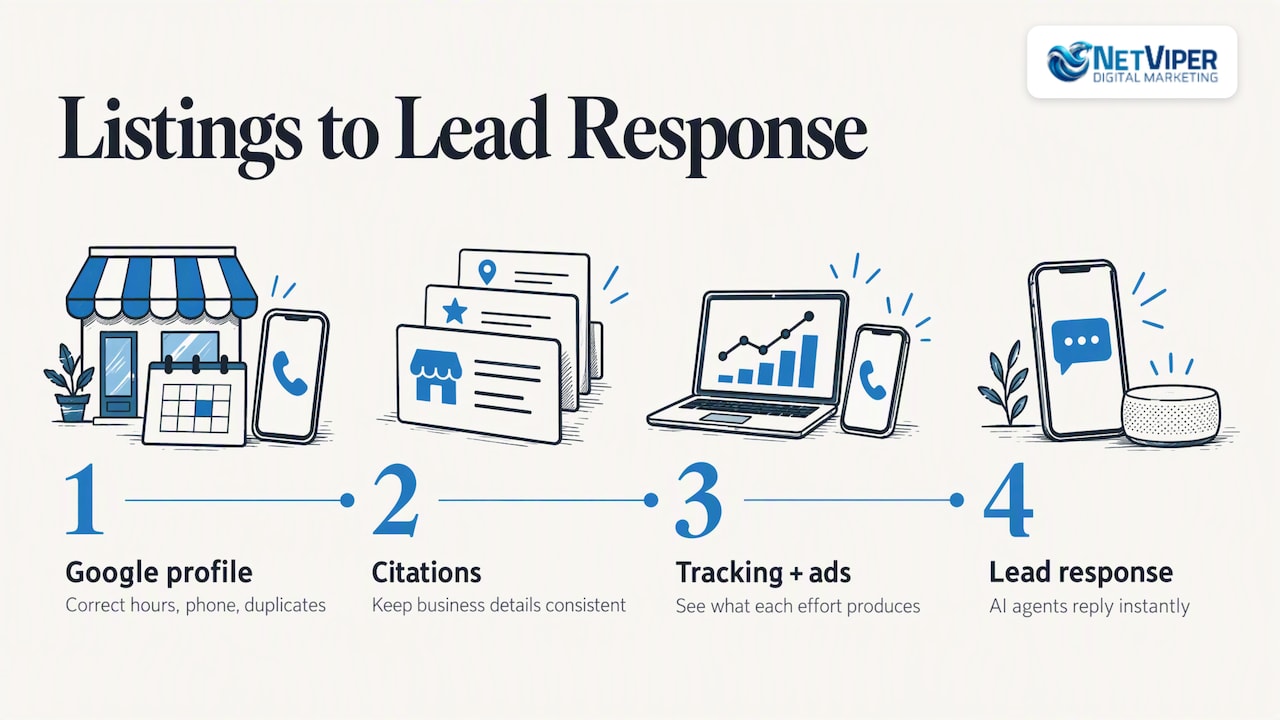
Our view is that listings management is a means to an end. The goal is a phone that rings and forms that fill. That is why we treat the Google Business Profile as the centerpiece, support it with consistent citations, and then connect the result to tracking and paid campaigns so you can see what each effort produces. We would rather show a business owner three calls traced to a corrected profile than hand over a report listing 80 directories.
The other piece is speed. A listing that works brings in more inquiries, and an inquiry that waits a day often goes to a competitor. That is why we also set up AI chatbots and voice agents to respond to leads instantly.
— Dave Fogel
Connecting listings to local PPC
People searching for local PPC management or local PPC services are usually asking a related question: once the listing is right, how do I add paid traffic? The two work together.
What local PPC management involves
Local PPC is paid search aimed at customers in your service area, typically run through Google Ads. In practice, management includes keyword and location targeting, ad copy, budget and bid control, landing pages, call and form tracking, and regular optimization based on results. Listings feed this directly: with location assets, your ads can show your address, a map to your location or the distance to your business, and you create them by linking your Google Business Profile to your Google Ads account. If the profile is wrong, so are your ads.
If you run service-area work, Local Services Ads are another route worth understanding, and our team can explain how they differ from standard search campaigns. For standard campaigns, see our Google Ads management in Jacksonville page or our broader PPC management services.
Planning spend
Google’s Performance Planner models how changes in bids and budget might affect key metrics, which helps you set a realistic budget before committing. Treat its output as a forecast, not a guarantee.
Measuring whether it works
Listing data is only valuable if you can tie it to business results. Track these:
- Calls: note that as of July 31, 2024, call history reports are no longer available in Google Business Profile, and call buttons on affected profiles use the phone number you supplied. Use a tracking number or a call-tracking tool to measure calls instead.
- Website clicks: add a UTM parameter to your profile’s website link. One suggested format uses a source such as GMBlisting and a medium of organic, so profile traffic shows up separately in your analytics.
- Direction requests and messages: monitor them in the profile insights.
- Form fills and booked appointments: tie them to the landing page or campaign that produced them.
- Cost per lead and close rate: compare paid and organic leads so you can decide where the next dollar goes.
When the tracking is not in place, even a good campaign looks like a mystery. Our conversion tracking audit exists for that situation, and a focused landing page usually improves what happens after the click.
How we can help
If you want listings handled alongside the work that brings in leads, we offer a few ways to start. Our local SEO plan GeoBoost 25 is $497 per month, and Listings & Citations is $60 per month, both described on our local SEO page. Google Business Profile optimization, link building and Google Ads management are quoted per business, so you will find no published price for those. Larger needs fall under our Full Digital Program at $1,995 per month plus a one-time $2,500 set-up fee; see the pricing overview for what is included.
We serve Jacksonville, St. Augustine, Ponte Vedra Beach and nearby communities. If you would like to know where your business stands, start with a local SEO review and we will point out errors, duplicates and gaps.
Choosing a provider: questions to ask
Whether you hire us or someone else, ask these before you sign:
- Who owns the Google Business Profile and directory accounts if we part ways?
- Which listings will you actively manage, and which are just submitted once?
- How do you handle duplicates and suggested edits?
- How will I see calls, clicks and bookings from my listings?
- Is the contract month to month, and what happens to the data if I cancel?
- Who do I talk to when something changes, such as hours or a new location?
A provider that answers these plainly is far more useful than one that leads with a directory count.
FAQ
What is local listings management?
It is the process of claiming, updating and maintaining your business information across search engines, maps and directories. The core data is your name, address and phone number, usually with hours, services and a description. It also includes monitoring duplicates and edits so the information stays accurate over time.
How much does a local business listing service cost?
Prices vary by provider and by how much is managed. At NetViper, Listings & Citations is $60 per month, and our GeoBoost 25 local SEO plan is $497 per month. Compare any quote by what it includes: cleanup, ongoing monitoring, Google Business Profile work and reporting.
Can I manage my listings myself?
Yes, if you have one location and details that rarely change. Start with Google Business Profile and Bing Places, keep one master record, and recheck quarterly. Multiple locations, frequent changes or a lot of duplicates are when software or a managed service saves time.
Do listings and PPC work together?
They do. Linking your Google Business Profile to Google Ads lets your ads show location details, so accurate listings improve the ads. Tracking calls and clicks across both shows which channel produces leads.
Sources
- Best Enterprise Local Listing Management Software 2026, TrustRadius
- Business Profile for service businesses overview, Google
- Bing Places for Business API documentation
- Listing Management API, Semrush
- What is Listing Management?, Semrush
- Local Listings Management & Distribution, Data Axle
- GBP Best Practices Playbook 2026, Google
- Why NAP & User Experience Are Crucial To Local SEO, Search Engine Journal
- Scalable Local SEO Practices That Actually Work, Search Engine Land
- What is the Local Listings service, DbaPlatform
- Product Linking: Link your Google Business Profile to Google Ads
- Create and edit a plan with Performance Planner, Google Ads Help
- Changes to Google Business Profile call history
Recommended

Chatbot Development for Business: What It Involves and How to Start
Chatbot development for business explained: what a chatbot can do, how projects are built, what to plan for, and how local businesses get one live without the guesswork.

Google Ads Budget: How Much to Spend and How to Set It
Learn how a Google Ads daily budget works, how to calculate a monthly budget from your lead goals, and what a local business should spend to get real data.

Google Business Profile Optimization in Jacksonville, FL
How Jacksonville businesses optimize a Google Business Profile: the steps that move Maps rankings, what to measure, what it costs and when to hand it off.
