
Call tracking for ads ties each phone call to the click, keyword, ad and campaign that produced it. For a local business, that matters because many of your best leads never fill out a form. They call. Without tracking, those calls look like free, unexplained business, and your Google Ads report understates what your spend is earning. This guide covers how call tracking works, the five ways Google Ads measures calls, how to set it up, which metrics show lead quality, what it costs, and the recording rules to follow.
TL;DR
- Google Ads can count calls from your ads, calls to a number on your website, and clicks on a mobile number. Each one tells a different part of the story.
- Set a minimum call length so a 5-second wrong number is not counted as a lead.
- Clicking a call asset costs the same as a standard headline click. The tracking itself in Google Ads adds no separate charge; third-party platforms are priced separately.
- Recording calls brings legal duties. Several states require all parties to consent, so announce recording on every call.
- Tracking only pays off if someone answers. Pair it with a plan for missed calls.
Table of Contents
- Why calls are the hardest lead source to measure
- The five types of call conversion Google Ads can measure
- How call tracking attributes a call to a click
- How to set up call tracking in Google Ads
- Call metrics that show lead quality
- What call tracking costs
- Recording calls: consent and eligibility
- Our perspective: tracking is only half the job
- Getting more from tracked calls
- Put call tracking to work with NetViper
- FAQ
- Sources
Why calls are the hardest lead source to measure
A form submission leaves a trail: a page, a timestamp, often a source. A phone call leaves nothing unless you build the trail. A plumber in Jacksonville, a dentist in Ponte Vedra or a law office in St. Augustine may get half their ad-driven leads by phone, yet see only clicks in their dashboard.
That gap causes bad decisions. You pause a keyword that looked like it produced no conversions, when it was producing calls. You overspend on a campaign that gets form fills but no phone business. Call tracking closes the gap so you can judge ad spend on real conversations.
Google’s own documentation describes the goal: phone call conversion tracking helps you see how ad clicks lead to different kinds of phone calls, so you can find the keywords, ads, ad groups and campaigns that drive the most valuable calls.
The five types of call conversion Google Ads can measure
Google Ads supports several phone call conversion types. They are not interchangeable, so pick the ones that match how your customers actually reach you.
| What is measured | How it works | What it tells you |
|---|---|---|
| Calls from ads | Call-only ads, or call and location assets, use a Google forwarding number | A caller tapped your ad and phoned you |
| Calls to a number on your website | A Google forwarding number replaces your number on the page | Which ad click led a visitor to call |
| Clicks on a number on your mobile site | Tracks the click on the number | A tap, not a confirmed call |
| Clicks on call ads and assets | Counts the click, based on Google’s estimation | An estimate of calls started |
| Imported call conversions | Call data uploaded from another system | Calls tracked in your phone system or CRM |
The distinction between a click on a number and an actual call is worth remembering. A tap on a mobile number tells you intent. It does not tell you the call connected, how long it lasted or whether it was a sales inquiry.
How call tracking attributes a call to a click
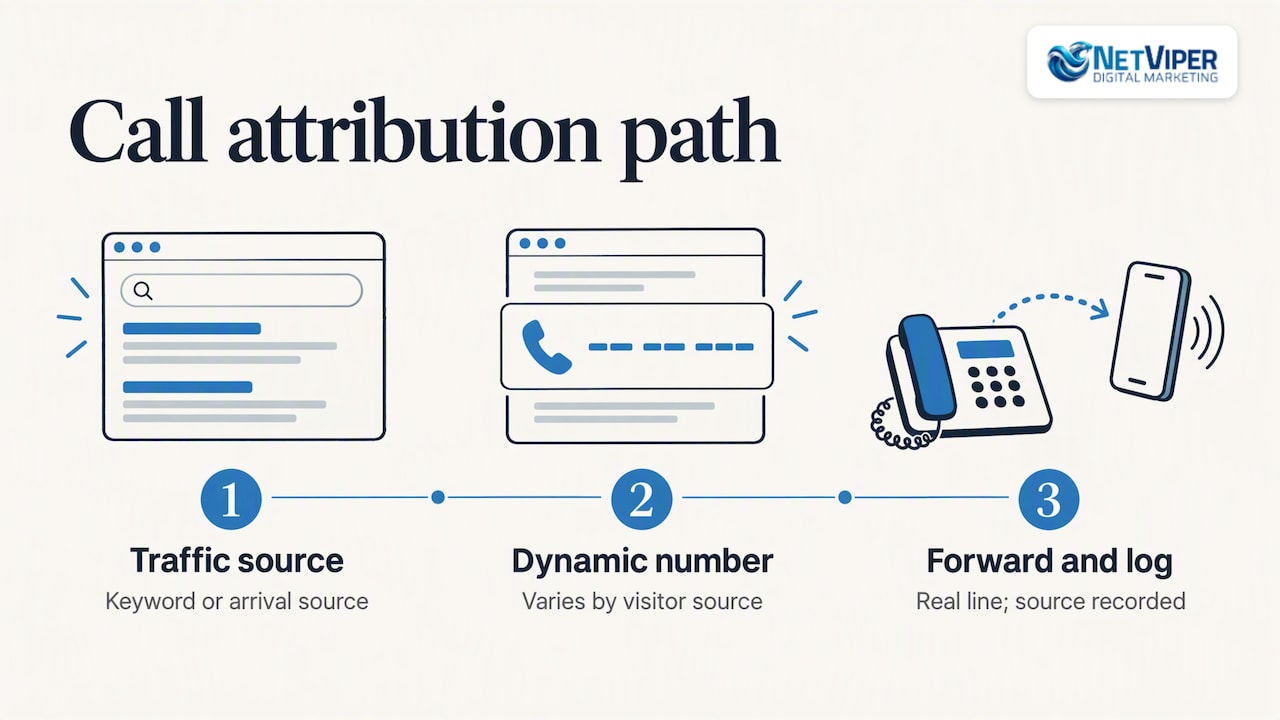
The core mechanism is a substitute phone number. Instead of showing your main line everywhere, the system shows a tracking number tied to a specific source. When someone calls it, the call forwards to your real line and the platform logs where the caller came from.
With Google’s built-in call reporting, Google assigns a forwarding number to your ad. You can then see call duration, call start time, the caller’s phone number for calls over 15 seconds (except in India), and whether the call was connected. Google notes these forwarding numbers can share your business’s area code or prefix when possible, but they belong to Google, can change, and cannot be used outside call reporting and website call conversion tracking. Do not print one on a truck or business card.
For calls from your website, Google recommends dynamically generated forwarding numbers that replace your business number on the page. This is the same idea third-party platforms call dynamic number insertion: the number a visitor sees depends on how they arrived. That is what lets you tie a call back to a specific keyword rather than just to “the website.”
Native Google tracking versus a dedicated call tracking platform
Google’s native tools cover most small local advertisers whose spend is mainly on Google. A dedicated platform becomes worth considering when:
- You advertise across several channels, such as search, Facebook, directories and print, and want one call report.
- You need call recordings or transcripts for coaching, outside the limits of Google’s own tools.
- You want calls passed into a CRM with the lead’s full history.
- You need offline numbers on direct mail or vehicle wraps, which Google forwarding numbers cannot serve.
If you only run Google Ads and a Google Business Profile, start with the native setup and add software when you hit one of those limits.
How to set up call tracking in Google Ads
The steps below follow Google’s own instructions in Measure calls from ads. Menu names change from time to time, so check them against the current help page.
- Create a conversion action. In your Google Ads account, add a new conversion and choose conversions from phone calls, then the phone call lead option.
- Pick the call source. Choose calls from ads, calls from website visits, or calls via uploads. You can create more than one.
- For website calls, select the option for someone calling a number shown on your website and enter your phone number. Then add the Google tag and the call snippet to your site so the forwarding number displays.
- For calls from ads,turn on call reporting in account settings, confirm the Calls from ads conversion action is active, and set it as a primary goal.
- Set a minimum call length. More on this below.
- Place a test call. Click your own ad or visit your site, call the displayed number and confirm the call appears in the “Call details” report.
If you import call conversions from another system, Google requires Google forwarding numbers for tracking calls from ads and from your website, and those numbers are only available in certain countries. That is no obstacle for a US business, but it is why agencies running multi-country accounts see different options by market.
Common setup mistakes
- Counting every call as a conversion. A 4-second hang-up is not a lead.
- Tracking taps but not calls. Click-to-call counts can be inflated by accidental taps.
- Leaving the website number static. Without number swapping, website calls cannot be tied to a keyword.
- Setting calls as a secondary goal by accident. If the action is not primary, bidding will not optimize toward it.
- Never testing. A broken snippet can run for months before anyone notices the missing data.
Call metrics that show lead quality
Raw call counts flatter you. Quality metrics tell you what is working.
Call duration. Google lets you set a minimum call length for a call to count as a conversion and lets you review actual durations in the Call details report. A good starting threshold depends on your business. A quick price check might take 30 seconds. A booked appointment usually takes longer. Review a sample of calls, find where real inquiries start, and set the threshold just below that.
Connected versus missed. The call reporting data shows whether the call was connected. A high share of unanswered calls means you are paying for clicks and losing the lead.
AI-assessed call quality. For US and Canadian numbers, Google can measure conversion quality by analyzing call recordings with its AI when recording is available, or by counting calls that exceed your minimum duration if it is not.
Source detail. Look at calls by keyword, ad group and campaign. A keyword that yields few clicks but many 3-minute calls may deserve more budget than one with plenty of clicks and no conversations.
Booked and closed. Duration is a proxy. The real test is whether the call became an appointment or a sale. Even a simple spreadsheet where your front desk marks each tracked call as booked, quote only, or not a fit gives you a better cost per customer than any dashboard can.
A simple worked example
Say a home services company spends $3,000 a month and your account shows 30 form fills, so the reported cost per lead is $100. Call tracking reveals another 45 calls over 60 seconds. That is 75 leads, or $40 per lead. Of the 45 calls, 15 booked jobs. Now you can judge keywords by booked calls, not clicks. The numbers here are illustrative, not a benchmark, but the pattern is common: untracked phone leads make ad performance look worse than it is, and that can lead to cutting the campaigns that work.
What call tracking costs
The cost depends on which route you take.
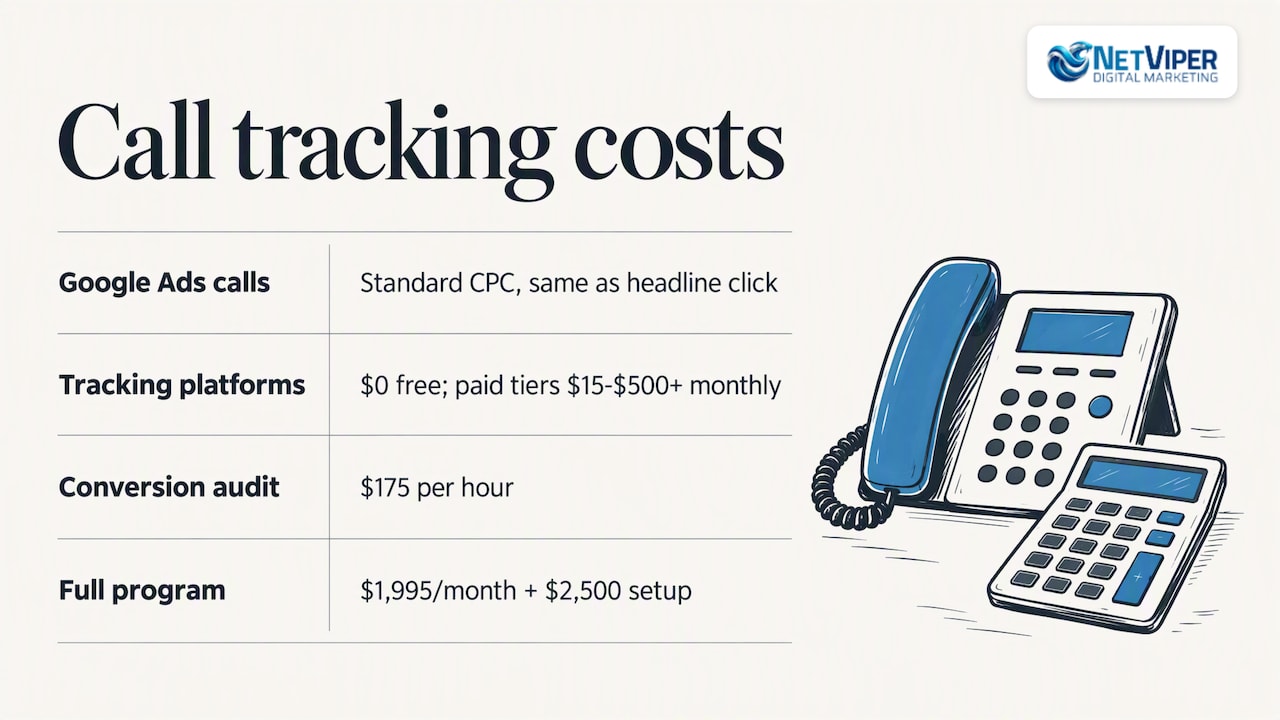
Inside Google Ads. Clicking a call asset on mobile, or the Call us button on desktop, costs the same as a headline click, a standard CPC. Google bills for the click, not the call. You pay the ad cost you were already paying; setting up conversion tracking on it is a configuration task, not a separate subscription.
Third-party platforms. Pricing varies with call volume, number of tracking numbers, recording and integrations. One roundup of call tracking tools puts typical monthly costs from $0 for free tiers to $15 to $500 and up, depending on features and volume, with free tools typically suited to a business under roughly 100 calls a month. Expect to pay more for number pools that cover many traffic sources, call recording, transcription or CRM sync.
Labor. The line item people forget is the time to install the tag, test it, review calls and act on the data. This is where a managed service earns its fee.
At NetViper, a conversion tracking audit is $175 per hour, which fits a business that already runs ads and suspects its call data is incomplete. Our full program, which covers ads, local SEO and AI tools together, is $1,995 per month plus a $2,500 one-time set-up fee, and is listed on our pricing page.
Recording calls: consent and eligibility
Tracking a call’s source is one thing. Recording what is said is another, and it carries legal duties.
Federal and state law. The main federal law, 18 U.S. Code § 2511, prohibits intentional interception of wire, oral and electronic communications, with an exception when one party has given prior consent. Justia’s 50-state survey explains that most states require one-party consent, while a smaller group requires all parties to agree, and it lists California among the all-party states. Violating state law can bring severe penalties. Because your callers may be in any state, the safe practice is to play a recording notice at the start of every call. If you operate across state lines or record sensitive conversations, ask your attorney to review your script.
Google’s eligibility rules. Per Google, call recording and AI-qualified call conversions are currently available only for calls involving US and Canadian phone numbers. Calls must flow through a Google forwarding number with call reporting turned on. Recording is automatically skipped for advertisers in sensitive verticals unless they accept the Call Ads Supplemental Terms.
Website disclosure. If you use Phone Analytics in Google Analytics, Google requires you to give clear notice, for example in your privacy policy, that information about calls to numbers on your site may be collected in conjunction with user activity.
Enhanced conversions. If you pass phone numbers or emails to improve measurement, Google says it hashes first-party customer data and matches it to signed-in Google accounts. Your privacy policy should describe this too.
Our perspective: tracking is only half the job
We work with owners across Jacksonville, St. Augustine and the beaches, and we see the same pattern. A business gets call tracking installed, enjoys the new report for a month, then discovers the report shows a bigger problem: a third of tracked calls go unanswered.
That is why we treat call tracking as part of a lead system, not a reporting add-on. First, we make sure the tag and forwarding numbers fire correctly, because bad data is worse than none. Second, we set conversion rules around calls that matter to the business, not every ring. Third, we look at what happens next: how fast the phone is picked up, what happens after hours, and whether a missed caller gets a response.
The third step is where our AI tools fit. An AI receptionist can answer when your team cannot, capture the caller’s details and book the appointment. Tracked calls then tell you which ads produced them, and answered calls turn into revenue instead of voicemail. Local advertisers are usually spending real money per click, so a missed call has a visible cost.
Our advice: do not buy software before you know your numbers. Place test calls, review a week of call details, and find out your answer rate. Then decide what to fix.
— Dave Fogel
Getting more from tracked calls
Once data flows, use it.
- Feed it back into bidding. Google notes that call reporting enables automated bidding strategies that aim to increase the likelihood of conversions. Quality-filtered call conversions give those strategies a cleaner signal than raw taps.
- Improve landing pages. If calls from a page are short and unproductive, the page may promise something your team cannot deliver. Our landing page optimization work looks at the phone number placement, the offer and the form together.
- Schedule ads around staffing. Call assets can be set to show only when your business can take calls. Google’s call campaign guidance lists showing numbers only when you can answer as an option.
- Compare channels. Facebook and local search produce different callers than search ads. Tracking numbers per channel show which one brings higher-value conversations.
- Check your Google Business Profile. Many local calls come from Maps, not ads. Our local SEO services cover profile optimization so you can see calls from both paid and organic local sources.
Put call tracking to work with NetViper
If you run Google Ads in Northeast Florida and cannot say which keywords produce calls, you are budgeting blind. Our Google Ads management in Jacksonville includes conversion setup and call tracking, so reporting reflects phone leads as well as clicks. If answered calls are the weak spot, our AI receptionist and agents are listed at $497 per month for the NV AI Pro Agent, with a $997 one-time setup and deployment fee for the AI Receptionist.
Start with a conversation about your current account. We will check your tracking, show you where calls are falling through, and tell you plainly what is worth fixing.
FAQ
What is call tracking in Google Ads?
It is conversion tracking that records phone calls generated by your ads or website and links them to the click behind them. You can see which keywords, ads and campaigns lead to calls, how long they lasted and whether they connected. Google offers it natively through call reporting and phone call conversion actions.
How much does call tracking cost?
Inside Google Ads there is no separate charge for the tracking; a click on a call asset costs the same as a normal ad click. Third-party platforms range from free tiers to roughly $15 to $500 or more a month, depending on volume and features. Setup and review time is the other cost to plan for.
Do I need a call tracking platform, or is Google Ads enough?
If most of your spend is on Google and you need to know which keywords drive calls, Google’s built-in tools are usually enough. Add a dedicated platform when you advertise across several channels, need offline tracking numbers, or want calls synced into a CRM.
Is it legal to record calls from my ads?
It depends on the states involved. Most states require one-party consent, but some require every party to agree, so a recording announcement at the start of each call is the safest practice. Check your script with an attorney, especially if you serve customers in several states.
What is a good minimum call length to count as a conversion?
There is no universal number. Listen to a sample of your real calls and set the threshold just below the length at which genuine inquiries begin. A business that books by phone will usually need a longer threshold than one that mostly fields quick questions.
Sources
- About phone call conversion tracking, Google Ads Help
- About call reporting, Google Ads Help
- Measure calls from ads, Google Ads Help
- About importing call conversions, Google Ads Help
- Set up tracking calls to a phone number on a website, Google Ads Help
- About call assets, Google Ads Help
- About call campaigns, Google Ads Help
- Manage your call recording settings and eligibility, Google Ads Help
- Policy requirements for Phone Analytics, Analytics Help
- Enhanced conversions for web ads, Google Ads Privacy Hub
- Recording phone calls and conversations, 50-state survey, Justia
- The best free call tracking software, HubSpot
Recommended

Chatbot Development for Business: What It Involves and How to Start
Chatbot development for business explained: what a chatbot can do, how projects are built, what to plan for, and how local businesses get one live without the guesswork.

Google Ads Budget: How Much to Spend and How to Set It
Learn how a Google Ads daily budget works, how to calculate a monthly budget from your lead goals, and what a local business should spend to get real data.

Google Business Profile Optimization in Jacksonville, FL
How Jacksonville businesses optimize a Google Business Profile: the steps that move Maps rankings, what to measure, what it costs and when to hand it off.
