
The right Google Ads budget is the amount that buys enough clicks to produce measurable leads at a cost per lead your business can afford. Work backward from the number of customers you want and what each one is worth, then turn the result into a daily budget per campaign. For most local businesses, that means starting at a few hundred dollars a month at the very least and planning for more once conversion tracking proves the campaign pays back.
This guide shows how the daily budget works, how to calculate your own number, what a small local business can realistically test, and how to adjust spend once data comes in.
TL;DR
- Google lets you set an average daily budget per campaign. On any single day it can spend up to 2x that amount, but in a month it will not bill more than 30.4x the daily figure.
- Start from your goal: target leads x acceptable cost per lead, divided by 30.4, gives a daily budget.
- Search Engine Land suggests small businesses start with at least $500 a month, within a $500 to $5,000 range, depending on competition and goals.
- A budget too small to produce enough clicks does not test anything. Size it so you can judge results within weeks, not quarters.
- Fix conversion tracking before you scale. Raising spend on a campaign that is not measured only raises the cost of not knowing.
Table of Contents
- How the Google Ads daily budget works
- Start from your goal, not from a number you saw online
- What a small business should spend
- How to allocate a budget across campaigns, locations and keywords
- Fix measurement before you raise the budget
- How to monitor and adjust your budget
- A budget review checklist
- Promo: Let a specialist set and manage the budget
- Our perspective
- FAQ
- Sources
How the Google Ads daily budget works
When you create a campaign, you enter an average daily budget. It is the amount you are comfortable spending per day over the course of a month. You can change it at any time.
Two limits sit around that number, and both are documented in Google’s spending limits page:
- Daily limit: on a given day, Google may spend up to twice your average daily budget. A $10 daily budget can cost up to $20 on a day with unusually strong search demand.
- Monthly limit: across a month, you are never charged more than your daily budget multiplied by 30.4, the average number of days in a month. A $10 daily budget caps at $304.
In rare cases the cost of the clicks and impressions Google served can exceed those limits. Google’s overdelivery explanation says it covers the difference, so you pay only up to the limits.
This is why a monthly figure is easiest to plan with. Google’s budget help page tells advertisers to multiply the daily budget by 30.4 to get the monthly maximum.
What happens when you change the budget mid-month
If you raise or lower a daily budget partway through the month, the monthly maximum is not simply the new daily number times 30.4. Google’s example for campaign budgets runs like this: a campaign on $5 a day has spent $113 by November 24, and the budget is raised to $10 a day. The most that can be charged for November is $113 plus $10 for each of the seven remaining days, or $183.
So a mid-month change takes effect on the days that remain. Plan increases at the start of a month if you want the full effect to show up cleanly in your reporting.
Daily budgets are per campaign
Each campaign carries its own budget. A business running a Search campaign for plumbing repair and another for water heater installation sets two budgets, and the total is the sum. That matters for allocation, covered below.
Start from your goal, not from a number you saw online
Benchmarks of what “most businesses spend” tell you very little about your own economics. A dental practice that earns thousands per new patient can justify paying far more per lead than a cleaning service earning a few hundred per job. Search Engine Land’s budget planning guidance recommends planning from the bottom up: set a business goal such as a number of conversions tied to a target cost per acquisition, revenue or return on ad spend, then use measures like conversion rate, cost per click and impression share to project what a budget can achieve.
Here is that logic in four steps a local business owner can run in a spreadsheet.
Step 1: Know what a customer is worth
Take the average gross profit on a job or a new customer, not revenue. If a job brings in $900 and costs you $600 to deliver, your gross profit is $300.
Step 2: Set the most you can pay for a lead
Multiply gross profit by the share of leads that become customers. If you close 1 in 3 leads, a lead is worth about $100 in gross profit ($300 x 33%). Paying more than that per lead loses money on each one, so your target cost per lead should sit below it, leaving room for margin and overhead. Use your own close rate from your records. If you do not track it, start by tracking it, because the whole calculation depends on it.
Step 3: Choose how many leads you want
Pick a monthly lead target your team can actually handle. Say 12 leads a month.
Step 4: Convert to a daily budget
Here is an illustration with made-up numbers, not a forecast:
- Target leads: 12 per month
- Target cost per lead: $80
- Monthly budget: 12 x $80 = $960
- Daily budget: $960 / 30.4 = about $31.58
That gives you a defensible starting number. The cost per lead is an assumption until real data replaces it, so treat the first weeks as measurement, not verdict.
Check the math with clicks and conversion rate
A second view works from clicks. Search Engine Land’s Google Ads cost guide gives an example: $1,000 of spend buying 250 clicks implies a $4 average cost per click. If 4% of visitors convert, that is 10 customers. At $300 per sale, those customers generate $3,000 in revenue, or 3x the ad spend. The guide presents this as an illustration, not a promise.
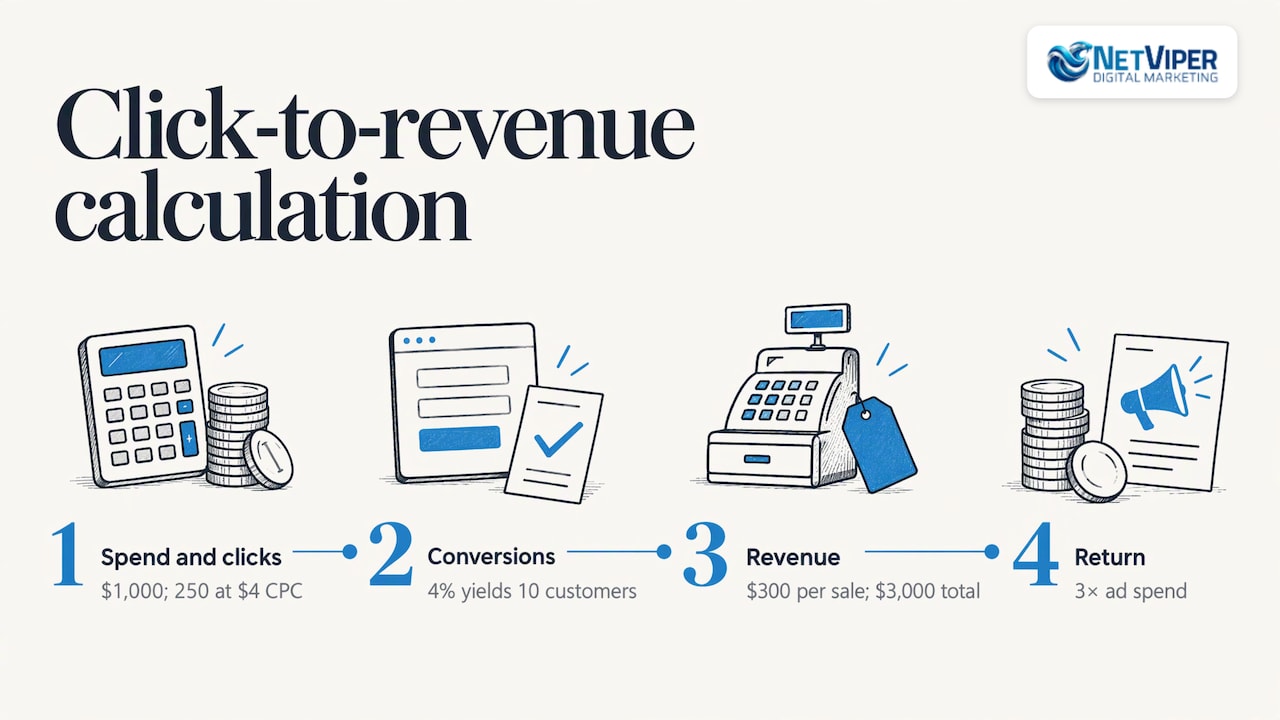
Use the same structure with your own inputs. Your cost per click depends on your industry and market, your conversion rate depends on your landing page and offer, and your sale value depends on your business. Change any one and the answer moves a lot. Google’s own cost tool shows budget benchmarks by industry and location, which is a useful sanity check against your calculation.
What a small business should spend
There is no fixed price for Google Ads, and Search Engine Land says so directly. Its guide recommends that small businesses begin with at least $500 a month and puts the small-business range at $500 to $5,000 a month. Where you land in that range depends on competition and goals.
That range is wide for a reason. Searches for emergency services, legal help and home repair in a large metro cost more per click than searches for niche local services in a smaller market. A business in the Jacksonville area competing for a high-value service will usually need to sit higher in the range than one filling a low-competition niche.
Why a budget that is too small tests nothing
The most common mistake is not spending too much. It is spending too little to learn anything. If a campaign earns only a handful of clicks a day, it takes months to collect enough visits to judge whether your landing page converts or your keywords attract the right people. At that pace, you are waiting, not testing.
A practical way to size a test:
- Estimate your cost per click from Google’s keyword planning tools or cost tool.
- Decide how many clicks you need before you will judge targeting. A few dozen to a hundred clicks is a reasonable first checkpoint.
- Divide those clicks by the number of weeks you are willing to wait, and multiply by your cost per click.
- Compare the result with your calculated budget. If your budget cannot buy enough clicks to judge in six to eight weeks, either raise it or narrow the campaign to fewer, higher-intent keywords and a tighter service area.
Narrowing is often the better first move. Concentrating a modest budget on a few high-intent searches in the towns you serve gives each keyword enough volume to learn from. Spreading it thinly across ten services and every neighborhood gives none of them enough.
Pick one thing to fund properly
Running several channels at once with a token amount each is a quick route to learning nothing. If your budget is limited, put it behind the channel closest to a buying decision, which for most local service businesses is Google search ads, and give it a full evaluation period before you add another. If Facebook ads are your second step, our guide to Facebook ads budgets covers how to size that separately.
How to allocate a budget across campaigns, locations and keywords
Once you know the total, the next question is where it goes. Google sets budgets per campaign, so allocation mostly means deciding how many campaigns you run and what each gets. These principles hold for most local businesses.
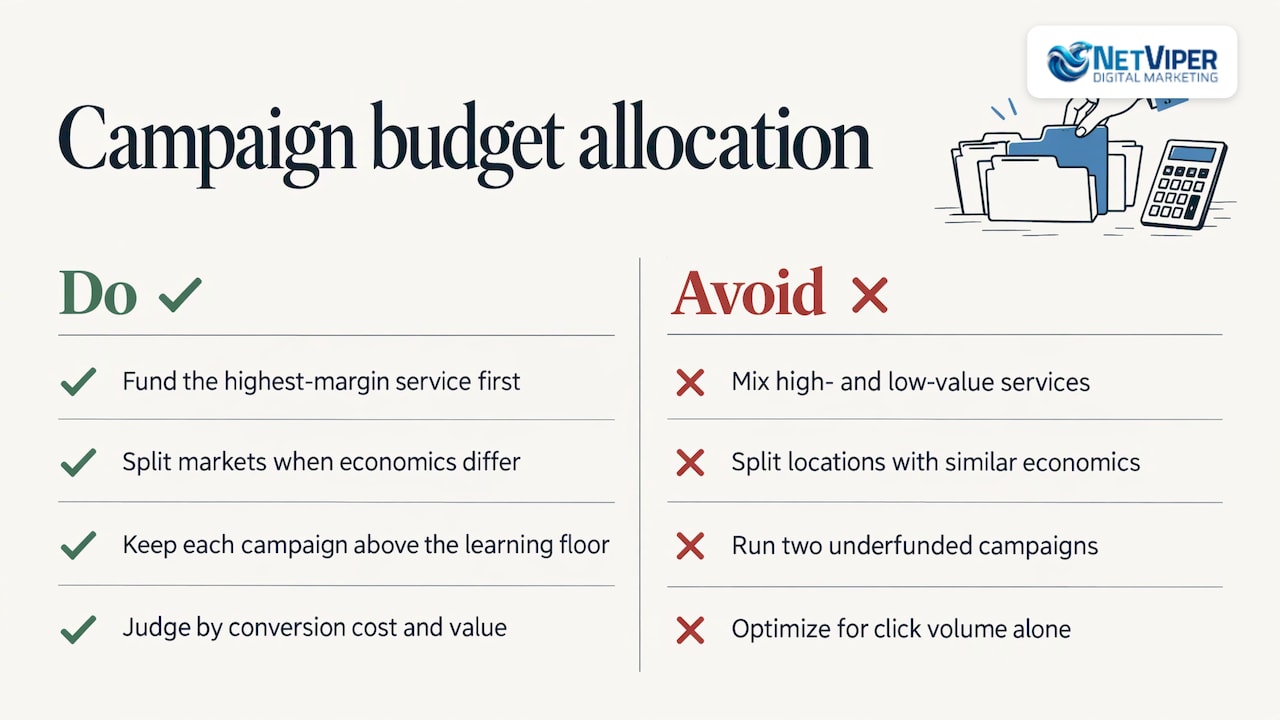
Fund your most profitable service first. Give the service with the best margin, or the one you most want more of, its own campaign and its own budget. Mixing a high-value and a low-value service in one campaign lets Google spend where clicks are cheapest, which is not always where profit is highest.
Separate by location only when the economics differ. If you serve Jacksonville, St. Augustine and Ponte Vedra, you can run one campaign across all three or split them. Split when the towns differ in competition, job value or travel cost, so you can control spend by market. Otherwise, start with one and let the data show where leads come from.
Keep a floor under every campaign. A campaign with a daily budget lower than the cost of a few clicks cannot gather useful data. If you cannot fund two campaigns above that floor, run one.
Protect branded searches cheaply. People searching for your business name are already close to contacting you. These clicks are usually inexpensive, so a small, separate budget keeps competitors from appearing first on your own name without taking much from your prospecting money. Search Engine Land’s planning guidance likewise advises keeping branded and retargeting spend lean and putting most of the budget toward reaching new prospects.
Move money toward what converts, not what clicks. Judge keywords and campaigns by cost per conversion and conversion value, not click volume. Google’s conversion value reporting lets you compare the value returned against cost to see which campaigns, ad groups or keywords return more and which return less. That requires conversion tracking that records real leads, which is the next step.
Fix measurement before you raise the budget
A budget only means something if you know what it produced. Before increasing spend, confirm that your account counts the actions that matter: form submissions, booked appointments and phone calls. Duplicate counting, such as a thank-you page that registers a lead every time it reloads, makes a campaign look better than it is and leads to scaling the wrong thing.
If your leads arrive by phone, you also need to attribute calls to the ads that produced them. Our guides on Google Ads conversion tracking and call tracking for ads walk through setup and common errors. If results are lagging even with tracking in place, why Google Ads are not converting covers the usual causes, from landing pages to keyword intent.
How to monitor and adjust your budget
Once the campaign is live, review it on a schedule rather than reacting to single days. Because Google can spend up to double the daily figure on one day, a high-spend day is not a problem in itself. Look at the monthly total.
Measure the right things
Google’s Search campaign measurement guidance points to conversion rate, conversion value, return on ad spend, conversions, cost per conversion and average cost per click as the metrics for evaluating performance. For a local business, the most useful trio is conversions, cost per conversion and, once you can connect leads to sales, revenue per dollar spent.
Give changes time to work
If you use Smart Bidding, where Google adjusts bids automatically toward a target, avoid repeated target changes. Google’s guidance on target adjustments says a change to a cost-per-acquisition or return-on-ad-spend target may need one to two conversion cycles to take effect, and recommends assessing results after those cycles. A conversion cycle is the typical time between a click and the resulting conversion, which is longer for a considered purchase than for an emergency call.
Forecast before you scale
Google’s Performance Planner forecasts how changes in overall spend may affect clicks, conversions and cost per action, and helps you plan monthly or quarterly budgets and shift money among campaigns pursuing the same goal. It works best once a campaign has history behind it.
Scale only when the numbers hold
A simple rule: raise the budget when cost per conversion is below your target and the campaign is limited by budget, meaning it is losing impressions it could have won. Raise in steps, for example 20% to 30% at a time, and watch the cost per conversion for a full conversion cycle before the next step. If cost per conversion climbs as you spend more, you have reached the point where additional dollars buy less valuable clicks, and the money is better spent improving the landing page or tightening keywords.
A budget review checklist
Use this each month:
- Did total spend land within the monthly limit you planned (daily budget x 30.4)?
- Are conversions being counted correctly, including calls?
- Is cost per lead below the maximum you calculated in step 2?
- Which campaigns are limited by budget while still converting well?
- Which keywords or locations are spending without producing leads?
- Is your team answering leads quickly enough to make the spend count?
That last point is easy to overlook. A lead that waits hours for a response is often a lead lost, whatever the budget. Many local businesses use automation such as an AI chatbot for business to reply instantly outside office hours.
Promo: Let a specialist set and manage the budget
If you would rather not build budget models, monitor pacing and rework keywords yourself, our team manages Google Ads for local businesses across Northeast Florida. Our Google Ads management and PPC services cover campaign setup and ongoing optimization, and our Full Digital Program is $1,995 per month with a one-time set-up fee of $2,500.
If you want to check your tracking or sharpen your plan first, we offer a Conversion Tracking Audit at $175 per hour and Paid Ads Coaching at $225 per hour. Our Google Ads agency guide explains what an agency does and what it costs, and our overview of PPC management in Florida covers what is included.
Our perspective
Most budget problems we see in local advertising are not about the amount. They come from a budget that has no connection to what a customer is worth, and from campaigns that cannot show which dollars produced which leads.
Our approach is to start with the number a lead is worth to your business, set the budget from that, and make sure every call, form and booking is tracked before we ask you to spend more. Local knowledge matters here: costs and competition in Jacksonville and St. Augustine differ from a national average, and a budget built on a national average will be wrong for you.
We pair Google Ads management with conversion-focused landing pages and AI tools that respond to leads instantly, so the clicks you pay for are not wasted by slow follow-up. Our specialists are certified in Google Ads and conversion optimization, and you work directly with local professionals who build the plan around your numbers.
Dave Fogel
FAQ
What is a good daily budget for Google Ads?
It is the amount that buys enough clicks to produce measurable leads at a cost you can afford. Calculate it by multiplying your target monthly leads by your acceptable cost per lead, then dividing by 30.4. Many small businesses land between roughly $17 and $165 a day, which corresponds to the $500 to $5,000 monthly range Search Engine Land cites.
Will Google spend more than my daily budget?
On a given day, yes: Google may spend up to twice your average daily budget when demand is strong. Over the month, it will not charge more than your daily budget times 30.4, according to Google’s documentation. If served costs exceed those limits, Google covers the difference.
How much should a small business spend on Google Ads per month?
Search Engine Land advises at least $500 a month as a starting point and gives $500 to $5,000 as the small-business range. Higher-cost industries and competitive areas sit toward the top. Start from your own lead goal and cost per lead rather than from an average.
How long should I run a campaign before changing the budget?
Long enough to collect meaningful data, usually several weeks, and at least one full conversion cycle after any bidding change. Google advises waiting one to two conversion cycles before judging a Smart Bidding target adjustment. Change budgets in steps rather than reacting to single days.
Can I change my budget during the month?
Yes, at any time. The new daily amount applies to the days that remain, so the monthly maximum equals what you have already spent plus the new daily budget times the remaining days.
Sources
- About spending limits – Google Ads Help
- About overdelivery and your average daily budget – Google Ads Help
- Choose your bid and budget – Google Ads Help
- About Google Ads campaign budgets – Search Ads 360 Help
- PPC budget planning: Aligning business goals, ad spend and performance – Search Engine Land
- How much does Google Ads cost? – Search Engine Land
- Google Ads Cost Tool – Google
- About conversion values – Google Ads Help
- Use data to optimize your Search campaigns – Google Ads Help
- How to make target adjustments with Search Smart Bidding – Google Ads Help
- Performance Planner – Google
Recommended

Google Ads Budget: How Much to Spend and How to Set It
Learn how a Google Ads daily budget works, how to calculate a monthly budget from your lead goals, and what a local business should spend to get real data.

Google Business Profile Optimization in Jacksonville, FL
How Jacksonville businesses optimize a Google Business Profile: the steps that move Maps rankings, what to measure, what it costs and when to hand it off.

Local SEO Citations: What They Are and How to Build Them
Local SEO citations explained for business owners: what they are, which ones matter, how to build and keep them consistent, and what citation management costs.
