
Google Business Profile management is the ongoing work of keeping your listing accurate, complete and active on Google Search and Maps. It covers claiming and verifying the profile, maintaining your details, answering reviews, adding photos and posts, controlling who has access, and reading the performance data. Done consistently, it helps nearby customers find you and choose you. This guide walks through each task, then explains what to expect from a management service.
TL;DR
- A Business Profile is free to manage, and it controls how your business appears on Google Search and Maps.
- Management is a routine, not a one-time setup: keep details current, respond to reviews and check performance regularly.
- Google says local results rest on relevance, distance and prominence, and you cannot pay for a better local ranking.
- Always keep the business owner as the owner of the profile, with any agency or employee added as a manager.
- Our Northeast Florida team handles this work for local businesses, starting with Google Business Profile Optimization.
Table of Contents
- What Google Business Profile management actually is
- Claiming, verifying and setting up the profile
- The ongoing tasks that make up management
- How Google ranks local results
- Managing users and protecting access
- What a management service should include
- Putting a profile routine in place
- Let us manage your Google Business Profile
- FAQ
- Sources
What Google Business Profile management actually is
Your Business Profile is the panel that appears when someone searches your business name or a service near them. It shows your name, hours, phone number, website, photos, reviews and the actions customers can take. Google describes it as a way to manage how your business shows up on Maps and Search, and says a verified profile can help customers find you and build trust.
Management means treating that panel as a working marketing asset rather than a listing you set up once. In practice that includes:
- Keeping contact details, hours, categories and service areas accurate.
- Publishing photos, videos, services, posts and offers.
- Collecting and responding to reviews.
- Managing who can edit the profile.
- Reviewing performance data and adjusting.
For a business without a storefront, such as a plumber or mobile detailer, Google lets you define your service areas and specialties, so customers see where you work even without a public address.
If you are comparing this with citation work, the two are related but different. Your profile is the listing Google controls most directly, while citations are mentions of your business across other directories. We cover the second in our guide to local listings management.
Claiming, verifying and setting up the profile
To show your business on Search and Maps, you must add or claim the business and then verify it. If Google tells you someone else has already verified the business, you can request ownership of the profile. That happens often when a former employee, web designer or previous owner set it up years ago.
Verification
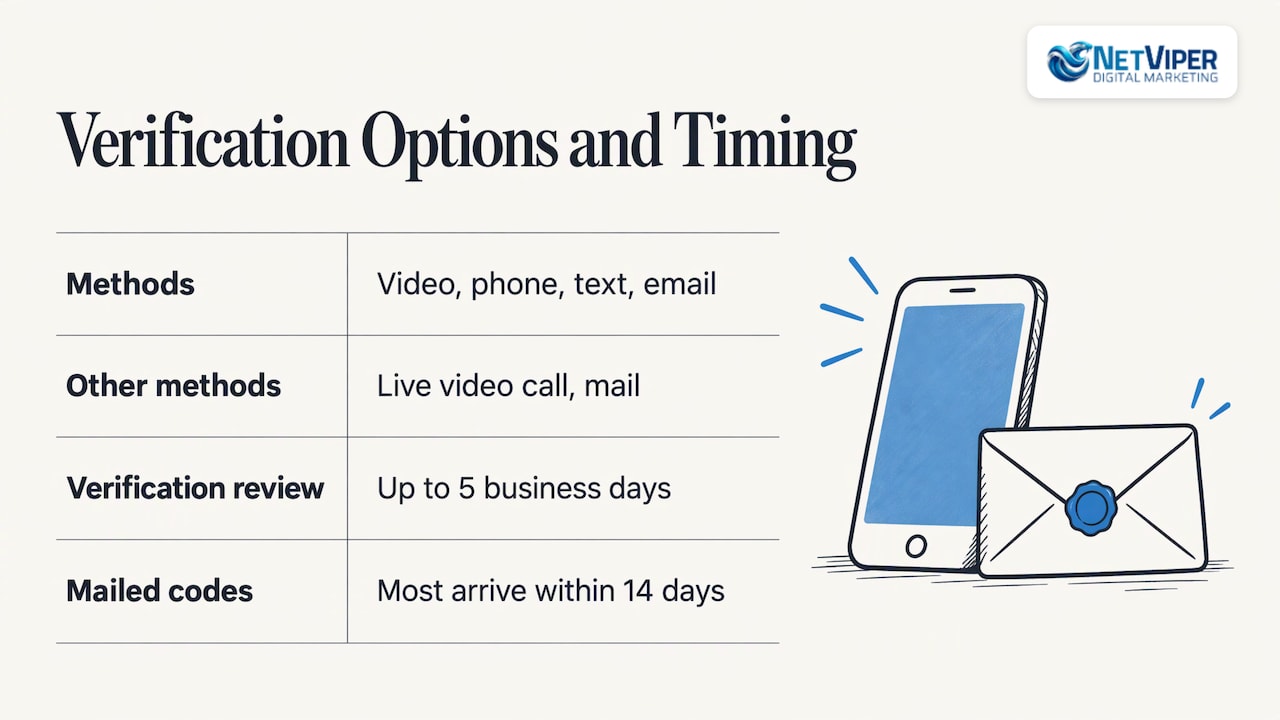
Google decides which verification methods your business gets. According to the University of New Hampshire Extension, the options may include video recording, phone, text, email, live video call or mail. Review can take up to 5 business days, and when mail is offered, most codes arrive within 14 days. Plan for that window before a seasonal push, not during it.
Unverified profiles are limited. Google notes you can still edit some information, such as name, category, address, hours, phone and website, but you need to verify to edit everything.
Do you need an LLC?
No. Google asks that you run a legitimate business that serves customers. Verification usually happens by phone, email or postcard, and in most cases articles of incorporation or a business license are not requested. Sole proprietors and home-based service businesses can qualify, as long as they follow Google’s representation rules.
Get the basics right
Google’s guidelines are specific, and following them prevents suspensions and lost edits. Under its guidelines for representing your business:
- Use your name as it is consistently represented in the real world.
- Make sure your address or service area is accurate and precise.
- Choose the fewest categories needed to describe your core business.
- Keep one profile per business.
You can add up to 9 additional categories beyond your primary one, but the guidance is to stay focused. Your primary category matters most, and all locations of a business share the same primary category.
For service areas, enter the cities, zip codes or other places you actually serve. Google asks you to be as specific and accurate as possible. The UNH guide notes you can list up to 20 areas, but more is not always better for a local business. A Jacksonville contractor serving Duval, St. Johns and Clay counties is better off naming those areas than listing every town in Florida.
The ongoing tasks that make up management
After setup, the UNH guide says there is maintenance throughout the year: responding to reviews, updating information as needed and checking performance. Here is how to turn that into a routine.
Keep every detail complete
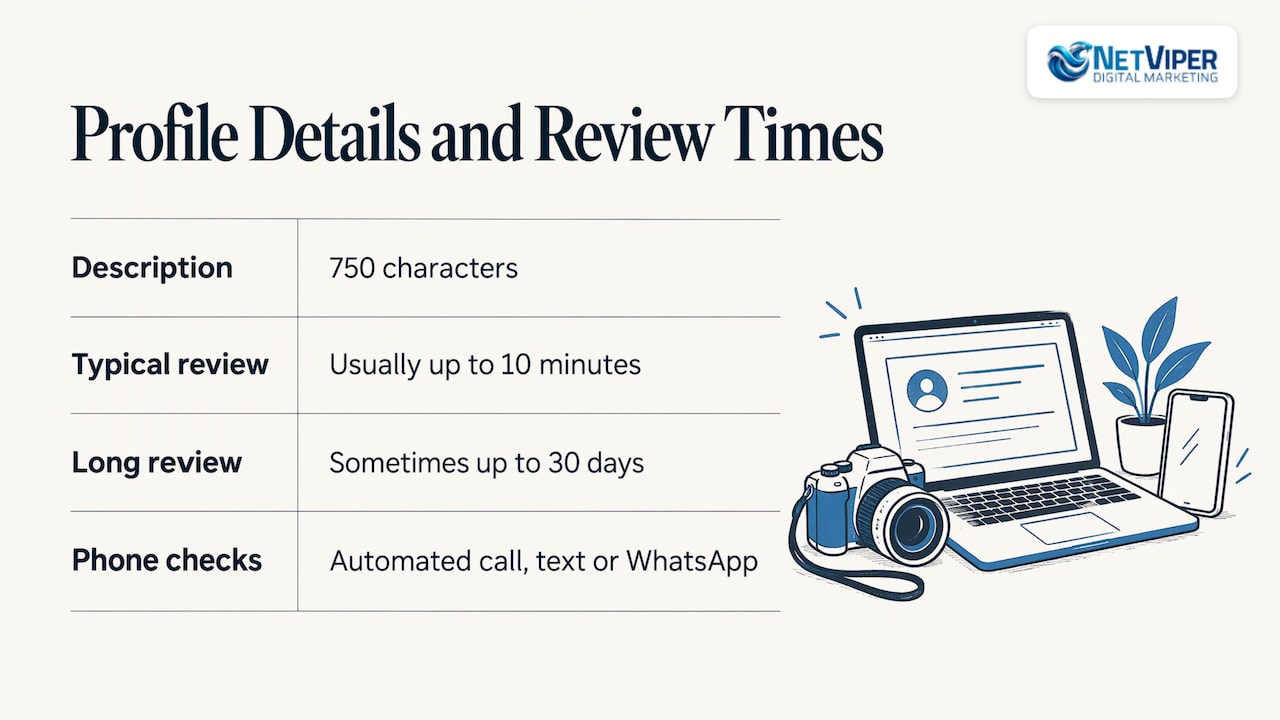
The same guide lists what a complete profile contains: contact information, location, hours, attributes, a 750-character description, photos, videos, services, posts, offers, events and social links. Google also states that businesses with complete and accurate information are more likely to show up in local search results.
Update holiday hours before the holiday, not after. Add new services when you launch them. Replace stale photos with current ones of your team, your work and your location.
Edits are reviewed against Google’s guidelines. Google says this usually takes up to 10 minutes but sometimes up to 30 days, so make important changes early.
Google may also contact your verified phone number by automated call, text or WhatsApp to confirm details, and your answers may be used to update the profile. Keep that number current and answer those messages.
Work the review process
Reviews feed the prominence signal Google uses in local results. When you reply to customers, Google notes it shows that you value their feedback. A simple standard works well:
- Reply to every review, positive and negative, within a few business days.
- Name the specific service or detail the customer mentioned.
- For a complaint, acknowledge the issue and move the conversation offline with a direct phone number.
- Ask happy customers for reviews at the point of service, with a short link to your profile.
We go deeper on this in our practical guide to online review management.
Read the performance data
Google’s performance page shows how people discover your profile and what they do next, including how customers use Search and Maps to find you. The searches metric updates at the start of each month and can take up to 5 days to appear. You can set a date range to compare periods. Insights may not be available for every profile, so check what your account shows.
Use the numbers to make decisions. If calls drop in a month where you changed your hours, revisit the change. If direction requests climb after you add photos of your entrance, do more of that. A search visibility analysis can also put your profile data next to your wider search performance, so you see where Maps and organic results support each other.
How Google ranks local results
Google states that local results are mainly based on relevance, distance and prominence. Relevance is how well your profile matches the search. Distance is how far you are from the searcher or the location they named. Prominence is how well-known you are, which draws on things like links from websites and your number of reviews.
Two practical points follow from that:
- Relevance and prominence are the factors you can work on every week: complete information, accurate categories, steady review activity and a website that backs up what your profile says.
- Google is explicit that there is no way to request or pay for a better local ranking, so the work is in doing the fundamentals consistently.
Our local SEO work for Jacksonville businesses is built around those same three factors.
Managing users and protecting access
Access is the part owners most often neglect, and the part that causes the most pain when an agency or employee leaves. Google’s rules are clear:
- Owners have full control, including adding or removing users, managing profile info and deleting the profile. A profile can have multiple owners but only one primary owner.
- Managers have mostly the same access, but cannot add or remove users or remove the profile.
To add someone, open your profile, go to More, then Business Profile settings, then People and access. Select Add, enter the email address, choose Owner or Manager under Access, and select Invite.
A good rule: the business owner holds the primary ownership, and every employee, freelancer or agency joins as a manager. Google’s guidelines for authorized representatives say they should respond promptly to access requests and transfer ownership to the owner immediately upon request. That is the standard we follow.
Our perspective on profile management
Most local businesses we meet in Northeast Florida have a profile that someone set up once and nobody has touched since. The hours are close but not right, the categories are guesses, and reviews sit unanswered for weeks. Those are fixable problems, and fixing them is often the fastest local win available.
We treat the Google Business Profile as the front door of local search. It works hardest when it is connected to the rest of your marketing: a website that confirms your services, consistent listings across directories, a review routine, and fast response when a lead calls or messages. Our certified specialists work across SEO, Google Ads and conversion optimization, so the profile is never managed in isolation.
Speed matters too. A customer who finds you on Maps usually contacts two or three businesses in a row. That is why we pair local SEO with AI tools such as chatbots and voice agents that respond to leads instantly, so a call or message at 9 p.m. does not go to a competitor.
Ownership stays with you. We work as a manager on your profile, keep you informed, and keep the strategy tied to local, direct access to people who know the Jacksonville and St. Augustine markets.
Dave Fogel
What a management service should include
A Google Business Profile management service takes the routine above off your plate. The scope varies, so use this checklist to understand what is covered:
| Task | What it looks like in practice |
|---|---|
| Profile audit and cleanup | Review of name, categories, service areas, hours, attributes and duplicate or suspended listings |
| Content updates | Photos, services, posts, offers and description kept current |
| Review handling | Replies to reviews, plus a process for requesting new ones |
| Access management | Owner keeps ownership, the agency is added as a manager |
| Reporting | Monthly look at searches, calls, direction requests and website clicks |
| Listings and citations | Consistent business details across other directories |
Google’s own guidance for representatives sets a good standard for the working relationship. Representatives should get express consent, work directly with the owner to verify, keep the owner informed about actions they take, and encourage the owner to own the profile with representatives added as managers. Google also says representatives should make sure the owner understands what a Business Profile is and where its data is used.
When you talk to any provider, ask these questions:
- Who will be the primary owner of my profile?
- How often will you update content and respond to reviews?
- What do I receive in reporting, and how often?
- How does the profile work connect to my website and listings?
- What is the monthly cost, and is there a setup fee?
What it costs with NetViper
Our published pricing for local visibility work is straightforward. Our GeoBoost 25 plan is $497 per month and GeoBoost 100 is $1,697 per month. Listings & Citations is $60 per month, and our SEO + Local SEO service is $1,495 per month. Google Business Profile Optimization is part of our local SEO offering, and we scope it to your business. See the local SEO page for the current details.
Putting a profile routine in place
Whether you manage the profile yourself or with a team, this cadence keeps it healthy:
- Weekly: answer new reviews, check for messages, add one or two fresh photos.
- Monthly: review the performance data, update posts and offers, confirm hours and services.
- Quarterly: audit categories, service areas, listings consistency and user access.
- Before any change in your business: update hours, services or location on the profile first.
If you want a view of where your wider search presence stands before you start, our SEO audit reports give you a baseline.
Let us manage your Google Business Profile
If you own a local business in Northeast Florida and want your profile to bring in calls, visits and booked appointments, we can take the whole routine off your hands. We optimize your profile, keep your listings consistent, support your review process and tie it to your website and ads. You remain the owner, and we work as your manager.

See our GeoBoost plans and Google Business Profile Optimization, or explore the full range of NetViper services if you want SEO, Google Ads and AI lead response working together.
FAQ
How do I edit my Google Business Profile?
Sign in to the Google Account linked to your profile and search for your business name on Google Search or Maps. You can then edit your profile directly there. Changes are reviewed, which usually takes up to 10 minutes but can take up to 30 days.
Is Google Business Profile free?
Yes. Google says you can manage how your business shows up on Maps and Search at no charge. A management service charges for the time and expertise of keeping the profile current, handling reviews and reporting, not for the profile itself.
Can I add an agency or employee to my profile?
Yes. Go to People and access in your Business Profile settings, enter their email and choose Manager or Owner. Managers can edit profile information but cannot add or remove users, so a manager role is the safest choice for outside help.
How often should I update my profile?
Check it at least monthly and respond to reviews as they arrive. Update hours, services and photos whenever something changes. Google notes that complete and accurate information makes a business more likely to appear in local results.
Sources
- Get started with Google Business Profile
- Get Listed on Google, Business Profile US
- Tips to improve your local ranking on Google
- Edit your Business Profile
- Guidelines for representing your business on Google
- Understand what happens to your Business Profile edits
- Understand your Business Profile performance and insights
- Manage your Business Profile owners and managers
- Business eligibility and ownership guidelines
- UNH Extension: How to Set Up and Manage Your Google Business Profile
- Do You Need an LLC to List Your Business on Directories?
- 5 Steps to a Unified Search Visibility Analysis
Recommended

Google Business Profile Management: What It Covers and How to Do It Well
Google Business Profile management explained: how to claim, edit and maintain your listing, handle reviews and users, and what a management service should include.

PPC Management in Florida: What It Includes and What It Costs
What PPC management covers for a Florida business, how Google Ads campaigns are run and measured, what fees to expect, and how to choose a manager.

CRM Integration Services: What They Connect and How to Choose
CRM integration services connect your CRM to ads, forms, email and billing so leads flow without re-entry. Learn what to connect, how it works and how to measure it.
