
CRM lead management is the routine of capturing every inquiry in one system, deciding which ones deserve attention first, assigning each to a person, and following up until the lead becomes a customer or is closed out. For a local service business, the CRM is only half of the job. The other half is making sure every call, form fill and ad click actually lands in it, and gets an answer in minutes. That is where we focus at NetViper Interactive: the website, ads, local search and AI automation tools that feed your lead pipeline and respond to leads so none slip away.
TL;DR
- Lead management follows the same path in any CRM: capture, qualify and score, route, nurture, then track and convert.
- Speed is the biggest lever for a small team. Automated routing should take seconds, and a human reply should follow within minutes.
- Score leads on two things: how well they fit your ideal customer, and how actively they are showing intent.
- Automate capture, assignment, first response and reminders. Keep the conversation itself human.
- Track response time, lead-to-appointment rate and source quality, so you know which ads and pages produce real customers.
Table of Contents
- What CRM lead management actually covers
- The five stages, applied to a local business
- Why speed matters more than software
- What lead management automation can handle
- Keeping the pipeline clean as volume grows
- The metrics worth watching
- A simple 30-day setup plan
- Where we come in
- Our perspective
- FAQ
- Sources
What CRM lead management actually covers
A lead is anyone who has shown interest: a form fill, a phone call, a chat message, a quote request. A CRM (customer relationship management system) is the database where those people and every interaction with them are stored. Lead management is the process that runs on top of it.
The major platforms describe the same sequence. HubSpot lays out five stages: capture, qualify and score, route, nurture, and track and convert. Other vendors split it into six or seven steps, but the substance is identical. For a local business owner, it translates into five practical questions:
- Where did this lead come from, and did we record it?
- Is this person a realistic customer for what we sell, in the area we serve?
- Who owns the follow-up?
- When did we last contact them, and what happens next?
- Did they buy, and which source or ad paid for it?
If your team cannot answer all five for every inquiry from the past 30 days, the process has gaps, and those gaps are usually where revenue leaks out.
The five stages, applied to a local business
1. Capture every lead in one place
Leads for local businesses arrive through many doors: phone calls from Google Ads and your Google Business Profile, website forms, Facebook lead forms, chat widgets, and voicemails after hours. Each door needs a direct connection to the CRM. When leads live in a shared inbox, a notebook and a phone’s call log, nobody can see the whole picture.
CRM platforms typically let you import leads, create them by hand, or capture them automatically from website forms. Salesforce’s implementation guide lists all three. Manual entry is the weakest of the three: it depends on someone remembering, and it adds delay.
Capture also means recording the source. A lead tagged only as a website visitor tells you nothing. A lead tagged with the campaign, the keyword or the landing page tells you where to spend more. Our guide to call tracking for ads explains how to attribute phone calls to the ads that produced them, and our walkthrough of Google Ads conversion tracking covers form and call conversions.
The quality of the page that generates the lead matters too. A focused landing page with one offer and one form gives you cleaner data than a general contact page.
2. Qualify and score
Not every inquiry is a customer. Someone outside your service area, a vendor pitching you, or a person asking for a free quote with no intention to hire all consume time. Freshworks reports that more than 65% of sales are lost to poor lead qualification, which is a good reminder that sorting leads is part of selling, not paperwork.
A simple framework is BANT: Budget, Authority, Need and Timeline. ZoomInfo notes it was developed by IBM in the 1950s and can be built into a CRM as required fields, with a minimum such as three of four criteria met. For a plumber, roofer or dental office, the local version is shorter:
- Service fit: Do we do this job?
- Location: Is the address inside our service area?
- Urgency: Is this an emergency, a project this month, or just research?
- Decision-maker: Is this the owner of the property or account?
Scoring turns those answers into a number. The cleanest approach keeps two scores apart: a fit score (does this person match your ideal customer?) and an intent score (are they acting like a buyer?). Nimble recommends separating fit from behavioral signals such as pricing-page visits, with thresholds that trigger same-day outreach, nurturing or disqualification. A caller who phones from a Google Ad for an emergency repair has both scores high. A person who downloaded a checklist six months ago does not.
Keep the model small. Five or six rules your team understands beat a 40-rule formula nobody trusts.
3. Route to the right owner
Routing decides who gets the lead. In a larger CRM you set assignment rules, for example by geography or service type. In Salesforce, a single assignment rule can hold up to 3,000 entries, evaluated in order until one matches. Small businesses rarely need that much. Three rules usually cover it: by service line, by territory, and a default owner for everything else.
Two habits prevent the most common failure, the lead nobody picked up:
- Every lead has exactly one named owner, even if it is the owner of the business.
- A missed deadline triggers an alert. Adobe’s lead scoring guide describes email alerts to reps and managers when a service-level agreement (SLA, the time limit for a task) is missed.
4. Nurture and follow up
Most leads do not buy on the first contact. Nurturing is the structured follow-up that keeps you in the conversation: a text after a missed call, an email with pricing details, a reminder two days later, a check-in a month later.
Rework’s SLA standard suggests follow-up cadences of every 24 to 48 hours for qualified leads until a meeting is booked, every 3 to 5 days for leads in progress, and every 30 to 60 days for long-term nurture leads. Treat those as a starting template and adjust to your sales cycle. A same-day emergency service needs hours, not weeks. A kitchen remodel may need months.
We cover this stage in depth in our guide to automated lead follow-up.
5. Track and convert
When a lead books or buys, the CRM should convert it into a customer record with the history attached. Zoho’s guide says a conversion should create a contact, an account for B2B, and a deal, with the full lead history carried over. If a lead does not convert, record why: no response, wrong area, price, timing. That reason field is one of the most useful pieces of data you will collect.
Why speed matters more than software
Most local businesses do not have a lead volume problem first. They have a response problem. Bitrix24’s 2026 benchmark of 1,001 companies found that in English-speaking markets, 40% of companies respond to leads in under five minutes, 28% take five to 60 minutes, 9% take longer than an hour, and 23% do not track response time at all.
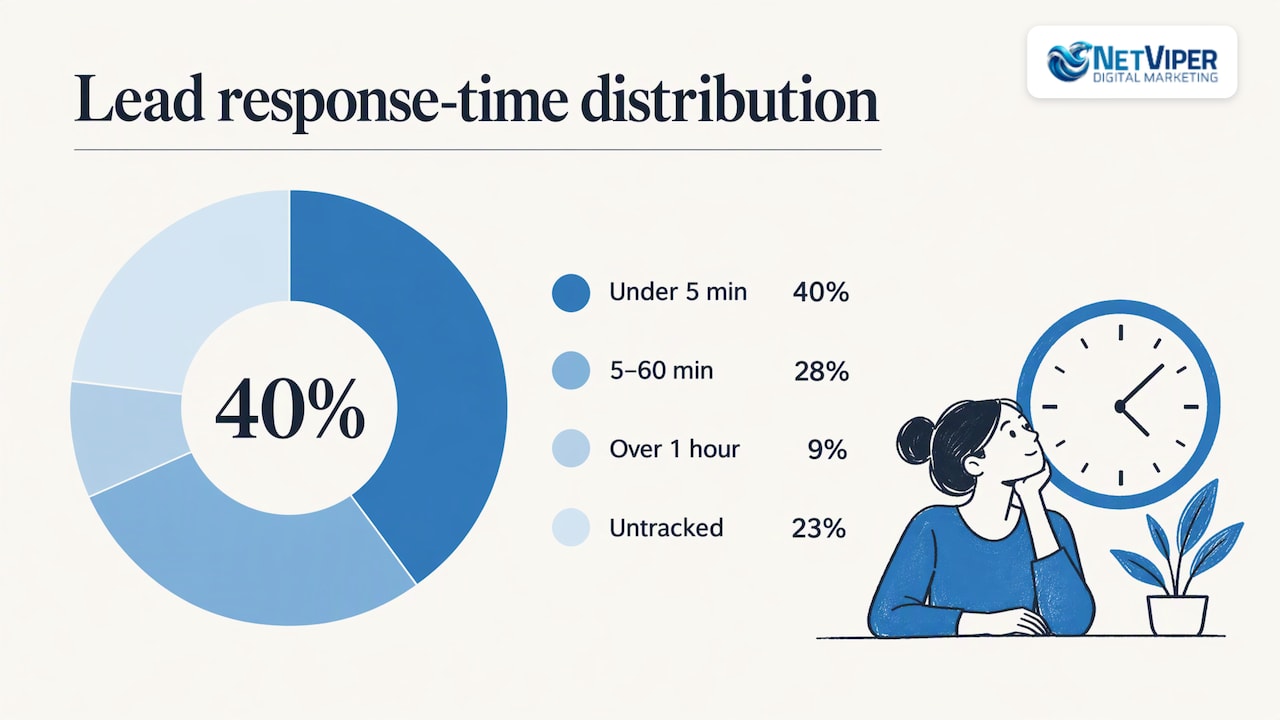
That last group cannot improve what it never measures. Rework’s SLA standard reports a correlation between response discipline and results: teams with 90 to 100% SLA compliance averaged an 18% conversion rate, against 8% for teams at 70 to 80% compliance. It is one company’s published data on correlation, not a guarantee, but the direction matches what any owner sees in practice: the business that answers first usually gets the job.
For a local business, speed has a practical problem. You cannot answer the phone while you are on a roof, in a treatment room or on a job site. Evening and weekend inquiries sit until Monday. This is the gap automation is built to close.
What lead management automation can handle
Automation is not a replacement for a good salesperson. It handles the repeatable parts so people can handle the conversations. According to HubSpot’s documentation, lead pipeline automation can move a lead to an attempting stage after an email, call or message, advance it to connected when the lead replies or a call is logged, and trigger tasks and emails at each stage. The parts of the workflow worth automating first:
| Workflow step | What to automate | What stays human |
|---|---|---|
| Capture | Form, call, chat and ad leads written straight into the CRM with source tags | Reviewing odd or high-value inquiries |
| Qualify | Service-area and service-type checks, basic scoring | Judging unusual jobs and large projects |
| Route | Assign to the owner by territory or service, alert on silence | Reassigning when someone is out |
| First response | Instant text, email, or AI call answering and booking | The estimate, the consultation, the close |
| Nurture | Scheduled reminders and follow-up sequences | Personal check-ins on warm leads |
| Reporting | Weekly response-time and source reports | Deciding where to spend next |
The rule of thumb: automate anything where the right answer is the same every time and speed matters, and keep a person in anything that involves judgment or relationship.
Routing in seconds, not hours
Rework’s standard recommends that automated routing take under 30 seconds, with manual routing under five minutes in business hours. A local business does not need enterprise tooling to hit that. It needs the form, the call tracking and the CRM connected, with a rule that assigns each new lead the moment it arrives. If you are weighing how to connect your tools, our article on CRM integration services explains what they connect and how to choose.
Answering when nobody can
This is where our AI tools fit. Chatbots and voice agents can respond to a lead the moment it arrives, any hour of the day, so the person is not left waiting. Our NV AI Pro Agent is $497 per month, and AI Receptionist setup and deployment is a one-time $997, both listed on our AI agents page. The aim is simple: no lead goes unanswered while you are busy doing the work that earns revenue.
Keeping the pipeline clean as volume grows
The Bitrix24 report recommends five intake fixes for growing teams: track response time for every inbound lead, route automatically with alerts, filter before the funnel with required fields, duplicate checks and bot filtering, remove manual steps rather than adding layers, and decide in advance where reclaimed time goes. For a local business, this becomes a short monthly checklist:
- Duplicates: The same customer calling and filling out a form should be one record, not two.
- Required fields: Phone number, service requested and ZIP code, at minimum.
- Spam: Block bot submissions so your team does not chase fake leads.
- Stale leads: Anything untouched past your SLA gets flagged, reassigned or closed.
- Written definitions: Agree on what counts as a qualified lead, an appointment and a won job. Prime Chase Data recommends a short written agreement on such definitions because teams in the US move fast and staff change often.
The metrics worth watching
You do not need a 30-metric dashboard. These six tell you whether the process is improving:
- Speed to first response: Median minutes from inquiry to first reply, in and out of business hours.
- Contact rate: Share of leads you actually reached.
- Lead-to-appointment rate: Share of leads that book a visit, call or estimate.
- Close rate: Share of appointments that become paying jobs.
- Source quality: Revenue per lead source, not just lead count.
- Cost per won customer: Ad and marketing spend divided by customers won.
The last two are why lead management and advertising belong together. A Google Ads campaign that produces many leads but few customers looks successful in a platform report and fails in the CRM. If you see that pattern, our guide on what to do when Google Ads is not converting walks through the usual causes, and the landing page conversion rate article shows how to judge your pages.
A simple 30-day setup plan
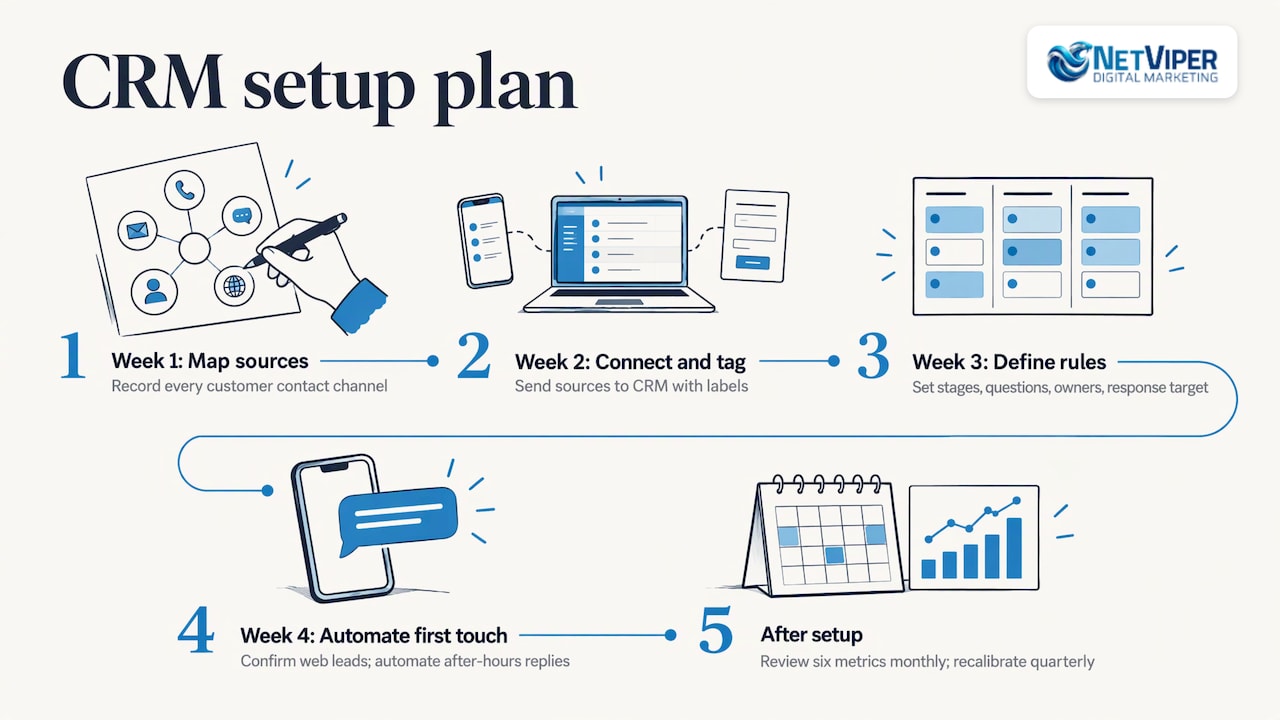
Week 1: Map the sources. List every way a customer can reach you: phone numbers, forms, chat, Facebook, Google Business Profile messages. Confirm each one is recorded somewhere.
Week 2: Connect and tag. Send every source into the CRM with a source label. Add call tracking so phone leads are tied to the campaign. Set required fields.
Week 3: Define stages and rules. Create five or six pipeline stages (new, contacted, appointment set, quoted, won, lost). Write your qualification questions and assign an owner rule. Set a response target, such as five minutes during business hours, with an alert when it is missed.
Week 4: Automate the first touch. Turn on instant text or email confirmation for web leads, and an automated answer for calls and chats outside business hours. Review your response-time numbers at the end of the week and adjust.
After that, review the six metrics monthly and recalibrate your scoring quarterly.
Where we come in
Most owners we speak with do not want to become CRM administrators. They want leads to arrive, get answered, and turn into booked work. We build the front end of that system for Northeast Florida businesses: Google Ads management, local SEO and Google Maps ranking, Facebook advertising, conversion-focused landing pages and smart websites designed for lead capture and appointment booking, plus AI chatbots and voice agents that respond instantly.
Our Full Digital Program is $1,995 per month with a one-time set-up fee of $2,500, and the details are on our pricing page. If your main gap is missed calls and slow replies, the AI agents page is the place to start.
If you already run ads or have a CRM but are not sure where leads are dropping, get in touch with our Jacksonville team and we will look at the path from click to booked appointment with you.
Our perspective
We see CRM lead management as a revenue problem, not a software problem. A CRM can only organize the leads it receives, and it can only help close the leads someone answers. For a local business, the weak points are usually at the edges: the ad that sends traffic to a generic page, the call that goes to voicemail, the form that nobody sees until the next morning.
That is why our work starts before the CRM. We build landing pages and smart websites that capture the right details, run Google Ads and Facebook campaigns aimed at high-intent traffic, and use AI chatbots and voice agents so a lead gets an immediate response at any hour. Then we track the result so you can see which campaigns produce booked work.
Our advice to owners is to pick a response standard, measure it every week, and automate the first touch. Everything else, scoring models, nurture sequences, dashboards, gets easier once no lead is waiting in silence.
Dave Fogel
FAQ
What is the difference between a CRM and lead management?
Lead management is the process of capturing, qualifying, routing and following up on new leads. A CRM is the system that stores the data and often runs that process, then continues to manage the relationship after the sale. In practice, most businesses run lead management inside their CRM.
How fast should a business respond to a new lead?
A common standard is under five minutes during business hours, with automated routing completing in under 30 seconds. Because a reply from a person is not always possible, many local businesses add an automatic first response by text, email or AI voice agent, followed by a human call.
Which parts of lead management should I automate first?
Start with capture and first response. Send every form, call and chat into one place, tag its source, assign an owner automatically, and send an instant acknowledgment. Then add reminders for follow-up and alerts for leads that go untouched.
Do I need a complicated scoring model?
No. A small model with a fit score and an intent score is enough for most local businesses. Service area, service type, urgency and decision-maker status cover the fit side. Calls, quote requests and booking attempts cover intent.
How do I know my lead management is working?
Watch response time, lead-to-appointment rate, close rate and revenue by source. If response time falls and appointment rates rise, the process is improving. If leads are plentiful but few become customers, review your landing pages, qualification questions and follow-up timing.
Sources
- HubSpot: What is lead management in sales?
- Salesforce Lead Management Implementation Guide
- Freshworks: What Is Lead Management?
- ZoomInfo: What is the BANT Acronym?
- Nimble: How to Qualify Leads Before Outreach Using a CRM
- Adobe: Lead Scoring guide
- Rework: Lead Assignment SLA
- Zoho: What is Lead Management?
- Bitrix24: CRM Benchmark Report 2026
- HubSpot: Set up lead pipeline automation
- Prime Chase Data: Setting U.S. Lead Scoring Criteria
Recommended

CRM Lead Management: A Practical Guide for Local Businesses
How CRM lead management works for a local business: capture, qualify, route and follow up on leads, what to automate, and which numbers to track.

AI Call Answering Service: What It Does, Costs and Needs
How an AI call answering service works for a local business: what it handles, what it costs, how to set it up, and the Florida recording rules to know.

Search Advertising Agency: What It Does and How to Choose
What a search advertising agency does, how to judge one, and why a Northeast Florida local business gets more from a local paid search team.
