
An AI call answering service picks up every inbound call, answers common questions, captures the caller’s details, books appointments and hands off the calls that need a person. For a local business in Northeast Florida, the value is not the technology itself. It is the lead that would have gone to voicemail and then to a competitor. Our NV AI Pro Agent and AI Receptionist setup exist so that no lead goes unanswered, and the sections below show how to judge any setup, what it costs and how to launch it safely.
TL;DR
- An AI answering service answers calls, handles routine questions, books appointments, captures lead details and transfers urgent or complex calls to your team.
- Published pricing for AI answering runs roughly $0.07 to $0.50 per minute, so the real cost depends on how the vendor bills, not just the headline plan price.
- The service pays off when it is connected to your calendar, CRM and ad tracking, so a call becomes a booked job and you can see which campaign produced it.
- Start with one narrow job such as after-hours calls, test realistic and difficult calls, and keep a clear path to a human.
- Florida requires consent from everyone on a call before it is recorded, so the greeting should say the call is answered by an AI and may be recorded or transcribed.
Table of Contents
- What an AI call answering service actually does
- Why missed calls cost a local business more than they seem
- What it costs: understanding how AI answering is billed
- Connect it to your phone system, calendar and CRM
- Tie calls back to your advertising
- Set it up in six steps
- Measure whether it works
- Florida rules to build into your greeting
- Our perspective: answer first, then convert
- Get an AI receptionist set up for your business
- FAQ
- Sources
What an AI call answering service actually does
Traditional voicemail waits for the caller to leave a message. An AI answering service converses. It greets the caller, works out what they want, pulls answers from the business information you give it, and takes an action: booking a time, collecting a name and number, or transferring the call.
The typical workflow has four parts:
- Greeting and intent. The system listens, converts speech to text and identifies the reason for the call: a quote, a booking, a hours question, a complaint.
- Answers from your content. It responds using approved information such as services, service area, pricing ranges and policies, plus a calendar for availability.
- Capture. It records the caller’s name, phone number, address or service type, urgency and a short summary of the request.
- Next step. It books, schedules a callback, sends a confirmation, or transfers the caller to a person with the context already collected.
The last step matters most. A well-built system does not try to resolve every call. It completes routine tasks and passes only the calls that need a person, so your staff hear about real opportunities instead of repeating the same hours-and-directions answers.
Why missed calls cost a local business more than they seem
A service business gets its calls at the worst times: while the crew is on a roof, the dentist is with a patient, or the shop is closed. Someone who is ready to hire usually calls the next business on the list rather than leave a message.
That makes call handling a marketing issue, not only an operations issue. If you pay for Google Ads, a Google Business Profile ranking or Facebook campaigns, each of those channels produces phone calls. Every unanswered call is ad spend that did not return a lead. The same logic applies to forms: a fast response to a new inquiry is what turns interest into an appointment, which is why we built a system for automated lead follow-up that responds in minutes.
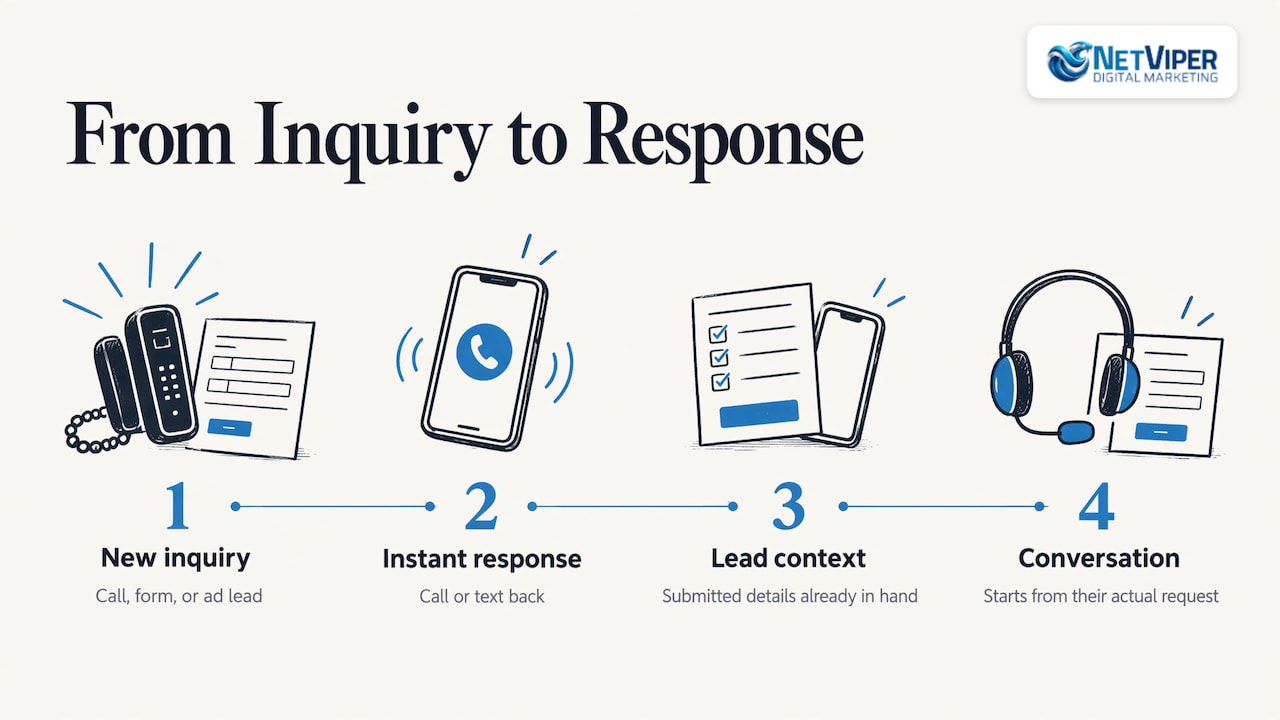
Voice AI also captures leads beyond the inbound ring. A form submission or ad lead can trigger an immediate call or text back, with the details the person entered already in hand, so the conversation starts from their actual request. That is the practical meaning of voice AI lead capture: the lead gets an answer in seconds, whether they called you or filled out a form at 9 p.m.
What it costs: understanding how AI answering is billed
Published vendor pricing varies widely, and the plan price rarely tells you the final bill. A review of vendor pricing pages found AI answering services run $0.07 to $0.50 per minute, or $0.40 to $2.00 per call, which works out to about $25 to $300 per month for a small business taking 50 to 200 calls. The same review put live human answering at $1.18 to $5.00 per minute, or roughly $250 to $1,200 per month.
The range is wide because vendors bill in different ways:
| Billing method | How it works | What to watch |
|---|---|---|
| Per minute | You pay for talk time | Rounding rules and whether hold time counts |
| Per call | A flat amount per answered call | Spam and wrong-number calls count |
| Per unique caller | A cap on distinct callers per month | Repeat callers and overage fees |
| Credits | A bundle of minutes or actions | What happens when credits run out |
The price of the AI itself is also only part of the total. A working setup needs a phone number or call forwarding, a booking calendar, a place to store leads, and someone to write and maintain the business content the agent speaks from. A low monthly plan that you configure yourself can cost more in missed bookings than a managed setup that is built around your business.
Measure cost per completed outcome, such as a booked appointment, rather than cost per minute. A $300 service that books 40 jobs is cheaper than a $60 service that books five.
What our AI answering options cost
Our published pricing for AI call handling is:
- NV AI Pro Agent: $497 per month.
- AI Receptionist setup and deployment: $997 one-off.
You can see both on our AI agents page. For a closer look at what a receptionist agent includes for a small business, read our guide to an AI receptionist for small business.
Connect it to your phone system, calendar and CRM
An AI that answers the phone and then emails a transcript to a shared inbox solves half the problem. The goal is a connected flow where the call produces a record, a booking and a follow-up without anyone retyping anything.
A practical integration links four pieces: your phone number and call routing, the voice AI, your calendar, and your customer or lead database (a CRM, meaning the system where you track leads and customers). After each call, the record should contain at least:
- Caller name and phone number
- Service address or location
- Type of request and urgency
- A one-to-three-sentence summary of the call
- Outcome: booked, needs callback or not qualified
If you skip the structured fields, you get recordings nobody listens to. If you capture them, your team starts the day with a ranked list of who to call and what they asked. When your tools do not talk to each other out of the box, CRM integration services are what close that gap.
Build the connection in a sensible order. Start with the one real problem, usually missed calls. Map what happens to a caller today. Decide what the AI may do (book, quote ranges, take messages) and what it may not do (promise discounts, diagnose problems, give legal or medical advice). Then wire in the calendar and the CRM, and keep a human fallback.
Tie calls back to your advertising
For a business running Google Ads or Facebook campaigns, the call is often the conversion. If you cannot tell which keyword, ad or landing page produced a call, you cannot tell what to spend more on. Our guide to call tracking for ads explains how to measure every call your PPC spend earns, and our walkthrough of Google Ads conversion tracking covers setup and common fixes.
When the AI agent records the reason for the call and the outcome, those calls can be counted as qualified leads or bookings instead of simply “a call lasted 40 seconds.” That tells Google Ads what a valuable conversion looks like and helps you cut spend on searches that only produce wrong numbers.
The same applies to local search. A Google Business Profile with a call button sends calls straight to your number, so a profile that ranks well in the map results is only as good as whoever answers. Pairing local SEO with 24-hour call answering means the visibility you earn is not wasted at 7 p.m.
Set it up in six steps
A good launch is narrow and tested. These steps work for any AI call answering setup.
- Pick one starting job. After-hours calls, overflow when your line is busy, or a dedicated line for new customers. A narrow start gives you clean results.
- List your top call reasons. Go through two weeks of real calls and write down the ten most common reasons. These become the agent’s core paths.
- Write the facts the agent may state. Hours, service area, services, price ranges, booking rules, what you do not do. If it is not written down, the agent should not say it.
- Define escalation. Decide when a call goes to a person: an unfamiliar request, a sensitive disclosure about health, legal or financial hardship, a request that needs authority to negotiate, and any caller who asks for a human. The person receiving the transfer should see the transcript and the details already collected.
- Test before going live. Run at least ten realistic scenarios, including background noise, interruptions, unusual names, spelled-out phone numbers, questions the agent cannot answer, double-booked slots and a caller who asks for a person. Check that the CRM record and follow-up text or email are correct.
- Start small, then widen. Release to the narrow job first, review calls weekly, and expand once results are consistent.
Rank problems by consequence. An awkward sentence is a minor defect. A booking that was never confirmed or a transfer that failed is a serious one, and those should block launch.
Measure whether it works
Track outcomes your business cares about, not just how many calls the AI handled:
- Appointments or qualified leads captured per week
- Transfers to staff and whether they were the right calls
- Callers who hang up early
- Accuracy of captured names, numbers and addresses
- Callbacks completed on time
- Complaints
Do not aim to have the AI “contain” every call. A healthy system transfers the right calls to people quickly. Callers who feel trapped in an automated loop are callers you lose.
Florida rules to build into your greeting
Two legal points matter for a Florida business using AI to answer calls. This is general information, and your attorney should review your setup.
Recording consent. Florida is an all-party consent state: Florida Statute 934.03 requires every party to consent before a call is recorded. If your AI answering service records or transcribes calls, say so at the start of the call. A short line in the greeting, such as telling the caller they are speaking with an automated assistant and the call may be recorded, handles it.
Outbound AI calls. The FCC ruled in February 2024 that AI-generated voices count as “artificial” under the Telephone Consumer Protection Act, which means calls and callbacks that use an AI voice generally require the recipient’s consent first. If your setup calls new leads back after a form submission, record that the person agreed to be contacted. For businesses using voice AI for follow-up, get that consent wording into the form itself.
Our perspective: answer first, then convert
We see the AI answering conversation go wrong in one consistent way: a business buys a phone bot as a standalone gadget. It answers, it takes a message, and nothing else changes. The calls were never the real goal. Booked jobs are.
That is why we treat call answering as part of lead generation. Our work covers Google Ads, local SEO and Google Maps ranking, Facebook advertising, landing pages and AI automation such as chatbots and voice agents, all for local businesses in Northeast Florida. When those pieces sit together, the ad that earns the click, the page that earns the call and the agent that answers it are designed as one path.
Our approach is to put the agent where leads already arrive: the phone line, the website and the ad campaigns. We build it around your services and service area, with a clear route to your team for the calls that need a person. The aim is simple: every lead you pay for or earn gets a prompt, professional response.
Dave Fogel
Get an AI receptionist set up for your business
If you want calls answered around the clock without building the system yourself, our NV AI Pro Agent is $497 per month, and AI Receptionist setup and deployment is a one-off $997. Our team works with local businesses in Northeast Florida, and the agent can sit alongside your Google Ads, local SEO and landing pages so the calls they generate are captured. See the details on our AI agents page.
If you are also looking at the website side of lead capture, our Smart Website service is built for lead capture and appointment booking.
FAQ
Is an AI call answering service the same as an answering service with live operators?
No. A live service uses people to take messages, and published pricing reflects that at roughly $1.18 to $5.00 per minute. An AI service answers with software, handles routine requests and bookings on its own, and transfers the calls that need a person. For most local businesses the AI route covers more calls at a lower cost per call.
Can voice AI book appointments and not just take messages?
Yes, when it is connected to your calendar. The agent can offer open times, confirm the booking and send a confirmation by text or email. Without a calendar connection it can only collect details, which is why integration is part of setup.
What should the AI say when a caller wants a person?
It should transfer right away, passing along the caller’s name, reason for calling and anything already collected. Set that rule before launch and test it with a call that asks for a human, a call during closed hours and a call where the transfer line is busy.
Do I need to tell callers they are talking to an AI?
It is good practice and it supports the recording disclosure Florida requires. Put a brief statement at the start of the greeting that the caller is speaking with an automated assistant and that the call may be recorded or transcribed. Have your attorney review the wording.
How long does it take to see results?
With a narrow first use such as after-hours calls, you can see captured leads and bookings within the first few weeks. Review transcripts weekly, fix gaps in the agent’s information, and widen its role once the results hold steady.
Sources
- Answering Service Cost: Real 2026 Pricing
- Florida Call Recording Law: Your Complete 2026 Guide
- FCC Rules AI-Generated Voices Are “Artificial” Under the TCPA
Recommended

AI Call Answering Service: What It Does, Costs and Needs
How an AI call answering service works for a local business: what it handles, what it costs, how to set it up, and the Florida recording rules to know.

Search Advertising Agency: What It Does and How to Choose
What a search advertising agency does, how to judge one, and why a Northeast Florida local business gets more from a local paid search team.

Multi-Location SEO Services: What They Include and How to Choose
Multi-location SEO services explained for local business owners: pages, Google Business Profiles, listings, reviews and reporting for each location or service area.
