
Your landing page conversion rate is the share of visitors who take the one action the page exists for, such as a call, a form or a booking. Published benchmarks put the middle of the range for commercial and professional services at about 6%, but the number that matters is your own, measured on tracked leads and compared with your own traffic source. Local businesses that fix tracking first, then message match, then the form and the offer, raise that number faster than those that redesign the page. NetViper Interactive builds and optimizes landing pages for Northeast Florida businesses, and the steps below are the ones we work through.
TL;DR
- Conversion rate = conversions ÷ visitors × 100. Count qualified leads (calls, booked appointments, real form fills), not clicks.
- A commercial and professional services median of 6.1% is a reference point. Paid search pages average higher than display, and your traffic source changes what “good” means.
- Before you change copy, check tracking, ad-to-page message match and mobile speed. Most weak pages fail there.
- Give the page one offer, one call to action, a short form and proof near the ask. Test one change at a time.
- Judge a test only after enough visitors have seen it. A few dozen visits prove nothing.
Table of Contents
- What a landing page conversion rate measures
- What counts as a good rate
- Diagnose before you change anything
- How to optimize a landing page, step by step
- How to test changes without fooling yourself
- Generating more leads from the same traffic
- Where NetViper fits in
- Our perspective
- FAQ
- Sources
What a landing page conversion rate measures
A landing page is the page a visitor reaches after clicking an ad, a search result or a link, built around a single action. The conversion rate tells you how often that page gets the action. For a local business the action is usually a phone call, a quote request, a booking or a form submission.
The formula is simple: divide conversions by visitors and multiply by 100. Shopify’s example shows 2,000 purchases from 100,000 visitors, which equals 2%. For a service business, 23 quote requests from 1,000 visitors is 2.3%.
Three things decide whether your number is honest:
- Count people, not clicks. One visitor who refreshes the page three times is still one visitor.
- Count qualified leads where you can. A form fill from a spam bot or a wrong-service inquiry inflates the rate without adding revenue.
- Track every conversion type. If half your leads call from a mobile page and only form fills are tracked, your rate looks half as good as it is.
In Google Analytics 4, Shopify’s guide explains that tracking requires conversion events to be set up first. After that you can open the Pages and screens report under Engagement, or build a custom exploration to compare conversions with users or sessions. Without those events configured, the report has nothing to show you.
What counts as a good rate
There is no single good number. Reported averages across industries range from roughly 2% to 11% depending on who collected the data and how. That spread is the first warning against chasing a headline figure.
Search Engine Land’s landing page statistics guide summarizes median rates by industry. A few that matter to local service businesses:
| Industry | Median conversion rate |
|---|---|
| Commercial and professional services | 6.1% |
| Legal | 6.3% |
| Health and wellness | 5.1% |
| Financial services | 8.3% |
| Ecommerce | 4.2% |
| Travel and hospitality | 4.8% |
The same guide reports averages by traffic channel: 4.1% for display, 10.9% for paid search, 12% for paid social and 19.3% for email. Visitors who searched for exactly what you sell are more ready to act than people who saw a banner while reading something else.
How to use a benchmark
Use benchmarks to spot a page that is far off, not to grade yourself to the decimal. If your Google Ads landing page converts at 1% and the median for your industry is above 6%, something specific is broken. If you are at 5% against a 6.1% median, you are in the normal range and the next gains come from testing.
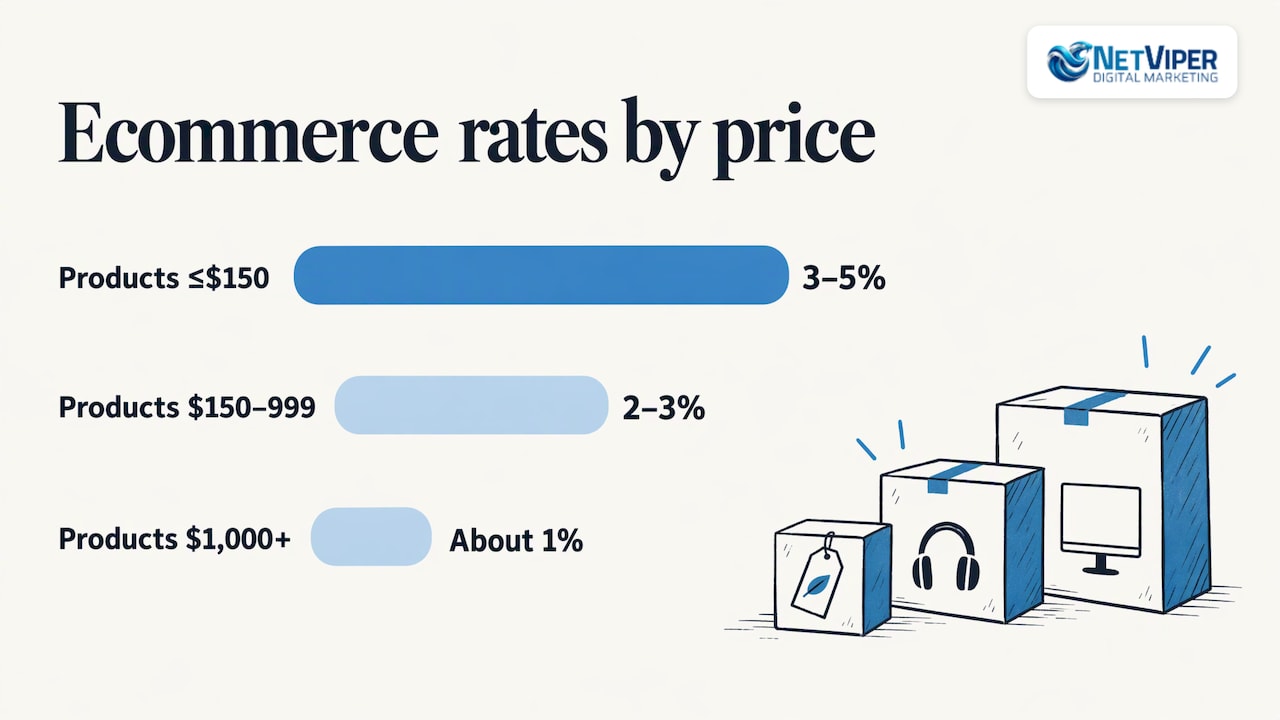
Price and purchase size also change the answer. Shopify’s guide gives ecommerce ranges of 3% to 5% for products at $150 or less, 2% to 3% for $150 to $999, and about 1% at $1,000 and above. The same logic applies to services: a $99 drain cleaning converts more easily than a $15,000 remodel consultation. Compare your page with similar offers, not with an average of everything.
A useful rule: the benchmark that counts is your own page last month, split by traffic source. Ads, organic search, Google Maps clicks and Facebook traffic behave differently, so a blended rate hides the problem.
Diagnose before you change anything
People often rewrite a headline when the real problem sits elsewhere. Work through these checks in order. Each one costs less than a redesign.
1. Is the conversion actually being recorded?
A page can convert well and report poorly. Common causes are a form that submits but fires no event, a tracking tag that loads only on the thank-you page of one browser, and phone calls that are never counted. If your reported rate is near zero while the phone rings, start here. Our guide on Google Ads conversion tracking setup and fixes walks through the usual failures, and call tracking for ads covers measuring calls.
2. Does the page match the ad or search that sent the visitor?
A visitor who clicked an ad about “emergency AC repair in Jacksonville” and lands on a general homepage has to hunt for what they wanted. Message match means the headline, offer and imagery echo the promise that earned the click. If your ad spend is high but leads are low, read Google Ads not converting: how to find and fix the cause before you raise budgets.
3. Is the traffic the right traffic?
A good page cannot convert people who never wanted the service. Look at the search terms or audiences bringing visitors. Out-of-area clicks and informational searches drag the rate down without any flaw in the page.
4. Is the page fast and usable on a phone?
Most local searches happen on mobile. Open your page on a phone over cellular data. If the button sits below three screens of text, if the form fields are hard to tap, or if the page takes several seconds to show anything, you have found a leak.
5. Do you have enough data to judge?
A rate drawn from a handful of visits swings wildly. Ten conversions from 100 visits and 100 from 1,000 both read 10%, but only the second is a number you can trust. Wait until you have a few hundred visitors per version at the very least before declaring a result, and more when the rate is low.
How to optimize a landing page, step by step
Once tracking and traffic are sound, work on the page itself. The order below puts the highest-impact changes first.
Step 1: Define one conversion goal
Choose the single action that produces revenue: call, quote request or booking. Everything else on the page should support it. Secondary actions such as a newsletter signup compete with the main one, and dilution costs conversions. In MarketingExperiments’ research, simplifying layout and cutting competing objectives lifted clickthrough by as much as 266% and conversion by as much as 26% in the test it reports.
Where it goes wrong: pages that list five services, three offers and a blog feed. A reader who has to decide what the page is for will leave.
Step 2: Write a headline that repeats the promise
State what you do, for whom and where, in the words the searcher used. “Same-day roof leak repair in St. Augustine” beats “Quality service you can trust.” Follow it with one line of support and the call to action in the first screen.
Step 3: Make one clear call to action
Use one button label that says what happens next, such as “Get my free estimate” or “Book a call.” Repeat the same action further down the page. Add a click-to-call button on mobile if calls are how your customers prefer to start.
Step 4: Shorten the form
Ask only for what you need to respond: name, phone, and perhaps the service needed. Each extra field is another reason to quit. A lead-generation page works best with source-specific messaging, a short form that asks only what is needed at that stage, proof near the ask and a clear promise of what happens next. Tell the visitor when you will respond.
Step 5: Put proof next to the ask
Reviews, credentials, photos of real work, the number of years in business and guarantees all reduce hesitation. MarketingExperiments reports a two-week split test with a 40.7% conversion improvement after the page’s eye path and credibility cues were improved, including photos, credentials, testimonials and a money-back guarantee. Place proof beside the form or button, not in a separate section no one scrolls to.
Step 6: Keep copy tight, and be plain about price
The same publisher reports a copy test in which short copy converted at 2.36% versus 2.07% for long copy. In the same report, removing the price cut overall conversion by 6.6% even though it increased clicks to deeper pages. Visitors want to know what they are getting into. If you can state a starting price or a typical range, do.
Step 7: Remove the exits
A landing page rarely needs the full site navigation. Menus invite visitors to wander off to your About page and never return. Keep the logo, the phone number and the single action.
Step 8: Fix speed and mobile layout
Compress images, drop unneeded scripts and make sure the call to action is reachable without much scrolling on a small screen. Test on a real phone, not only in a desktop preview.
How to test changes without fooling yourself
Testing is how you learn what your own visitors respond to. HubSpot’s split-testing guide recommends a clear hypothesis, one variable at a time, a check that mobile looks consistent, and a run of at least two weeks.
A practical routine:
- Write the hypothesis: “Replacing the generic headline with the service-plus-city headline will raise quote requests.”
- Change only that element.
- Split traffic evenly between the two versions.
- Run it at least two weeks and long enough to collect a meaningful number of conversions in each version.
- Keep the winner, record the result, and move to the next element.
Beyond the conversion rate itself, watch bounce rate, time on page, scroll depth and recorded sessions. They explain why a page converts or does not. A rising bounce rate after a change often points to a message mismatch, while visitors who scroll to the form but do not submit point to the form itself.
Small local campaigns face a real constraint: traffic is limited. If your page gets 300 visits a month, you cannot run many tests. Prioritize the biggest changes (offer, headline, form length) and accept that each test takes longer.
Generating more leads from the same traffic
Search Engine Land reports that 43.6% of surveyed marketers name lead generation as their primary landing page goal. For a local business the practical levers are:
- A specific offer. A free estimate, a same-day appointment or a diagnostic visit gives people a reason to act now.
- Speed of response. A lead contacted in minutes is far more likely to turn into a job than one contacted tomorrow. Our local business lead generation guide covers the follow-up side.
- More than one way to reach you. Offer a call, a form and a booking option, but keep one of them dominant.
- Clear next steps. Say what happens after the form is sent.
AI tools can also help capture leads that arrive when no one can pick up the phone. NetViper offers NV AI Pro Agent at $497 per month and AI Receptionist setup and deployment at a one-time $997, so after-hours inquiries get answered instead of lost.
Where NetViper fits in
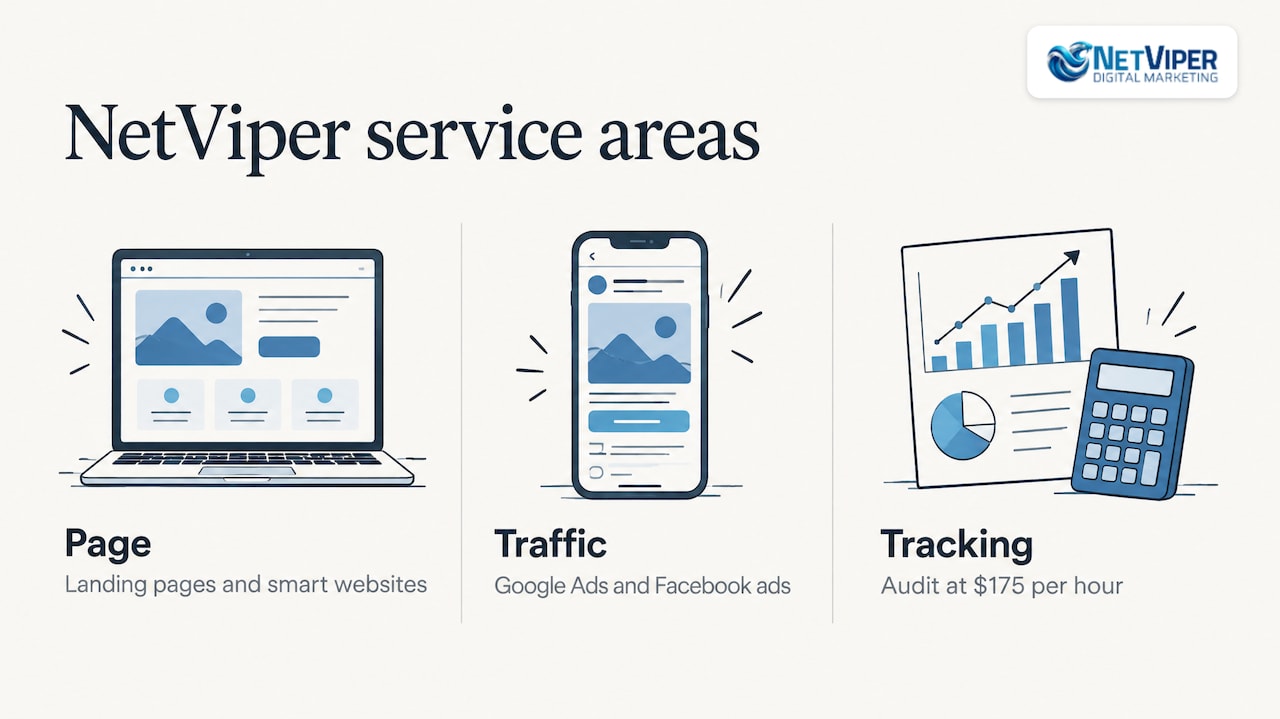
A landing page lives or dies on three things: the page, the traffic and the tracking. Many businesses have one or two of the three working. NetViper works across all of them for local companies in Northeast Florida.
On the page side we build and refine landing pages and smart websites designed to capture leads and book appointments. On the traffic side we manage Google Ads and Facebook ads. On the measurement side we offer conversion tracking and a Conversion Tracking Audit at $175 per hour, so you know which clicks produce calls and jobs. Prices for landing pages themselves are not published, and the pricing page lists what is. The Full Digital Program is listed at $1,995 per month with a one-time $2,500 set-up fee.
If your ads send traffic to a page that is not producing calls, talk to NetViper about landing page optimization and we will look at the page, the traffic and the tracking together.
Our perspective
Most local owners ask us whether their conversion rate is good. The better question is whether they can see where each lead came from. When tracking is right, the rest of the work becomes obvious: the page that sends calls, the ad group that sends tire-kickers, the form field that loses people.
We build pages and run the ads that feed them, which means the headline can match the keyword and the offer can match the audience from the start. That is how a Jacksonville plumber, a St. Augustine dentist and a Nocatee contractor each end up with a page that speaks to their own customers rather than a template.
We also treat response speed as part of conversion. A page that earns a lead and an office that answers it two hours later are working against each other, which is why we pair landing pages with AI chatbots and voice agents that respond right away.
Our advice: fix tracking, match the message, shorten the form, then test one change at a time. It is not glamorous, and it works.
Dave Fogel
FAQ
What is a good landing page conversion rate for a local service business?
As a reference, Search Engine Land’s summary of benchmark data shows a 6.1% median for commercial and professional services and 6.3% for legal. Pages fed by paid search tend to convert better than those fed by display. Treat these as reference points and compare your page with its own history, split by traffic source.
Is a 2.5% conversion rate good?
It depends on traffic and offer. For a high-ticket service with cold traffic it can be healthy. For a paid search page promoting a simple offer, it is likely below what a well-matched page can reach, so check tracking and message match first. Compare against your own prior months before deciding.
How do I calculate my landing page conversion rate?
Divide the number of conversions by the number of unique visitors and multiply by 100. Count calls, booked appointments and qualified form submissions together if they all produce business. Use a long enough period to have a few hundred visitors, otherwise the figure will swing from week to week.
How long should I test a change?
At least two weeks, per HubSpot’s split-testing guidance, and long enough for each version to collect a meaningful number of conversions. Change one element at a time so you know what caused the difference.
How much should I expect to pay for landing page optimization?
Scope varies with the number of pages, the tracking required and whether ads are involved. NetViper does not publish a price for landing pages, but its pricing page lists the audit, coaching and program prices it does publish, and you can ask for a quote for your specific pages.
Sources
- Landing Page Conversion Rate: Benchmarks and How To Improve (Shopify)
- 12 essential landing page statistics (Search Engine Land)
- What Is a Landing Page Conversion? The Complete Guide (Deadline Funnel)
- How I Use Landing Page Split Testing (HubSpot)
- No Unsupervised Thinking (MarketingExperiments)
- Optimizing Landing Pages (MarketingExperiments)
- Optimizing Landing Pages 2006 (MarketingExperiments)
Recommended

Landing Page Conversion Rate: What’s Good and How to Raise It
Learn how to calculate your landing page conversion rate, what benchmarks to expect, and which changes lift lead conversions for a local business.

Voice AI for Business: Where It Pays Off and How to Start
Voice AI answers calls, books appointments and follows up with leads around the clock. Learn where it works, what to check first, and how a local business starts.

Local Reputation Management: A Practical Guide for Local Businesses
Learn how local reputation management works: claim your profiles, earn reviews within platform rules, handle negative reviews, and measure results.
