
If your Google Ads are getting clicks but no leads, the cause is almost always one of five things: conversion tracking that is not counting, a campaign that is too new to judge, the wrong searches triggering your ads, the wrong locations, or a landing page that does not match the ad. Work through them in that order. Fixing tracking first matters most, because nothing else can be judged until conversions are counted correctly.
This guide is written for local business owners who pay for clicks and want phone calls, form fills and booked appointments. Each section tells you what to check, where to find it in your account and what a sensible fix looks like.
TL;DR
- Confirm that conversion tracking works before you change anything else. Submit your own form and place a test call, then see whether Google Ads records them.
- Give the data time. Conversions can be reported up to 90 days after a click, so recent days always look worse than they are.
- Open the Search terms report and your location settings. Irrelevant searches and the wrong geography are the most common budget leaks for local businesses.
- Make the landing page repeat the ad’s promise and call to action, with one clear form or phone number.
- Respond to every lead within minutes. A good campaign still looks broken if calls go to voicemail.
Table of Contents
- Step 1: Make sure conversions are actually being counted
- Step 2: Give the campaign enough time and data
- Step 3: Check who is clicking, and from where
- Step 4: Fix the landing page and the ad-to-page match
- Step 5: Look at what happens after the lead arrives
- A 14-day diagnostic plan
- Perspective: why local campaigns stall
- Get the leads your clicks already deserve
- FAQ
- Sources
Step 1: Make sure conversions are actually being counted
Before you rewrite ads or raise bids, rule out a tracking problem. A campaign can generate real calls and form submissions while the account shows zero, and the reverse can happen too, when the account counts the wrong actions.
Start in the Goals > Conversions > Summary section of your account. Google lists several tracking statuses, and each one points to a different fix:
- Active: the tag is working as intended.
- Needs attention: there are action items to address.
- Misconfigured: conversions stopped because of a setup error or a broken tag.
- Awaiting conversions: no conversions in the last 7 days, typically because the action is under 48 hours old, campaigns are paused or traffic is too low.
- Removed: the action was deleted or archived.
Those definitions come from Google’s conversion tracking troubleshooter. If a tag shows as Inactive, Unverified or Needs attention, Google’s troubleshooting page tells you to verify the implementation with Google Tag Assistant and to confirm that your conversion actions are set to Primary. For call tracking, make sure call reporting is on and that the minimum call length is not set so high that real calls are excluded.
An Unverified or Inactive status is normal for a brand-new tag. Google explains that it changes to Active only after the account records its first conversion or a successful test event.
A five-minute tracking test
- Open your landing page in a private browser window.
- Click your own ad, or visit the page with the tracking tag installed.
- Fill in the form with a test name, or call the tracked number from a mobile phone.
- Check the thank-you page loads, since many form tags fire there.
- Look in the Conversions summary the next day, allowing for reporting delays.
If the test does not appear, the problem is tracking, not your ads. If you are not sure how forms, phone calls and chat leads are wired together, our guide to call tracking for ads explains how to measure every call your ad spend earns.
Watch for the opposite problem too. If you count page views, button clicks or other soft actions as conversions, the account looks healthy while no revenue arrives. Count only actions that matter to the business: a submitted quote request, a booked appointment, a call of meaningful length.
Step 2: Give the campaign enough time and data
A common reason a campaign looks like it is not converting is that it is simply too early. Google’s own documentation is clear about the lag.
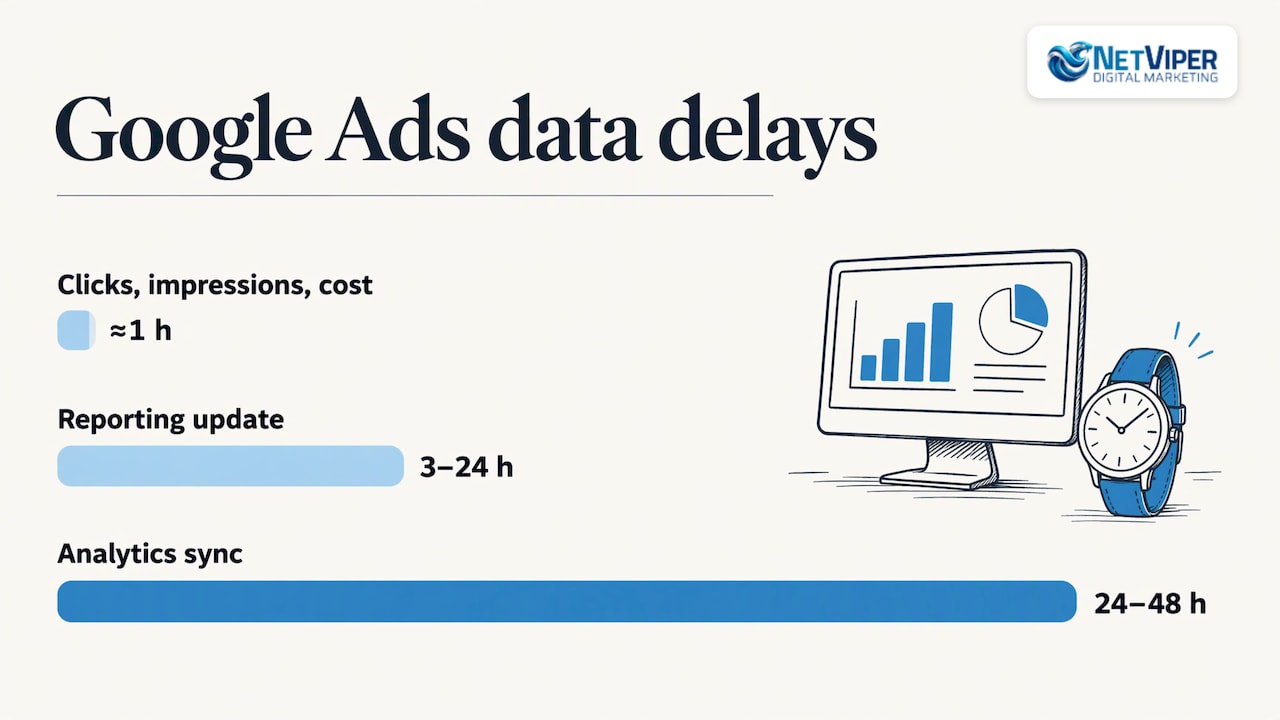
- Reporting can take 3 to 24 hours to update, according to Google’s tracking status guidance.
- Clicks, impressions and cost are fresh within about an hour, but conversion data varies by attribution model and conversion type.
- Conversions can be reported up to 90 days after the click, depending on the conversion window you chose. Comparing recent weeks with older ones can show fewer conversions and a higher cost per conversion, because some people who clicked have not converted yet.
- After significant changes or account linking, it can take up to 7 days for conversion data to fully appear. When you link Google Analytics, allow 24 to 48 hours for synchronization before comparing numbers.
For a local service business, the sales cycle matters. A homeowner who requests a roof estimate may click an ad on Monday, compare three companies and call on Friday. A dental patient may click twice before booking. Judge results over a period long enough to include your typical decision time, and leave out the most recent days when you look at cost per lead.
Small budgets add another problem: volume. With only a handful of clicks per day, a few leads either way swing the numbers wildly. If tracking is fine and the budget is thin, Google suggests raising bids or budgets, or waiting for volume to build. Avoid changing bids, budgets, keywords and ads all in the same week, because you will not know which change helped.
Step 3: Check who is clicking, and from where
Once tracking is sound and the data is mature enough, ask whether the clicks come from people who could buy from you. Two reports answer this.
Search terms report
The Search terms report shows the actual queries that triggered your ads. Search Engine Journal recommends using it to see what is and is not converting. Sort by cost and look for patterns:
- Job seekers, students or do-it-yourselfers (“jobs”, “free”, “how to”, “training”).
- Services you do not offer, such as commercial work when you only serve homes.
- Searches for a competitor’s name or a different city.
- Broad, vague queries with high spend and no leads.
Add these as negative keywords. You can apply them at the ad group, campaign or list level, using broad, phrase or exact match, as the same article explains. Review the report weekly at first. Broad match and automated bidding can widen reach quickly, and a few unchecked weeks can burn real money.
Then look the other way: queries that did convert. Add them as exact or phrase match keywords so you control the bid and the ad text. Google notes that specific keywords tend to convert better than general ones, because people searching for a specific model have usually done their research and want to buy. For a local business the equivalent is a searcher typing “emergency AC repair Jacksonville” rather than just “air conditioning”.
Location targeting
Location settings are the next suspect. Google offers a choice between “Presence or interest” and “Presence” targeting, a distinction covered by Search Engine Journal. If your ads can show to people who are merely interested in your area, such as travelers researching a trip to St. Augustine, you may pay for clicks from people who will never visit your shop. For a business that serves a defined area, “Presence” is usually the tighter setting to test.
Also check the radius or the list of cities. A 40-mile radius that includes places you will not drive to produces leads you cannot serve. Use the location report to see which zip codes bring leads and which only bring clicks.
CTR as a diagnostic
If you have a few hundred clicks and still no conversions, Search Engine Land advises checking tracking first, then click-through rate, then landing page performance from other channels. A low CTR can mean irrelevant targeting, irrelevant ad creative, or both. A healthy CTR with no conversions points more strongly at the landing page or the offer.
| Symptom | Most likely cause | First fix |
|---|---|---|
| Zero conversions in the account, but you know leads arrived | Tracking is broken or misconfigured | Check status, test with Tag Assistant, run a test submission |
| Low CTR, many impressions | Wrong keywords or weak ad copy | Tighten keywords, add negatives, rewrite headlines |
| Good CTR, lots of clicks, no leads | Landing page or offer mismatch | Match page to ad, simplify the form |
| Leads in the account, but no sales | Wrong searches or slow follow-up | Review search terms, speed up response |
| Conversions dropped last week only | Reporting lag | Wait, then compare with a matured period |
Step 4: Fix the landing page and the ad-to-page match
When traffic is relevant and tracking works, the landing page is the usual bottleneck. Google’s guidance is that the page should closely match your ad and keywords. Its example: if the keyword is “discount shoes” and the ad promises shoes at 20% off, visitors should find those discounted shoes on the page. The tighter that connection, the better your chance of a conversion.
The same page says the landing page should mirror the ad’s call to action. If the ad invites people to book a free tour, the page should feature a sign-up form prominently.
For a local service business, that translates to a short checklist:
- One page per service. An ad for “water heater replacement” should land on a water heater page, not your homepage with eleven menu items.
- Headline echoes the search. Use the words the customer typed, plus your city or service area.
- One primary action. Either a short form or a click-to-call button, shown above the fold on mobile.
- Proof near the action. Reviews, license numbers, years in business and photos of real work, but only what is true for your company.
- Fast load on a phone. Most local searches happen on mobile, and a slow page loses the click you already paid for.
- Short forms. Ask for name, phone and what they need. Every extra field costs you leads.
The question “why is my content not converting?” has the same answer on any page: the visitor cannot quickly tell that this page solves their problem and what to do next. Read the page as a stranger who has five seconds. If the offer, the price range or the next step is not obvious, rewrite the first screen before touching anything else. Our landing page guide walks through the elements that matter, and if you would rather have specialists build and test pages for you, see our landing page optimization service.
Test one change at a time
Pick a single variable per test: the headline, the form length, the button text or the hero image. Run it long enough to collect a meaningful number of leads and compare against the previous version over equal periods. Changing five things at once may raise conversions, but you will not learn why, and you cannot repeat it on the next page.
Step 5: Look at what happens after the lead arrives
Some campaigns are converting in the account while the owner feels they are not, because leads go cold. Common leaks:
- Calls during business hours that ring out or go to voicemail.
- Form submissions answered the next morning, after the customer has already called a competitor.
- No text or email confirmation, so the visitor wonders whether the form worked.
- Tracked calls from outside your service area that your staff cannot take.
Local buyers often contact two or three businesses in the same hour and tend to go with whoever answers first. Set a rule for your team: every web lead gets a call or text within five minutes during business hours. If that is unrealistic, an automated first response can cover the gap. Our AI agents and receptionist tools are built to answer and qualify inquiries so that fewer leads go unanswered, including after hours.
Also confirm that your campaign hours match your staffing. Showing ads at 9 p.m. when nobody answers the phone can make sense only if a form or an automated reply is ready to capture the lead.
A 14-day diagnostic plan
Use this order. It keeps you from making changes that hide the real cause.
- Day 1: Check the conversion status for every action. Run a test form submission and a test call. Remove any action that counts page views or other soft goals as primary conversions.
- Days 2 to 3: Compare the account’s conversions with the leads you can verify in your phone log, email and CRM. If the numbers disagree widely, fix tracking before anything else.
- Days 4 to 5: Export the Search terms report. Add negative keywords for clearly irrelevant queries. Promote converting queries to exact or phrase match.
- Day 6: Review location settings and the location report. Switch to the tighter targeting option if you are paying for clicks from outside your service area, and exclude zip codes that never produce leads.
- Days 7 to 9: Build or edit one landing page so that the headline, offer and call to action match the ad group. Cut the form to the essential fields.
- Days 10 to 12: Let the changes run. Do not touch bids or budgets, so the data stays clean.
- Days 13 to 14: Compare against the prior period, leaving out the most recent days that are still missing delayed conversions. Decide the next single test.
If you run the plan and the numbers remain poor, the issue may be strategic: an offer that is not competitive, a budget too small for your market, or a keyword set that is too costly for the margin. That is the point where a second opinion is worth paying for. Our Paid Ads Coaching is $225 per hour, and a Conversion Tracking Audit is $175 per hour.
Perspective: why local campaigns stall
We review a lot of local Google Ads accounts, and the pattern is rarely a single dramatic error. It is usually a stack of small ones: a tag that fires on the wrong page, a service-area radius drawn too wide, a homepage standing in for a landing page, and a phone that nobody answers at 6 p.m.
That is why we start with measurement and local relevance. Our certified Google Ads and conversion optimization specialists look at tracking first, then search terms, then the page. For businesses in Northeast Florida, local knowledge changes decisions: which neighborhoods to target, how seasonal demand shifts at the beaches, and which services people in Jacksonville and St. Augustine search for in a hurry.
We also believe that a click is only the beginning of the job. Pairing well-built campaigns with fast lead response, including AI chatbots and voice agents that reply the moment someone reaches out, is how we help clients get more value from the same ad spend. Direct access to local professionals who know your market means you are not waiting on a ticket queue to fix a broken form.
Dave Fogel
Get the leads your clicks already deserve
If you want a team to run this diagnostic and keep the account tuned, we manage Google Ads for local businesses across Northeast Florida, from tracking setup to landing pages to follow-up automation. Learn more about our Google Ads management in Jacksonville, or see how paid search management works and what it includes.
Our Full Digital Program is $1,995 per month with a one-time set-up fee of $2,500, and it brings ads, SEO and conversion work under one roof. You can see the full list of services and published prices on our pricing page.
FAQ
Why am I getting clicks but no conversions in Google Ads?
The usual causes are broken tracking, irrelevant search terms, the wrong locations, a weak landing page or a bid strategy that has not had time to learn. Check tracking first with a test submission. Then review the Search terms report and your location settings before you rewrite ads.
How long does it take for conversions to show in Google Ads?
Reporting can take 3 to 24 hours to update. Conversions can also be credited up to 90 days after the click, depending on your conversion window, so recent days often look weaker than they will once the data matures. After major changes or account linking, allow up to 7 days.
How do I improve Google Ads conversions on a small budget?
Use specific, high-intent keywords, add negative keywords from the Search terms report and tighten location targeting to the area you serve. Send each ad group to a matching landing page with one clear action. Change one thing at a time so you can see what worked.
Is my landing page the problem or my ads?
Look at click-through rate. A low CTR points to targeting or ad copy. A decent CTR with plenty of clicks and no leads points to the landing page, the offer or tracking. Confirm tracking first, then compare the page’s headline and call to action with the ad.
Should I pause my campaign if it is not converting?
Not before you check tracking and give it enough time and volume to judge. If you pause, you lose the data that tells you what to fix. Make targeted changes instead, such as adding negatives, tightening locations and improving the page.
Sources
- Troubleshoot your conversion tracking status, Google Ads Help
- Conversion Tracking troubleshooter, Google Ads Help
- About conversion measurement, Google Ads Help
- About data freshness, Google Ads Help
- Find out how long it takes for your customers to convert, Google Ads Help
- Data discrepancies: Factors and troubleshooting, Google Ads Help
- Improve your conversion rate, Google Ads Help
- Optimize your ads and landing pages, Google Ads Help
- 15 Fixes To Improve Low Conversion Rates In Google Ads, Search Engine Journal
- Mastering Maximize conversions bidding in Google Ads, Search Engine Land
Recommended

Google Ads Not Converting? How to Find and Fix the Cause
Getting clicks but no leads from Google Ads? Check tracking, wait times, search terms, targeting and landing pages in order to find what is costing you conversions.

Local Facebook Advertising: How to Reach Nearby Customers
Learn how local Facebook advertising works: location targeting, objectives, retargeting website visitors, measurement and privacy basics for local business owners.

Conversion-Focused Web Design for Local Businesses
Learn what conversion-focused web design is, the principles behind it, and how local businesses can turn more website visitors into calls, bookings and leads.
