
A duplicate Google Business Profile is a second listing for a business that already has one, and it splits your reviews, confuses customers and can keep your real listing from ranking in Google Maps. The fix depends on one question: is the duplicate in your account, in someone else’s account, or live on Maps with no owner? Once you know which, Google gives you a specific route: remove it, request access, or suggest a merge. Below is how to tell which case you have, the exact steps for each, what happens to your reviews, and how to keep duplicates from coming back. If you would rather hand the cleanup to a local team, we cover that near the end.
TL;DR
- Google marks a profile as a duplicate when a verified profile already exists for the same business, when profiles share an address, or when one business has several profiles for different services.
- Check your Business Profile Manager and filter Businesses from “All” to “Duplicate” to see what Google has flagged.
- Duplicate in your account: remove it. Duplicate owned by someone else: request access. Duplicate live on Maps with no owner: suggest a merge from the listing.
- Removing a profile permanently deletes its posts, photos, videos and review replies, so decide which profile survives before you act.
- Prevent repeats by keeping your name, address and phone number identical everywhere and by managing one profile per eligible location.
Table of Contents
- Why a business ends up with two profiles
- Step 1: Find out which duplicate you have
- Step 2: Choose the profile that survives
- Step 3: Fix it, by situation
- What happens to reviews, photos and posts
- Why duplicates keep coming back
- What a duplicate costs you in Maps
- When to hand it off
- A local-SEO view of duplicates
- Getting it done with NetViper
- FAQ
- Sources
Why a business ends up with two profiles
Most duplicates are accidents, not mistakes in judgment. A previous owner or marketing vendor created a listing years ago. An employee added the business again after not finding the login. Google itself generates listings from public data when a place gets mentioned online, and the business moves or rebrands and the old pin stays behind.
Google’s official help page on duplicate profiles names three reasons a profile gets marked as a duplicate:
- A verified profile already exists for the same business.
- Multiple profiles share the same address.
- Multiple profiles exist for the same business offering different services.
A profile that Google treats as a duplicate does not show on Google Search or Maps. That matters because the profile you worked on may be the one that is hidden, while an older, neglected listing keeps showing with an old phone number or a closed-business label. Customers who call that number or drive to that pin never reach you.
Duplicates versus legitimate separate listings
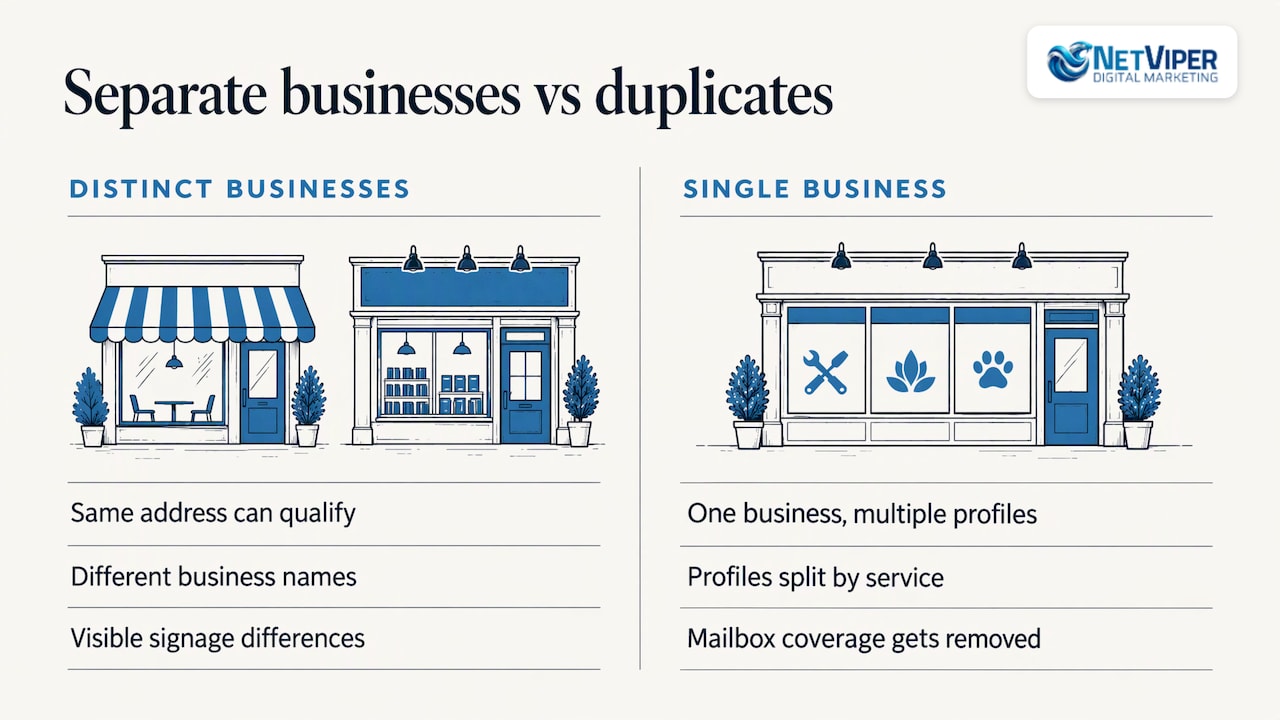
Not every pair of listings is a duplicate. Google’s guidance says two or more eligible businesses at the same address can each have their own profile if they are distinct businesses with different names and clearly visible differences in signage. A dentist and a separate orthodontic practice in the same building are an example. A single business splitting itself into three profiles by service is not.
Eligibility also matters. Google’s eligibility and ownership guidelines require in-person contact with customers during stated hours. Online-only businesses, lead-generation companies, rental properties and P.O. box addresses do not qualify. If you were tempted to create a second profile to cover another service area from a mailbox, that is the kind of listing Google removes.
Step 1: Find out which duplicate you have
Before you click anything, identify where the duplicate lives. There are three situations, and each one has a different fix.
Check your dashboard first. Google’s Merchant Center help page explains that in Business Profile Manager you can change the Businesses filter from “All” to “Duplicate” to find flagged profiles. Each flagged profile shows either a “View original” link, if you have access to the original, or a “Request access” button, if you do not. That one detail tells you which case you are in.
Then search Maps. Search your business name, your phone number and your street address on Google Maps, ideally while logged out or in a private window so you see what customers see. Write down every listing that appears, with its address, phone number, category and review count. You will need that list to decide which profile survives.
Then sort what you found:
| What you see | Whose is it | Fix |
|---|---|---|
| Flagged duplicate in your own dashboard | Yours | Remove it from your account |
| Flagged duplicate with “Request access” | Someone else’s | Request ownership |
| Live listing on Maps, no owner, same business | Nobody’s | Report it as a duplicate in Maps |
| Two real, distinct businesses wrongly flagged | Yours | Appeal to Google support |
Step 2: Choose the profile that survives
Do this before any removal or merge, because both actions are permanent. Compare your listings on four points:
- Verification. A verified profile you control should almost always be the survivor.
- Review history. The listing with more reviews and a longer history carries more weight with customers.
- Accuracy. Check the name, address, phone number, hours and website. Details can be edited later, but the right place pin is hard to rebuild.
- Photos and posts. Note what the other profile has that you want to keep.
Take screenshots of the losing listing, including its reviews, photos and any posts. Google’s removal rules say owner posts, photos, videos and review replies are permanently deleted when you remove a profile, so a record lets you re-upload the good photos to the surviving profile.
If you are choosing between two profiles for a Northeast Florida business, a quick rule: keep the one whose address matches your signage and your state business registration, since that is the one Google can most easily confirm.
Step 3: Fix it, by situation
The duplicate is in your own account
If you created the second profile by mistake, Google says to remove it from your account and that doing so will not affect your verified listing. Google’s community guidance adds that a duplicate already flagged in your dashboard is often not live on Maps, and that important data such as reviews may already have been merged into the main profile, so removing it from your account is usually all you need.
Follow Google’s removal rules:
- Only a primary owner can remove a profile’s content and managers.
- New owners and managers must wait 7 days before removing content.
- Removal is permanent. User reviews stay on the place, and the business may still show on Search and Maps.
The duplicate belongs to someone else
This is the case when a former employee, a past agency or an earlier owner created the listing. If the duplicate shows “Request access,” use Google’s request ownership process:
- Go to business.google.com/add.
- Enter the business name and address and select the business.
- Choose Request Access and submit the form.
- The current owner has 3 days to respond. If there is no response, you may have the option to claim the profile, though Google notes that option is not always available.
Google’s ownership guidelines also explain why an old owner can lose control: ownership may be revoked if the owner has not signed in recently, the business confirms they are no longer authorized, or Google cannot reach them by email after multiple attempts. Authorized representatives, such as agencies, must never claim a profile without the owner’s express consent and must transfer ownership immediately on request. If a past vendor still holds your listing, put that request in writing.
The duplicate is live on Maps with no owner
When two live listings for the same business appear on Maps and neither sits in your account, report it from the listing itself. Open the duplicate on Google Maps, choose Suggest an edit, then Close or remove, then Duplicate of another place, select the primary listing and submit. Google’s help page says same-business profiles at the same location can be merged this way, with reviews combined but review replies possibly lost, and reviews from recently merged profiles can take a few days to appear.
Google does not publish a timeline for these reports, so check back after a few days and avoid filing the same report repeatedly.
Two real businesses were wrongly marked as duplicates
If two distinct, eligible businesses were incorrectly merged or flagged, Google says to contact support and appeal the duplicate status. Bring evidence of permanent signage showing both businesses, with different names and clearly visible differences.
Both profiles are yours and verified
When you control two verified profiles for the same place, remove the one you do not want from your account first, then deal with whatever remains on Maps. Merging is not possible between a storefront and a service-area business, so confirm both listings are the same type before you proceed.
What happens to reviews, photos and posts
Reviews are the asset most owners worry about, so here is what Google states:
- When profiles merge: reviews are combined, replies to reviews may be lost, and merged reviews can take a few days to appear.
- When you remove a profile from your account: posts, photos, videos and review replies are permanently deleted. User reviews remain on the place, and the business may still appear on Search and Maps.
That difference is why the order of steps matters. If the weaker profile has 40 reviews and the stronger has 12, a merge suggestion brings the reviews together, while deleting the wrong profile first gives up your replies and media. After any merge, re-read the surviving profile’s reviews and reply again where replies were lost. Our guide to local reputation management covers how to respond to reviews so they work for you in Maps.
Why duplicates keep coming back
Cleaning up once is not enough if the cause stays. The common causes in local businesses:
- Inconsistent business details. Different spellings of your name, “Suite 4” in one directory and “Ste. 4” in another, or an old phone number on a data aggregator can lead Google to create or keep a second record.
- Moves and rebrands. The old address stays live after a move unless it is updated or marked appropriately.
- Multiple vendors. An agency, a web designer and a franchise office each creating a profile.
- Service listings split into several profiles. Google says to list different services under one profile instead.
- Address changes handled as new listings. For a new address, edit the existing profile rather than creating another.
A short prevention routine:
- Keep one master record of your exact business name, address, phone number, website and categories.
- Use that record everywhere your business is listed.
- Limit who can create profiles for the business, and keep at least two trusted owners on the profile.
- Re-check the “Duplicate” filter in Business Profile Manager and search Maps for your name every quarter.
- When you move, rebrand or add a location, update the existing profile first and then update the listings elsewhere.
The listings side is where most repeat duplicates start. Our overview of local listings management explains how directories feed each other and why one wrong entry can spread.
What a duplicate costs you in Maps
A duplicate is not just untidy. It splits the signals that help a local business show up in the map pack: reviews, engagement, calls and consistent business details. Instead of one profile with strong activity you have two weaker ones, and one of them may be hidden by Google. The visible but outdated listing can send customers to a disconnected number, which means lost calls from people who were ready to buy.
That is also why duplicate cleanup matters for anyone running ads. Google Ads location and call assets and local campaigns draw on your business information, so wrong details waste spend. If you are weighing how much a clean profile is worth, read what moves a business up in local search ranking factors.
When to hand it off
A single flagged duplicate in your own dashboard is a ten-minute job. The harder cases are the ones where the old listing is owned by a vendor who will not respond, where you have several locations with overlapping addresses, or where a profile has been suspended along the way. Those take patience, documentation and follow-through, and the time comes out of your day running the business.

We work with Northeast Florida businesses on exactly this kind of local profile problem. Our Google Business Profile management page explains what ongoing management covers, and if you operate in the Jacksonville area, our Google Business Profile optimization in Jacksonville page is the place to start. If you have more than one location, see how multi-location SEO keeps each profile distinct.
A local-SEO view of duplicates
Most of the duplicate profiles we see in local search trace back to one root cause: nobody owned the business’s identity online. A listing was created by a past vendor, another by a well-meaning employee, and a third by Google from public data. Every one of them looked harmless alone. Together they split reviews and weaken a business in the Maps results that decide where local customers call first.
Our approach is to treat the Google Business Profile as the anchor of local SEO and to keep everything else consistent with it: the website, the citations and the listings. That is why we pair Google Business Profile optimization with listings and citations work, and why it matters that one team looks after both. Fixing a duplicate without fixing the listings that caused it just resets the clock.
For Northeast Florida businesses, local knowledge matters here too. Neighborhood names, shared office buildings and multiple practices at one address are common, and each calls for a decision about what is a real separate business and what is a duplicate. We make that call with the owner, with the evidence in hand.
Dave Fogel
Getting it done with NetViper
If you want the profile cleaned up and kept clean, our local SEO services include Google Business Profile Optimization and Listings & Citations, which is $60 per month. Our GeoBoost 25 plan starts at $497 per month and our SEO + Local SEO service is $1,495 per month; the full list is on our services page.

Business owners in Jacksonville, St. Augustine and the surrounding area can reach us through netviperinc.com to talk through which listings are costing them calls.
FAQ
How do I remove a duplicate Google Business listing?
If the duplicate is in your own Business Profile Manager, filter Businesses to “Duplicate” and remove it from your account. If it is live on Maps and unowned, open it, choose Suggest an edit, then Close or remove, then Duplicate of another place, and select the primary listing. Removal from an account is permanent for posts, photos and replies, so pick the profile to keep first.
Can I merge two Google Business Profiles?
Yes, when both describe the same business at the same place. Google combines the reviews, though review replies may be lost and the merged reviews can take a few days to show. A storefront and a service-area business cannot be merged with each other.
Why does my business have two Google profiles?
Usually because a verified profile already existed, two profiles share an address, or one business created separate profiles for different services. Past vendors, employees and Google’s own listings from public data are the common sources. Google’s help page lists all three reasons for a duplicate flag.
Can I create a second Google Business Profile?
Only for a distinct, eligible business or location. Two businesses at the same address can each have a profile when they have different names and clearly visible differences in signage. For a different service from the same business, add it to the existing profile.
How long does it take Google to fix a duplicate?
Google does not publish a timeline for duplicate reports. Dashboard changes can reflect within about 24 hours in connected tools, and merged reviews can take a few days to appear. If the issue is still there after a week or two, reach out through Business Profile support with your evidence.
Sources
- Resolve duplicate profiles & ownership issues, Google Business Profile Help
- Business eligibility and ownership guidelines, Google Business Profile Help
- How to fix: Duplicate Business Profile, Google Merchant Center Help
- Remove a Business Profile from your Google Account, Google Business Profile Help
- Request ownership of a Business Profile, Google Business Profile Help
- My business has a duplicate listing, Google Business Profile Community
Recommended

Duplicate Google Business Profile: How to Find, Fix and Prevent It
Two listings for one business split your reviews and hurt your Maps visibility. Learn how to find the duplicate, remove or merge it, and keep it from returning.

Google Ads Management Cost in Jacksonville, FL
What Google Ads management costs in Jacksonville: how fees differ from ad spend, common pricing models, what a fee should include and how to judge the return.

CRM Lead Management: A Practical Guide for Local Businesses
How CRM lead management works for a local business: capture, qualify, route and follow up on leads, what to automate, and which numbers to track.
