
An AI receptionist is voice software that answers your business phone, talks with callers in natural language, answers common questions, captures lead details, books appointments and hands the call to a person when a human is needed. For a small business, the value is simple: calls get answered when you are on a job, with a customer or closed for the night. This guide explains how it works, which calls it should and should not handle, what to check before you pay, and the legal points Florida business owners need to know.
TL;DR
- An AI receptionist answers inbound calls 24/7, responds from your business information, books appointments, captures leads and transfers calls to your team.
- It pays off when calls regularly go to voicemail or callers ask the same questions. It is a weaker fit when call volume is low or most calls are complex or emotional.
- Pricing models differ (flat monthly, per minute, per call, per session), so compare the overage rules, not just the headline monthly number.
- Florida requires consent from all parties to record a call, so disclose recording at the start of every call.
- Our NV AI Pro Agent starts at $497 per month, with a one-time $997 AI Receptionist setup and deployment fee.
Table of Contents
- What an AI receptionist actually is
- What calls an AI voice receptionist can handle
- Where an AI receptionist falls short
- Is an AI receptionist worth it for your business?
- What an AI answering service costs, and the fees to check
- How to set up an AI receptionist
- Call recording and AI disclosure: what Florida businesses should know
- Our perspective: the phone is part of your marketing
- How NetViper helps
- How to choose a provider
- FAQ
- Sources
What an AI receptionist actually is
The older version of phone automation was the IVR: “Press 1 for sales, press 2 for service.” Callers hated it because it forced them into fixed menus. An AI receptionist replaces the menu with conversation. The caller says why they are calling, the software interprets the request, and it responds using the information you gave it: your services, hours, service area, pricing guidelines and calendar.
Behind the scenes, the flow is usually the same. Your business number forwards to the service, the system answers immediately, converts speech to text in real time, uses a language model to work out what the caller wants, and replies in a synthetic voice. Because it is software, it can also write to your systems: it can log a lead, create a calendar event or send a text confirmation while the caller is still on the line.
You will see this product described in several ways: AI phone answering service, AI call answering, AI voice receptionist, AI answering service for business. They all describe the same core idea. The differences are in how much the system can do beyond picking up the phone, and how well it is configured for your business.
What calls an AI voice receptionist can handle
The tasks that work well are repeatable and have clear answers. For most local service businesses, that covers a large share of inbound calls.
- Frequently asked questions. Hours, location, service area, whether you handle a particular job, how to prepare for a visit.
- Lead capture. Name, phone number, the problem, the address and how urgent it is, logged and sent to you as a text or email summary.
- Appointment booking and rescheduling. The system checks your calendar and offers open times rather than taking a message and leaving you to play phone tag.
- Text follow-ups. A confirmation or a link to your booking page sent right after the call.
- Call routing. Urgent calls or named-person requests transferred to the right staff member, ideally with the caller’s reason already captured so they do not repeat themselves.
- After-hours coverage. Nights, weekends and holidays, when most small businesses simply let the phone ring out.
Think about what this means for a roofer, an HVAC company, a dental office, a law practice or a salon. The first business to answer an inquiry usually wins it, and a caller who reaches voicemail will often dial the next result. Answering instantly is a lead-capture issue, not only a convenience issue.
Where an AI receptionist falls short
Honest evaluation means knowing the limits. AI receptionists can struggle with unusual requests, emotional or high-stakes calls and questions outside the knowledge base you supplied. They can also misunderstand a caller or give an incomplete answer.
That is why escalation rules matter more than any feature list. Decide in advance which calls always go to a person:
- Callers who are upset, distressed or reporting an emergency.
- Large, high-value jobs where the first conversation is part of the sale.
- Existing customers with billing disputes or complaints.
- Anything the system cannot answer from your information after one attempt.
- Any caller who asks for a human.
The last point is worth building in deliberately. An easy way to opt out of an AI-only interaction protects your reputation and keeps frustrated callers from hanging up. Then review real call transcripts during the first few weeks and update the knowledge base wherever the system stumbled. The quality of an AI receptionist is largely the quality of the information and rules behind it.
Is an AI receptionist worth it for your business?
Use a few plain checks rather than guessing.
Count your missed calls. Look at your phone records for a typical month: how many calls went to voicemail, how many came after hours, and how many callers never left a message. Each of those is a possible lost customer.
Put a value on a lead. If an average new customer is worth $400 to your business and you miss ten real inquiries a month, that is a number you can compare against a monthly fee.
Listen for repetition. If staff spend much of the day answering the same five questions, automation frees up time. If most calls are unique, detailed or emotional, the savings shrink.
Check call volume. Very low volume may not justify a monthly subscription. A business that gets a handful of calls a week might do better with a good voicemail and fast text-back process.
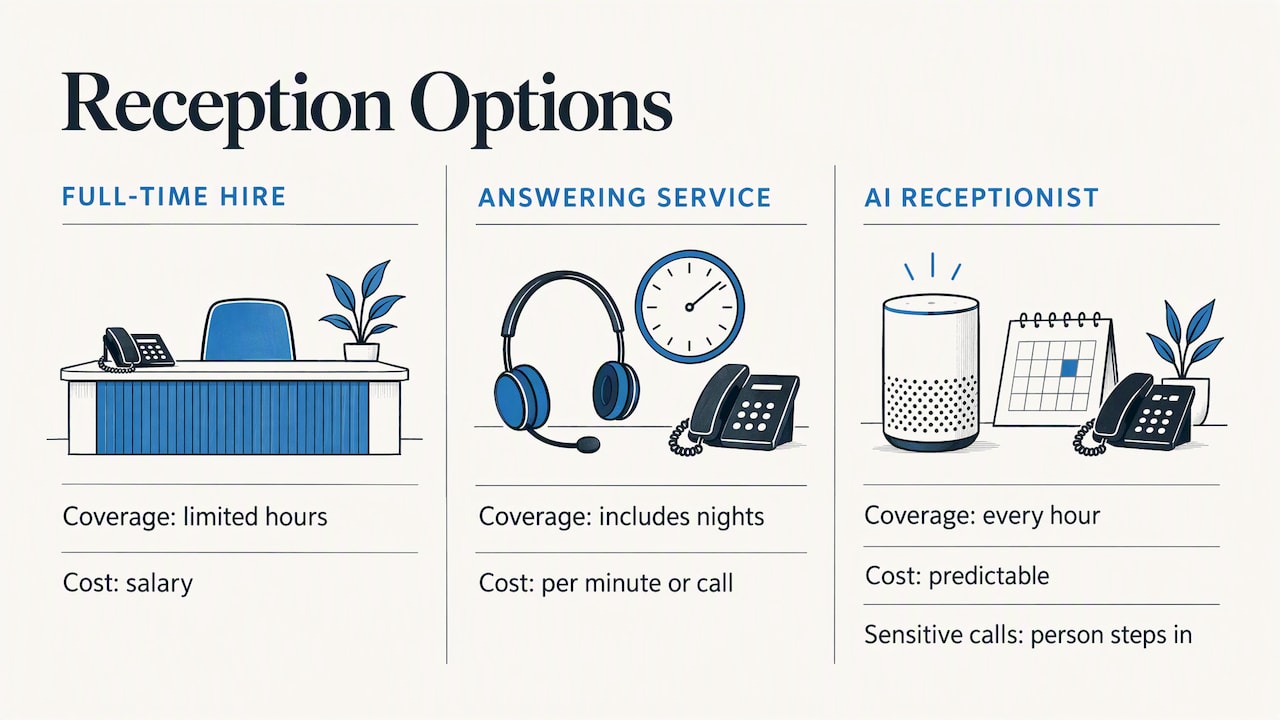
Compare against alternatives. A full-time receptionist is a salaried hire with limited hours. A human answering service covers nights but typically charges by the minute or call. An AI receptionist covers every hour at a predictable cost, with a person stepping in for the sensitive calls.
What an AI answering service costs, and the fees to check
Pricing across the category is not uniform, and that is where small businesses get surprised. Providers charge in different units:
| Pricing model | How it works | What to ask |
|---|---|---|
| Flat monthly plan | Fixed fee, sometimes with a minute or call cap | What happens past the cap? |
| Per minute | You pay for talk time | Do long calls and hold time add up? |
| Per call or per session | Each conversation counts | Do spam, robocalls and very short calls count? |
| Setup fee | One-time configuration charge | Is the knowledge base built for you? |
Before signing, ask about these specifics:
- Overage rates. A cheap base plan with expensive extra minutes or sessions can cost more than a higher flat plan.
- Spam handling. Robocalls and sales calls can eat your allowance if they are counted.
- Integration costs. Calendar, CRM and phone-system connections sometimes require a higher tier.
- Contract terms. Month to month is easier to test than an annual commitment.
- Transfer behavior. Can the system transfer to a live line, and does a transferred call still bill as AI usage?
Our own pricing is published so you can compare directly. The NV AI Pro Agent is $497 per month, and AI Receptionist setup and deployment is a one-time $997 fee.
How to set up an AI receptionist
Setup is less technical than most owners expect, but it rewards preparation. The typical sequence:
- Write down what callers ask. Pull from voicemails, texts and your own memory: the top 10 to 20 questions and their answers.
- Gather business information. Services, prices or price ranges, hours, service area, policies, and the details you need from a new lead.
- Define routing and escalation. Who gets urgent calls, who handles billing, what happens after hours.
- Connect your tools. Calendar for booking, and a CRM or email for lead delivery. Most systems work with common calendar and CRM tools, but confirm yours is supported.
- Forward your number. Your existing business line forwards to the AI, so customers keep calling the number they already know.
- Test before going live. Call it yourself with easy questions, awkward ones and angry ones. Fix gaps in the knowledge base.
- Review early calls. Read transcripts for the first few weeks and tighten the answers.
If you want a deeper look at how the information layer works, see our page on the AI knowledge base. For examples by business type, our AI use cases page is a good starting point.
Call recording and AI disclosure: what Florida businesses should know
AI call answering usually means recording or transcribing calls, and that brings in the law. Florida is an all-party consent state: it is illegal to record a phone conversation without the consent of all parties under Florida Statute 934.03, and the penalties can be criminal. If your callers are in other states, their rules can apply as well, and states differ.
The practical fix is simple. Have the receptionist state at the start of every call that the call may be recorded or transcribed. Doing it on every call removes the guesswork about where the caller is located.
Outbound calls are a separate matter. In February 2024 the FCC ruled that AI-generated voices count as “artificial” voices under the TCPA, which affects calls and texts your system initiates, not just calls it answers. If you plan to use AI for outbound follow-up, get your consent process reviewed first.
If you handle health information, ask any provider whether it will sign a business associate agreement before you route patient calls through it. For legal questions about your specific situation, speak with a Florida attorney.
Our perspective: the phone is part of your marketing
Most small business owners think of the phone as an operations problem. We see it as the last step of your marketing. You can pay for Google Ads, climb the Google Maps results and get calls coming in, but if nobody picks up, that spend is wasted.
That is why we built AI chatbots and voice agents into our work for Northeast Florida businesses. A business that advertises and ranks locally should respond to every lead immediately. Instant response is a conversion issue: the shorter the gap between a customer’s inquiry and your answer, the better your odds.
We also believe in setting expectations. An AI receptionist is not a replacement for your judgment or your relationships. It handles the repeatable calls, captures the details and gets the right ones to you quickly. Owners who succeed with it write good call rules, keep their information current and review transcripts. Those who treat it as set-and-forget are the ones who end up disappointed.
— Dave
How NetViper helps
We work with local businesses in Northeast Florida, including Jacksonville and St. Johns County. The NV AI Pro Agent is $497 per month, and AI Receptionist setup and deployment is a one-time $997. The aim is that you never miss a lead, whether it arrives as a phone call, a website chat or an ad click.
Because we also run Google Ads, local SEO and Facebook advertising, we can connect the phone to the rest of your lead generation. If your calls come from Google Ads or from Google Maps visibility through our local SEO work, the receptionist is the piece that turns those calls into booked jobs. If you prefer to start with text-based conversations, see our AI chatbots for customer service and lead generation. You can also read our FAQ on AI assistants for small businesses in Jacksonville.
How to choose a provider
When you compare options, whether it is a phone system add-on, a standalone AI service or a local agency, use the same checklist:
- Voice quality. Call the demo line. Does it sound natural, and does it handle interruptions?
- Accuracy on your business. Ask it your real questions, not the sales script.
- Transfer options. Warm transfers with context are better than a cold handoff.
- Integrations. Confirm your calendar, CRM and phone system by name.
- Pricing clarity. Get the overage and spam rules in writing.
- Compliance. Recording disclosure, data handling and, if relevant, a business associate agreement.
- Local support. Someone who understands your market and answers when the system needs adjusting.
A local partner matters more than it sounds. The greetings, service areas, neighborhoods and seasonal patterns of a Northeast Florida business are different from a national template, and the configuration should reflect that.
FAQ
How much does an AI receptionist cost?
Prices vary by provider and by pricing model, from flat monthly plans to per-minute or per-call billing. Ask about overage charges, spam call handling and setup fees. Our NV AI Pro Agent is $497 per month, plus a one-time $997 setup and deployment fee for the AI receptionist.
Can an AI receptionist replace a human receptionist?
For routine calls such as FAQs, lead capture and booking, it can cover most of the work, around the clock. It should not handle emotional, complex or high-stakes calls on its own. The best setup routes those calls to a person with the caller’s details already captured.
Will callers know they are talking to AI?
Modern voices sound natural, but you should not try to hide it. Tell callers upfront that the call may be recorded, and give them a simple way to reach a person. Federal rules on disclosing AI calls have been proposed but are not final, so a clear greeting is the safer practice.
Can I keep my current business phone number?
Yes. Most setups forward your existing number to the AI receptionist, so customers keep dialing the number they know. You can also set rules for which calls go straight to your staff during business hours.
Sources
- Florida reporter’s recording guide, Reporters Committee for Freedom of the Press
- FCC Rules AI-Generated Voices Are “Artificial” Under the TCPA, Wilson Sonsini
Recommended

Chatbot Development for Business: What It Involves and How to Start
Chatbot development for business explained: what a chatbot can do, how projects are built, what to plan for, and how local businesses get one live without the guesswork.

Google Ads Budget: How Much to Spend and How to Set It
Learn how a Google Ads daily budget works, how to calculate a monthly budget from your lead goals, and what a local business should spend to get real data.

Google Business Profile Optimization in Jacksonville, FL
How Jacksonville businesses optimize a Google Business Profile: the steps that move Maps rankings, what to measure, what it costs and when to hand it off.
