
An AI chatbot for business answers visitor questions, qualifies leads and books appointments on your website at any hour, then passes serious prospects to a person on your team. The chatbot itself is the easy part. Results depend on what it is trained on, how it captures contact details, where that data goes and who picks up the lead next. This guide covers each of those decisions for local business owners, including what to ask a chatbot development company before you sign.
TL;DR
- A well-built chatbot answers routine questions, qualifies prospects, books consultations and escalates complex inquiries to a human, according to the U.S. Small Business Administration.
- Lead generation works best when the bot asks about needs, budget or timeline, captures contact details and syncs them to your CRM.
- Treat privacy and security as part of the setup: control who can access transcripts, and honor every data promise you make.
- The chatbot works harder on a site with a clear primary action, a visible lead form and a mobile-friendly layout.
- Judge any provider on integration, handoff rules, data handling and measurable lead outcomes, not on a demo alone.
Table of Contents
- What an AI chatbot actually does for a business
- How a lead generation chatbot should work
- Chatbot, live chat or AI voice agent?
- Train the chatbot on content you approve
- What to look for in a chatbot development company
- Integrating the chatbot with your website, CRM and marketing tools
- Privacy and security: set it up safely
- Website design that gives the chatbot something to convert
- Measuring whether the chatbot pays for itself
- Our perspective
- Getting started with NetViper
- FAQ
- Sources
What an AI chatbot actually does for a business
A chatbot is software that holds a conversation with your website visitors. Modern AI versions read a question in plain language and answer from the content you approve, rather than forcing the visitor through a fixed menu. For a local business, that usually means four jobs.
- Answering routine questions. Hours, service areas, pricing structure, preparation steps and how your process works. The SBA’s guidance on chatbots for small businesses lists answering customer questions, saving time and increasing sales among the benefits.
- Qualifying leads. The bot asks a few questions so you know who is serious before anyone picks up the phone.
- Booking. It sends suitable prospects to a consultation or appointment scheduler.
- Escalating. When a question is complex, sensitive or emotional, it hands the visitor to a person.
IBM describes the same pattern: chatbots can ask qualification questions and connect complex prospects to trained sales agents, while capturing CRM data that supports lead nurturing.
The SBA’s January 2026 guide on AI for small business notes that website chatbots can answer common questions or complete orders. It also frames AI adoption as part of a broader, budgeted marketing plan, with attention to advertising compliance. That is the right mindset: a chatbot is one part of how you capture and convert demand, not a replacement for it.
Where it fits in a local marketing funnel
Most Northeast Florida businesses already pay to bring people to their site through Google Ads, local SEO or Facebook campaigns. Every click that leaves without contacting you is wasted spend. A chatbot gives those visitors an immediate way to ask a question at 9 p.m. on a Sunday, which is often when a homeowner or a busy owner is researching a service. It works alongside Google Ads management and local SEO to turn traffic you have already earned into conversations.
How a lead generation chatbot should work
A lead generation chatbot is not a pop-up that says “Hi, need help?” and waits. It follows a deliberate conversation path. Salesforce’s guide describes chatbots that engage visitors, ask about needs, budget or timeline, and collect names, email addresses and preferences, then sync that data with CRM and marketing-analytics software.
Here is a practical flow for a local service business.
- Open with a specific prompt. Tie it to the page. On a roofing page, ask what kind of roof problem the visitor has. On a pricing page, offer to explain how pricing works.
- Answer the first question fully. Give value before asking for anything. A visitor who gets a useful answer is far more willing to share an email address.
- Ask two or three qualifying questions. The SBA’s example is a bot that asks about the visitor’s business idea, the stage they are at and their struggles before pointing them to a consultation scheduler. Adapt that to your own trade: service needed, location, timeline.
- Capture contact details at the right moment. Ask for a name and a phone number or email once the visitor has shown intent, and say what happens next.
- Hand off or book. Qualified leads go to a calendar or a live person. Everything else gets a helpful answer and a follow-up sequence.
- Follow up automatically. A fast response is what separates a captured lead from a lost one. Our guide to automated lead follow-up shows how to build a system that responds in minutes.
Define the handoff rules before launch
Decide in advance what makes a lead “hot” and who receives it. Examples: the visitor asks for a quote, names a timeline under 30 days, or mentions a budget in your target range. Hot leads should trigger a text or email to a named person right away. Questions about billing disputes, safety, legal matters or complaints should always go to a human. Write these rules down, because a chatbot can only escalate on conditions you have defined.
Chatbot, live chat or AI voice agent?
These tools overlap, and many businesses need more than one.
| Tool | Best for | Limit to plan around |
|---|---|---|
| AI chatbot | Website visitors who type; after-hours questions; lead capture and booking | Only as good as the approved content behind it |
| Live chat | Businesses with staff available to reply during set hours | Unanswered chats feel worse than no chat |
| AI voice agent or receptionist | Phone calls, missed calls, appointment booking by voice | Needs clear call-routing and handoff rules |
If most of your leads arrive by phone, as they do for many contractors, clinics and home-service companies, a chatbot alone leaves a gap. We cover the phone side in our overview of an AI receptionist for small business and in the broader AI use cases page.
Train the chatbot on content you approve
The most common failure is a bot that answers confidently and incorrectly. The fix is a controlled source of truth: your services, service areas, policies, pricing structure, FAQs and process descriptions, written in your words. We call this an AI knowledge base. When the knowledge base is accurate, the bot stays within what you actually offer. When a question falls outside it, the bot should say so and offer a handoff instead of guessing.
A short checklist for the content:
- List every service you offer and the areas you cover.
- Explain how pricing works, even if you cannot publish exact figures.
- Add your real hours, booking process and what a first appointment includes.
- State what the bot must never promise, such as guarantees, medical or legal advice, or firm quotes.
- Review real conversations monthly and add the questions the bot could not answer.
The FTC has made clear that companies must back up what they say their AI can do. In its DoNotPay matter, the agency required the company to substantiate claims that its service could perform professional services like a human. For your business, the lesson is simple: do not let your chatbot or your marketing overstate what the bot can do.
What to look for in a chatbot development company
Whether you search for a chatbot development company, a chatbot integration service or a simple website chatbot service, the evaluation questions are the same. Ask any provider, including us, the following.
- What exactly will the bot be trained on, and who maintains that content? Vague answers here predict wrong answers on your site later.
- How does it capture and qualify leads? Ask to see the conversation flow, not only a generic demo.
- Where does lead data go? You want contact details and conversation summaries delivered to your CRM, inbox or phone, not trapped in a dashboard.
- What are the handoff rules? Ask how a human is alerted, how fast, and what happens after hours.
- How is data protected? See the security section below.
- What is the pricing structure? Look for a clear monthly fee, a clear setup fee and no surprises. Be cautious of any provider that cannot say what is included.
- How will results be measured? Leads captured, appointments booked, response time and conversion rate are reasonable. “Engagement” alone is not.
- Who do you talk to? Local businesses benefit from direct access to the people who build and adjust the system, not a ticket queue.
Also ask whether the provider understands your local market. A chatbot for a Jacksonville dental practice, a St. Augustine restaurant group and a Ponte Vedra home-services company should sound different, cover different questions and route leads differently. Our FAQ on AI assistants for small businesses in Jacksonville answers many of the practical questions owners raise before they start.
Integrating the chatbot with your website, CRM and marketing tools
An unintegrated chatbot creates a new inbox to check, and leads get lost there. Salesforce outlines a straightforward integration sequence: choose a platform compatible with your CRM, configure an API or native integration, map chatbot fields to CRM fields, test that data flows correctly, and connect marketing automation for follow-up.
In practice, for a local business:
- Website. The chatbot installs as a widget on every page, with page-specific opening prompts on your highest-value pages.
- CRM or contact list. Name, phone, email, service requested and a short conversation summary should land in one place. Map each chatbot field to a CRM field deliberately, and test with a dummy lead before launch.
- Calendar. Let the bot show real availability and book directly, so the visitor never has to wait for a callback to get a time.
- Email and text follow-up. Integrating chatbot data with marketing automation can trigger follow-up messages, personalized recommendations and meeting scheduling that keep prospects engaged through the buying journey, as Salesforce notes.
- Ad platforms. Pass conversions back to Google Ads and Facebook so your campaigns learn which clicks produce real leads. Our conversion tracking work covers this.
Once leads reach your CRM, the work moves to your sales process. If your team sends proposals or deal pages after a chatbot-booked call, sales content workflow automation can keep that follow-up consistent and quick.
Privacy and security: set it up safely
A chatbot collects names, emails and phone numbers, so it deserves the same care as any system that holds customer data. Three official sources are worth knowing.
Honor your data promises. The FTC’s January 2024 guidance warns that AI providers must keep their data-use and confidentiality commitments, and that using data for other purposes without clear notice and affirmative express consent can create risk under FTC law. The same guidance stresses that commitments made in promotional materials and terms of service count. Read a provider’s terms, and make sure your own privacy notice says what the chatbot collects and why.
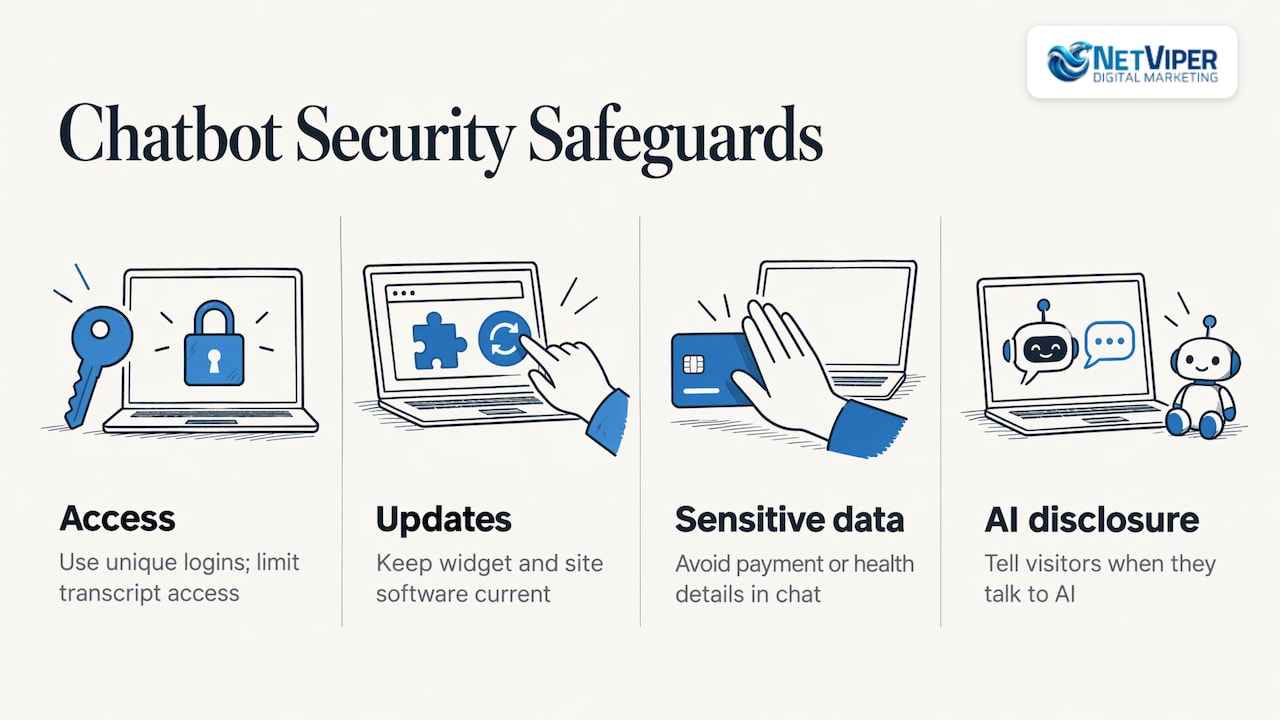
Know the threats. NIST’s July 2025 chatbot report identifies prompt injection, hallucinations, data exposure and unauthorized access as chatbot threats, and discusses safeguards such as access controls and validation filters. In plain terms: limit who can see transcripts, restrict what the bot can access, and test it with tricky questions before launch.
Keep plugins updated. Website chatbot plugins are software like any other. NIST’s vulnerability database records CVE-2026-16773, in which versions of the WPBot plugin through 8.5.9 exposed chat transcripts with names, email addresses and phone numbers to unauthenticated visitors. If your site runs on WordPress, ask your provider who updates chatbot plugins, and how quickly.
A simple security checklist: use unique logins with limited access, keep the widget and site software current, avoid collecting sensitive details (such as payment or health information) in chat, and tell the visitor when they are talking to an AI.
Website design that gives the chatbot something to convert
A chatbot cannot fix a confusing site. Lead generation website design and a chatbot should pull in the same direction: one clear next step. The SBA’s homepage guidance recommends choosing a primary action, using a prominent lead form or signup call to action, displaying contact information and making sure the site works on mobile devices.
Its guidance on calls to action adds that CTAs should be concise and easy to read, directing visitors to an action, and that landing-page CTAs can collect names, phone numbers and email addresses for lead nurturing.
Putting that together:
- Pick one primary goal per page: call, form, booking or chat.
- Keep the phone number and chat launcher visible on mobile without scrolling.
- Match the chatbot’s opening line to the page the visitor is on.
- Send paid traffic to dedicated landing pages, not a general homepage. See our landing page guide and landing page optimization service.
- Consider a smart website built from the start for lead capture and appointment booking.
Measuring whether the chatbot pays for itself
Track a short list of numbers monthly, and compare them with your numbers before the chatbot launched.
- Conversations started versus leads captured: the capture rate shows whether your prompts and questions work.
- Qualified leads and appointments booked from chat.
- Response time to hot leads after handoff.
- Close rate and revenue from chat-sourced leads, tracked in your CRM.
- Unanswered questions: the best list for improving the knowledge base.
If you are not sure your current tracking is reliable, a conversion tracking audit is the first step. Without it, you cannot tell which leads came from chat, which from ads and which from Google Maps.
Our perspective
Most chatbot projects we see fail for the same reason: the tool was installed, but nobody owned the lead after the chat ended.
At NetViper, we treat the chatbot as one piece of a lead system. Traffic comes from Google Ads, local SEO and Facebook campaigns. The website and landing pages give visitors a clear action. The AI tools respond instantly, by chat or by voice, so a lead does not wait for business hours. A person with local knowledge then takes it from there.
We build for Northeast Florida businesses because the questions, the competitors and the customers are local. A bot that knows your service areas, your neighborhoods and your process will outperform a generic one every time. We also believe you should be able to reach the people who built your system, and that results should be measured in leads and booked appointments, not in chat counts.
If you are going to add AI to your marketing, do it with a clear plan, approved content, tracked outcomes and a human ready to respond.
Dave Fogel
Getting started with NetViper
We set up AI chatbots and voice agents for local businesses in Northeast Florida as part of a wider lead system. Our NV AI Pro Agent is $497 per month, and AI Receptionist setup and deployment is a one-time $997. You can see what is included on our AI agents page.
If you want the chatbot paired with traffic and a site built to convert, our Full Digital Program is $1,995 per month with a one-time $2,500 set-up fee, detailed on our all services page. For a closer look at how chat fits customer service and sales, read about our AI chatbots for customer service and lead generation, or see how AI agents improve sales efficiency. To talk through your situation, start at netviperinc.com.
FAQ
How much does an AI chatbot for a small business cost?
Cost depends on what is included: setup, monthly platform and support fees, integrations and ongoing content updates. Our NV AI Pro Agent is $497 per month, and AI Receptionist setup and deployment is a one-time $997. Ask any provider for a written list of what the fee covers, including who updates the bot’s content.
Can a chatbot replace my front-desk or sales staff?
It should take on repetitive questions, after-hours inquiries and first-pass qualification, which frees your team for conversations that need judgment. Complex or sensitive inquiries should still go to a person, which is how the SBA describes chatbots being used for directing complex inquiries to a human agent. Most owners get the best results by pairing the bot with clear handoff rules.
How long does it take to set up a website chatbot?
The technical install is often quick. The slower part is preparing accurate content, mapping fields to your CRM, testing the handoff and approving the conversation flow. Plan for testing with real questions before you let the bot talk to customers.
What should I ask about chatbot integration services?
Ask which CRM, calendar and email tools it connects to, how fields are mapped, and how you will know a lead was delivered. Ask who is alerted when a hot lead arrives and how fast. Request a test with a dummy lead before launch.
Is a chatbot safe for customer data?
It can be, if it is set up with care. Limit access to transcripts, keep software updated, avoid collecting sensitive details in chat and make sure your privacy notice matches what the bot does. Official guidance from the FTC and NIST is a good checklist for your provider conversation.
Sources
- Chatbots for Customer Service: How Small Businesses Are Using Them, U.S. Small Business Administration
- AI for small business, U.S. Small Business Administration
- What is a Call to Action and Why Do You Need One On Your Website, U.S. Small Business Administration
- 7 Ways to Improve Your Website Homepage, U.S. Small Business Administration
- Guide to Lead Generation Chatbot, Salesforce
- Benefits of Chatbots, IBM
- AI Companies: Uphold Your Privacy and Confidentiality Commitments, FTC
- IR 8579, Developing the NCCoE Chatbot, NIST
- CVE-2026-16773, National Vulnerability Database
- DoNotPay final consent letters, FTC
Recommended
Jacksonville Small Business Website Design: What Your Site Needs
What a Jacksonville small business website needs to win local searches, Google Maps visibility and ad leads, and how to judge whether your site is working.

Landing Page Conversion Rate: What’s Good and How to Raise It
Learn how to calculate your landing page conversion rate, what benchmarks to expect, and which changes lift lead conversions for a local business.
Voice AI for Business: Where It Pays Off and How to Start
Voice AI answers calls, books appointments and follows up with leads around the clock. Learn where it works, what to check first, and how a local business starts.
